From Oracle to pandas with ArpeOracle

We recently released the Arpeio ADBC drivers, a set of database drivers that exchange data in a columnar format. This post uses one of them with Oracle Database, in Python: we read a table into a pandas DataFrame with the ArpeOracle driver. The goal is to move data between Oracle and DataFrames as fast as possible, in both directions, so that the actual work on it, an analysis, a transformation or a model, takes most of the time. This post covers the read direction.
ODBC, JDBC and Python's DB-API are row-oriented APIs, while DataFrame libraries store data column by column, and the conversion can take longer than the query itself. An ADBC driver builds Apache Arrow columns in native code. ArpeOracle implements the Oracle network protocol itself, without the Oracle client libraries, and decodes the rows straight into Arrow columns. pandas can hold Arrow columns directly, since version 2.0, through its pyarrow dtype backend.
Data
We use the LINEITEM table of the TPC-H benchmark at scale factor 10: 59,986,052 rows and 16 columns. The data was generated with the TPC-H extension of DuckDB (CALL dbgen(sf=10)), written to Parquet, and loaded into Oracle 19c with ArpeOracle's bulk ingest (adbc_ingest), into the following table:
CREATE TABLE LINEITEM (
    L_ORDERKEY      NUMBER(10),
    L_PARTKEY       NUMBER(10),
    L_SUPPKEY       NUMBER(10),
    L_LINENUMBER    NUMBER(10),
    L_QUANTITY      NUMBER(15,2),
    L_EXTENDEDPRICE NUMBER(15,2),
    L_DISCOUNT      NUMBER(15,2),
    L_TAX           NUMBER(15,2),
    L_RETURNFLAG    CHAR(1),
    L_LINESTATUS    CHAR(1),
    L_SHIPDATE      DATE,
    L_COMMITDATE    DATE,
    L_RECEIPTDATE   DATE,
    L_SHIPINSTRUCT  VARCHAR2(25),
    L_SHIPMODE      VARCHAR2(10),
    L_COMMENT       VARCHAR2(44)
)
TPC-H keys only need to hold values up to 2,147,483,647, the 32-bit integer range (DuckDB writes them as int64). Oracle has no binary integer column type: every number is a NUMBER, and INTEGER stands for NUMBER(38), whose values can exceed the 64-bit integer range, so ArpeOracle returns it as decimal128(38, 0). We use NUMBER(10) instead, which holds any 32-bit value and maps to Arrow's int64.
Setup
The drivers are available for Linux (x64) and Windows (x64). The driver is installed and registered with the ADBC driver manager by a one-line script, as described in the documentation. A 30-day trial licence can be downloaded for free, along with this install command, from the trial page:
curl -fsSL https://raw.githubusercontent.com/arpe-io/adbc-drivers/main/install.sh \
  | sh -s -- arpeoracle --license /path/to/your.lic
Installing arpeoracle 0.4.3 (linux_amd64)
  from https://github.com/arpe-io/adbc-drivers/releases/download/arpeoracle-v0.4.3/libarpeoracle_adbc_driver-linux-x64.so
  checksum OK
  licence installed from --license: /home/<user>/.local/lib/arpeio-adbc/arpeoracle/arpeio_adbc.lic

Installed:
  library:  /home/<user>/.local/lib/arpeio-adbc/arpeoracle/libarpeoracle_adbc_driver-linux-x64.so
  manifest: /home/<user>/.config/adbc/drivers/arpeoracle.toml
  (user manifest dir; if your ADBC client doesn't find it, set
   ADBC_DRIVER_PATH=/home/<user>/.config/adbc/drivers)

Load it by name, e.g. in Python:
  import adbc_driver_manager.dbapi as dbapi
  dbapi.connect(driver="arpeoracle", db_kwargs={...})
The same script lists the installed drivers, with their version and whether a licence is in place:
curl -fsSL https://raw.githubusercontent.com/arpe-io/adbc-drivers/main/install.sh \
  | sh -s -- --installed
Installed Arpeio ADBC drivers:

  arpeoracle Oracle                 0.4.3     user   licence:yes  /home/<user>/.local/lib/arpeio-adbc/arpeoracle/libarpeoracle_adbc_driver-linux-x64.so
On the Python side, we need pandas, PyArrow and the ADBC driver manager:
pip install pandas pyarrow adbc-driver-manager
Imports
import adbc_driver_manager.dbapi as dbapi
import pandas as pd
import pyarrow as pa
Package versions
Used in this post:
Python               : 3.13.14
OS                   : Linux
adbc_driver_manager  : 1.12.0
pandas               : 3.0.6
pyarrow              : 26.0.0
ArpeOracle           : 0.4.3
Oracle Database      : 19c Enterprise Edition 19.3.0.0.0
The following packages are not needed for the transfer itself, but they were used for the timing comparisons quoted below:
oracledb             : 4.0.2
arrow-odbc           : 9.3.3
Oracle Instant Client: 23.26 (for the ODBC driver)
Loading the table
pd.read_sql accepts an ADBC connection. The driver is loaded by name:
uri = "oracle://<user>:<password>@localhost:1522/orclpdb1"

with dbapi.connect(driver="arpeoracle", db_kwargs={"uri": uri}) as conn:
    lineitem = pd.read_sql("SELECT * FROM LINEITEM", conn, dtype_backend="pyarrow")
59,986,052 rows x 16 columns in 22.6 s (2.66 M rows/s)
This time is the median of the benchmark runs described below, which call cursor.fetch_arrow_table() and to_pandas(types_mapper=pd.ArrowDtype), the same two steps as read_sql with the pyarrow backend.
The DataFrame is in memory, in the Python process:
lineitem.shape
(59986052, 16)
Comparison with python-oracledb and arrow-odbc
As a reference, we read the same table with python-oracledb, Oracle's Python driver, in its default thin mode, which does not need the Oracle client libraries either, and with arrow-odbc and Oracle's ODBC driver. Both can return Arrow data, which PyArrow converts to pandas. Each driver is used with its default type mapping, without any type option or cast, and all the results are converted with the pandas pyarrow backend. The three DataFrames therefore hold the same rows, but not with the same types (see Output types). In all three cases, the time covers everything from sending the query to having the DataFrame in memory, in the Python process.
python-oracledb's fetch_df_all() takes 63.9 s and arrow-odbc 80.3 s, against 22.6 s with ArpeOracle: 2.8 and 3.6 times longer. python-oracledb's thick mode, which goes through the Oracle client libraries (Instant Client 21.10 here), was left out: it was slower than thin mode in all our preliminary runs, for example 7.6 s against 6.6 s on the scale factor 1 table, with NumPy dtypes.
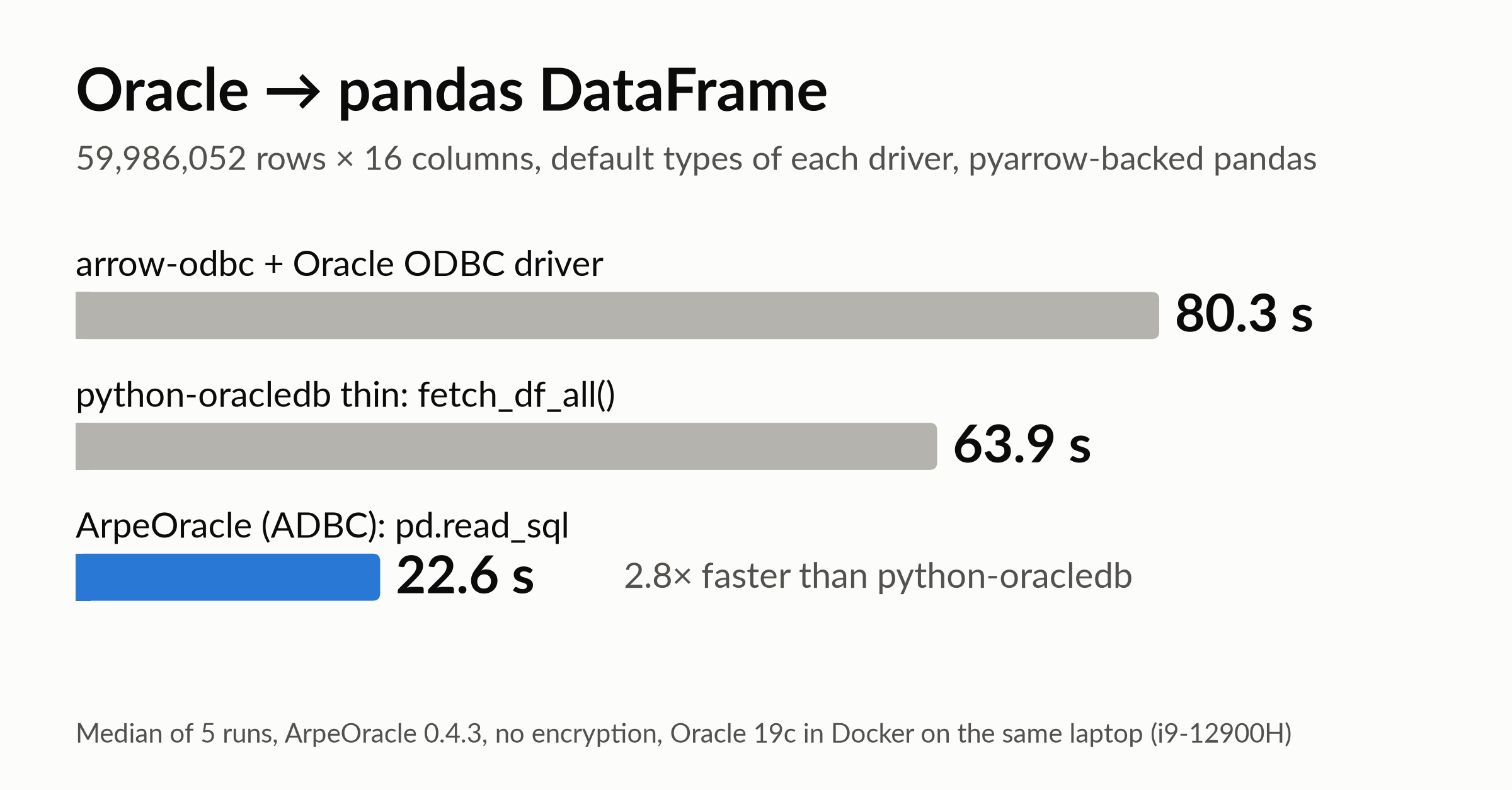
Median time to read the 59,986,052 rows of LINEITEM into a pandas DataFrame, over five runs.
Oracle runs in a Docker container on the same laptop, an Intel i9-12900H with 32 GB of RAM, and the data goes through the loopback interface rather than a real network. ArpeOracle receives about 2.2 Gbit/s here, so on a 1 Gbit/s network the link would limit the transfer and the gap with python-oracledb would be much smaller. Client and server together use less than 2 of the 20 logical CPUs, so sharing the machine does not slow them down.
The times are medians of five runs, each in a new Python process, with the same fetch size of 32,000 rows for all drivers, which was within 1 to 2% of each driver's best time in a preliminary sweep on a 10-million-row table (for arrow-odbc, it is the ODBC rowset size). arrow-odbc is used with its default fetch_concurrently=True: one thread fetches while another converts, whereas ArpeOracle and python-oracledb fetch and decode sequentially here. There is no network encryption: the connection is plain TCP, without TLS, and python-oracledb's thin mode does not support Oracle's native network encryption, so it is off for all three drivers. Every run was checked against row counts, column aggregates and sample rows computed by Oracle. A warm-up round of the three drivers precedes the measured ones.
The table occupies 7.2 GB on disk and does not stay entirely in the host's page cache while the client builds a DataFrame of 9.7 to 12.1 GB: according to the container's I/O counters, the runs re-read up to about 4 GB each from disk, without visible effect on the times.
python-oracledb and ArpeOracle receive the same volume from Oracle, 5.8 GB in 1,875 to 1,876 round trips according to Oracle's session statistics, so the difference comes from the decoding on the client side. With ArpeOracle, the Oracle container uses 18.6 s of CPU during the 22.6 s read, so producing and sending the rows takes most of the time. It uses about the same, 19.3 s, with python-oracledb, and 10.5 s with arrow-odbc, whose ODBC driver goes through the Oracle client libraries (OCI).
Peak memory is 11.4 GB for the Python process with ArpeOracle, 9.8 GB with python-oracledb and 12.4 GB with arrow-odbc. The DataFrames do not have the same size, since the types differ: 10.4 GB with ArpeOracle, 9.7 GB with python-oracledb, whose decimals are 8-byte floats but whose strings have 8-byte offsets, and 12.1 GB with arrow-odbc, whose keys are 16-byte decimals. Data sizes in this post are in binary units (1 GB = 2^30 bytes), and network rates in decimal units (1 Gbit/s = 10^9 bit/s).
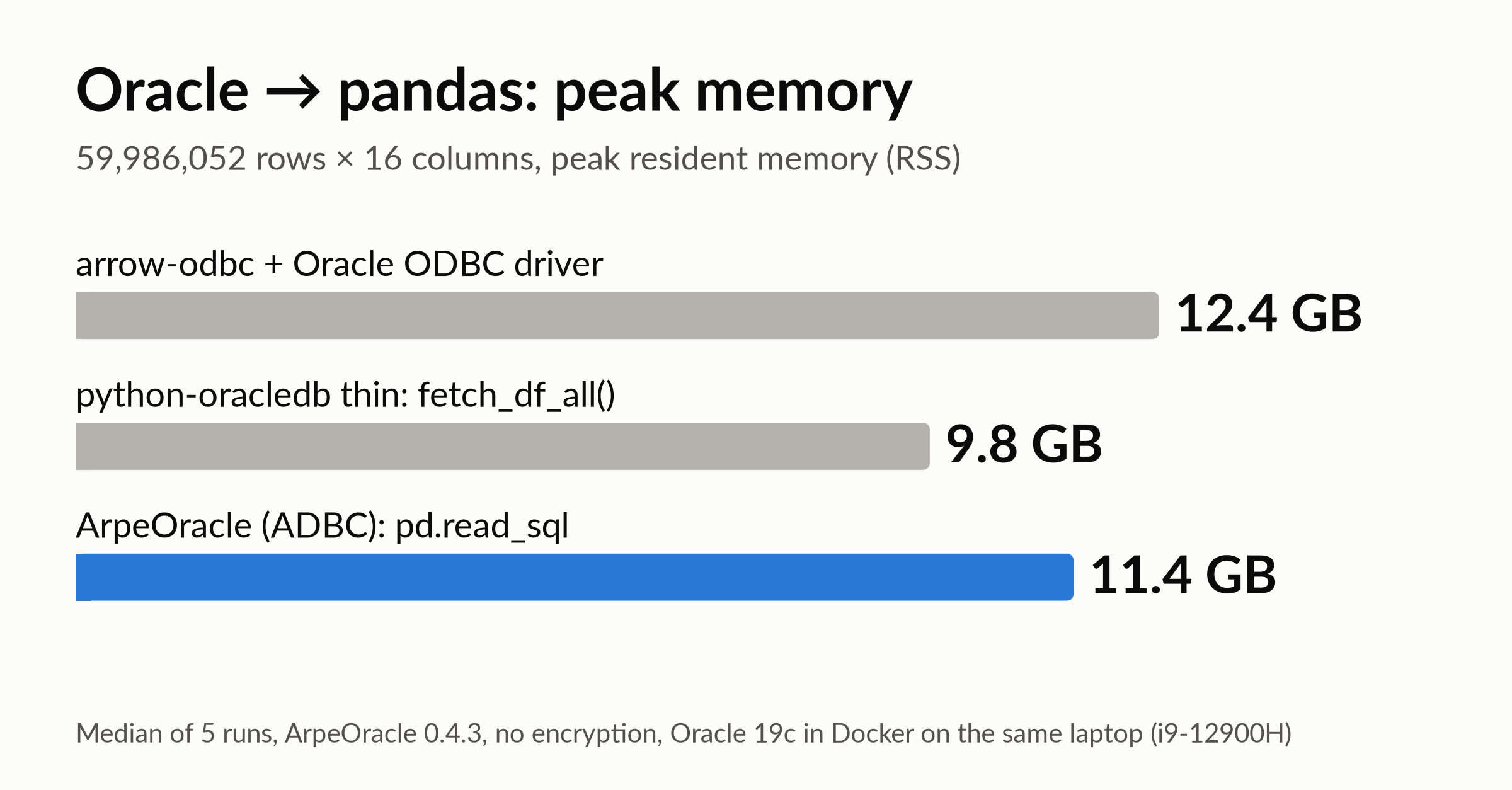
Peak resident memory of the Python process during the transfer, median over five runs.
Output types
The default type mappings of the three drivers differ for every Oracle type in this table except DATE. The table gives, for each Oracle type, the Arrow type returned by each driver:
| Oracle type | ArpeOracle | python-oracledb fetch_df_all() | arrow-odbc |
|---|---|---|---|
NUMBER(10) | int64 | int64 | decimal128(10, 0) |
NUMBER(15,2) | decimal128(15, 2) | double | decimal128(15, 2) |
CHAR, VARCHAR2 | string | large_string | string |
DATE | timestamp[s] | timestamp[s] | timestamp[s] |
With the pyarrow backend, each pandas dtype is the Arrow type of the driver, e.g. decimal128(15, 2)[pyarrow]. An Oracle DATE holds a time of day, down to the second, so all three return a timestamp in seconds rather than a date; in this table, the time is always midnight.
ArpeOracle keeps NUMBER(15,2) as an exact decimal and maps NUMBER(10) to a 64-bit integer. python-oracledb returns NUMBER(15,2) as a 64-bit float, which is not exact for values such as 0.07, and the strings with 64-bit offsets (large_string); its oracledb.defaults.fetch_decimals = True setting keeps exact decimals, but also turns NUMBER(10) into decimals. arrow-odbc returns the NUMBER(10) keys as zero-scale decimals, 16 bytes per value instead of 8.
dtype_backend="pyarrow" matters here. Without it, pandas uses its default NumPy-based dtypes, and NumPy has no decimal type: the four NUMBER(15,2) columns then become columns of Python Decimal objects, 240 million of them for this table.
The output types also affect the elapsed time, for better or worse. In an earlier run where all three drivers returned the same types as ArpeOracle, python-oracledb took 62.2 s instead of 63.9 s, and arrow-odbc 88.4 s instead of 80.3 s, since it then has to convert its decimal keys to int64.
Arrow in pandas
With the pyarrow backend, a pandas column is a wrapper around a PyArrow array. We fetched the result as a PyArrow table, converted it with table.to_pandas(types_mapper=pd.ArrowDtype), which is what read_sql does, and compared buffer addresses for the 16 columns, 7 of which are shown here:
| Column | Arrow type (driver) | pandas dtype | Shared with the driver | pandas column |
|---|---|---|---|---|
| L_ORDERKEY | int64 | int64[pyarrow] | all | 464.8 MB |
| L_QUANTITY | decimal128(15, 2) | decimal128(15, 2)[pyarrow] | all | 922.5 MB |
| L_EXTENDEDPRICE | decimal128(15, 2) | decimal128(15, 2)[pyarrow] | all | 922.5 MB |
| L_RETURNFLAG | string | string[pyarrow] | all | 293.2 MB |
| L_SHIPDATE | timestamp[s] | timestamp[s][pyarrow] | all | 464.8 MB |
| L_SHIPMODE | string | string[pyarrow] | all | 481.2 MB |
| L_COMMENT | string | string[pyarrow] | all | 1,752.0 MB |
Every column, strings included, uses the driver's buffers, and the conversion takes about 2 ms for the 16 columns. Unlike Polars, which converts strings to Arrow's string_view layout, at the cost of a copy, pandas keeps the Arrow string layout of the driver.
The pandas columns also keep the driver's record batches as chunks. ArpeOracle streams results in batches of 32,000 rows by default, so the 59,986,052 rows arrive as 1,874 full batches plus one of 18,052 rows, hence 1,875 chunks. This batch size is also the number of rows requested from Oracle at each round trip.
Wrap-up
With ArpeOracle, the 59,986,052 rows of LINEITEM go from Oracle into a pandas DataFrame in 22.6 s, 2.8 times faster than python-oracledb, with exact decimals and no copy from the Arrow result to pandas. ArpeOracle implements Oracle's network protocol itself, so there are no Oracle client libraries to install.
Driver downloads, for Linux (x64) and Windows (x64), are at github.com/arpe-io/adbc-drivers. The binaries download freely and run once a licence is present. A 30-day trial licence for ArpeOracle can be downloaded for free here; for a full licence, contact us at sales@arpe.io or see arpe.io.
Appendix: reading the table with python-oracledb and arrow-odbc
Both are used with their default types. With python-oracledb, in thin mode:
import oracledb

con = oracledb.connect(user="<user>", password="<password>", dsn="localhost:1522/orclpdb1")
odf = con.fetch_df_all("SELECT * FROM LINEITEM", arraysize=32_000)
lineitem = pa.table(odf).to_pandas(types_mapper=pd.ArrowDtype)
With arrow-odbc (pip install arrow-odbc) and Oracle's ODBC driver, which needs the Oracle Instant Client, the connection string can point to the driver library directly:
import arrow_odbc

odbc = arrow_odbc.connect(
    "DRIVER=/path/to/instantclient_23_26/libsqora.so.23.1;"
    "DBQ=localhost:1522/orclpdb1;UID=<user>;PWD=<password>"
)
reader = odbc.read_arrow_batches("SELECT * FROM LINEITEM", batch_size=32_000)
table = pa.Table.from_batches(reader, schema=reader.schema)
lineitem = table.to_pandas(types_mapper=pd.ArrowDtype)
Free 30-day trial