Your First 15 Minutes with LakeXpress - SQL Server to Snowflake

LakeXpress exports database tables to Parquet files on cloud storage and publishes them as tables in a data lakehouse. This walkthrough takes you from a fresh download to a working pipeline: all 31 tables from a SQL Server AdventureWorksDW database, exported to S3 as Parquet, then loaded as internal tables in Snowflake. The actual sync completes in under a minute; the setup steps take around fifteen minutes end to end. No prior LakeXpress experience required.
Who this is for
You have never used LakeXpress before. You have a SQL Server instance with the AdventureWorksDW sample database, a Snowflake account, and an S3 bucket. You want to see the tool work end to end before reading the full documentation.
What you will build
A pipeline that discovers every table in the dbo schema of adventureworksdw, exports them in parallel as compressed Parquet files to S3, and loads them as internal tables in Snowflake. After initial setup, the whole pipeline runs with two commands.
Prerequisites
LakeXpress is an orchestrator: it coordinates extraction, staging, and publishing across the systems you point it at, and it keeps all of its own state (sync configurations, run history, table-level metrics, retry bookkeeping) in a dedicated database it calls the metadata database, or lxdb. This database is what makes runs resumable and auditable. You can kill a sync mid-flight, come back later, and LakeXpress picks up where it left off. In this post we host lxdb on the same SQL Server instance as the source data for convenience, but it can live anywhere LakeXpress supports (PostgreSQL, SQLite, another SQL Server, and so on); it has no relationship with the source or target of your pipelines.
The rest is one-time setup, mostly done by your admins, and once it's in place everything below runs from your laptop with just the LakeXpress binary.
Two Snowflake terms are worth pinning down before the list, since they appear in it. A Snowflake stage is a named reference to a location where data files live before they are loaded into tables. An internal stage is storage managed by Snowflake itself; an external stage is a pointer to a location in your own cloud storage (S3, Azure Blob, GCS). In the workflow shown here, LakeXpress uses an external stage: FastBCP writes Parquet files into your S3 bucket, and Snowflake's COPY INTO reads from that same bucket through the stage to populate the target tables. The storage integration is what grants the stage permission to read from the bucket without embedding AWS credentials in Snowflake.
Here is what you need:
- A SQL Server with the
adventureworksdwdatabase (the source data) and an emptylxdbdatabase for the LakeXpress metadata, plus a user with create/write privileges onlxdb. You do not need to create any tables inlxdbyourself: LakeXpress creates its own schema on first run (you). - An AWS S3 bucket and an AWS CLI profile with read/write access to it (you or your AWS admin).
- A Snowflake account with an active warehouse, a target database (e.g.
LAKEXPRESS_DB), and an external stage (e.g.AWSS3_AWDW_STAGE) backed by a storage integration pointing at that bucket (typically set up once by a Snowflake admin). The stageURLmust match thedirectoryyou will set in the credentials file later in this post (we will repeat this reminder when you write that file).
Download and install LakeXpress
Request a trial at arpe.io/get-trial?product=LakeXpress and fill in the form:
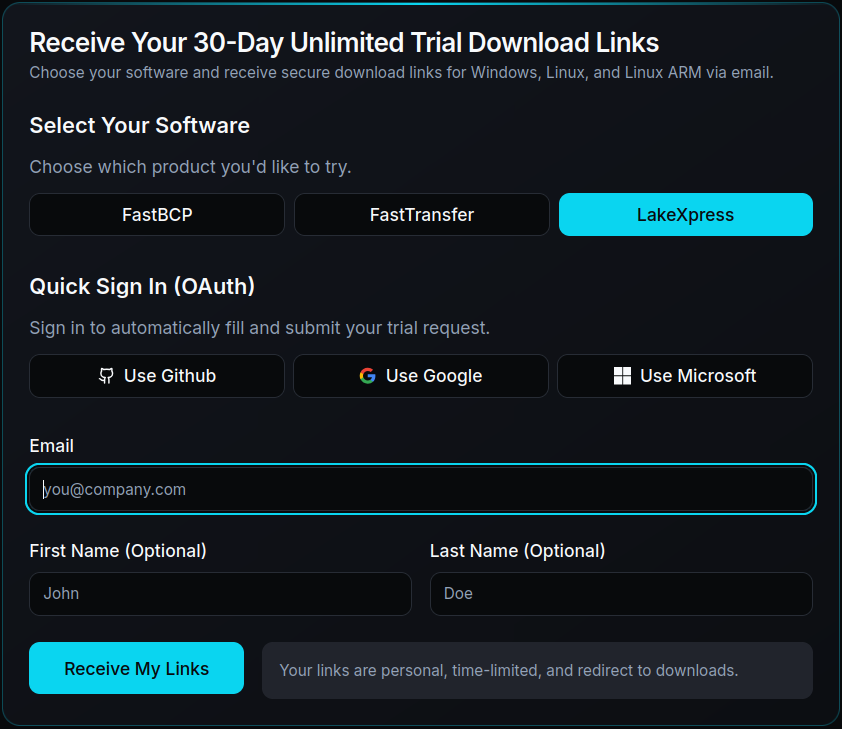
You will receive an email with personalized download links for three platforms:
- Windows 64-bit
- Linux x64
- Linux ARM64
The links expire one month after the email is sent. We are on a Linux x64 machine, so we download that version. It comes as a single zip file containing both LakeXpress (the orchestrator) and FastBCP (the extraction engine):

Extract and make the binary executable:
unzip LakeXpress.zip -d LakeXpress
cd LakeXpress
./LakeXpress --version
LakeXpress 0.4.1
The extracted archive has this structure:
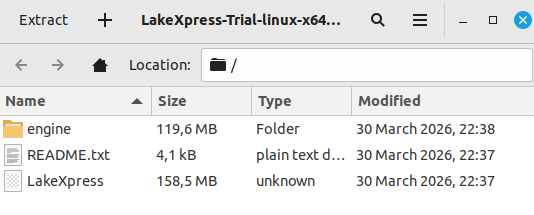
LakeXpress sits at the root and FastBCP is in the engine/ subdirectory. FastBCP is the extraction engine that LakeXpress calls under the hood to read data from the source database and write Parquet files; you never invoke it directly in this tutorial. Keep this layout as-is: LakeXpress auto-discovers the FastBCP engine when it is in engine/ right below the main binary, so you don't need to pass --fastbcp_dir_path on the command line.
Verify the Snowflake stage
LakeXpress stages Parquet files on S3 and then loads them into internal Snowflake tables using COPY INTO. Before going further, confirm the target database and stage from the prerequisites are reachable. In a Snowflake worksheet:
USE DATABASE LAKEXPRESS_DB;
DESC STAGE AWSS3_AWDW_STAGE;
Two rows from the output matter:
STAGE_LOCATION.URL, for examples3://aetplakexpress/snowflake/. This must match thedirectoryfield of theaws_s3_stageentry in the credentials file below exactly: same bucket, same prefix, trailing slash included.STAGE_INTEGRATION.STORAGE_INTEGRATION, the name of the storage integration that grants Snowflake read access to the bucket. This field must contain a value. If it is empty, the stage has no integration attached andCOPY INTOwill fail later in the sync. Stop here and ask your Snowflake admin to attach a storage integration to the stage before continuing.
The credentials file
LakeXpress reads all connection details from a single JSON file. Each entry is identified by a key that you reference on the command line.
Create a file named lx_credentials.json containing four entries, one per system LakeXpress talks to:
lxdb_mssql: the SQL Server database where LakeXpress stores sync configurations, run history, and table-level metrics. Here we use a separatelxdbdatabase on the same SQL Server instance. LakeXpress creates its schema automatically on first run, so you only need a database and a user with full privileges on it.ds_mssql: the source SQL Server database containing the AdventureWorksDW data.aws_s3_stage: the S3 staging area, configured with an AWS CLI profile name. Itsdirectoryfield must match the Snowflake stage URL you read fromDESC STAGEearlier, character for character (same bucket, same prefix, trailing slash included). A mismatch here is the most common cause ofCOPY INTOfinding zero files.snowflake_pat: the Snowflake target, authenticating via a programmatic access token (no MFA prompts, so it works for automation). Creating a PAT takes about two minutes via the linked Snowflake guide and does not require admin rights. Classic username/password is also supported; see the Snowflake authentication modes docs for the full list.
Each entry looks like this (shown here for the Snowflake target):
"snowflake_pat": {
  "ds_type": "snowflake",
  "auth_mode": "pat",
  "info": {
    "account": "your-snowflake-account",
    "user": "your-snowflake-user",
    "token": "$env{LX_SNOWFLAKE_TOKEN}",
    "warehouse": "SNOWFLAKE_LEARNING_WH",
    "database": "LAKEXPRESS_DB",
    "stage": "AWSS3_AWDW_STAGE"
  }
}
Sensitive values use the $env{...} syntax: LakeXpress substitutes the named environment variable at runtime, keeping secrets out of the file. The full lx_credentials.json is listed at the end of the post.
Make sure the referenced environment variables are set in your shell before running LakeXpress, otherwise it raises an error.
Create the sync configuration
The config create command registers a named sync configuration, telling LakeXpress where to read from, where to stage files, and how to publish.
./LakeXpress config create \
  -a lx_credentials.json \
  --lxdb_auth_id lxdb_mssql \
  --source_db_auth_id ds_mssql \
  --source_db_name adventureworksdw \
  --source_schema_name dbo \
  --target_storage_id aws_s3_stage \
  --publish_target snowflake_pat \
  --publish_method internal \
  --publish_schema_pattern INT_{database} \
  --n_jobs 4 \
  --fastbcp_p 4
| Argument | Value | Description |
|---|---|---|
-a | lx_credentials.json | Path to the credentials JSON file |
--lxdb_auth_id | lxdb_mssql | Credential entry for the LakeXpress logging database |
--source_db_auth_id | ds_mssql | Credential entry for the source SQL Server |
--source_db_name | adventureworksdw | Source database name |
--source_schema_name | dbo | Schema to export |
--target_storage_id | aws_s3_stage | Credential entry for the S3 target |
--publish_target | snowflake_pat | Credential entry for the Snowflake target |
--publish_method | internal | Load data into native Snowflake tables (default is external) |
--publish_schema_pattern | INT_{database} | Template for the target schema name * |
--n_jobs | 4 | Number of tables exported concurrently |
--fastbcp_p | 4 | Degree of parallelism FastBCP uses within each table export |
* {database} is replaced by the value of the database field in the Snowflake credential entry. Here that value is LAKEXPRESS_DB, so the resulting schema is INT_LAKEXPRESS_DB. Use a different database in your credentials and you get a different schema name.
LakeXpress assigns a unique sync_id and saves the configuration. Copy it from the output; you'll need it in the next step:
[...] config create: Creating sync configuration...
[...] Initializing export database with mode: preserve
[...] Export tables created/verified successfully
[...] All export database tables verified/created successfully
[...] Export database initialized successfully with mode: preserve
[...] Created sync configuration: sync-20260413-17eef4
[...]
[...] ============================================================
[...] Sync configuration created successfully!
[...]
[...]   sync_id: sync-20260413-17eef4
[...]
[...] Use this sync_id with the following commands:
[...]   ./LakeXpress sync -a lx_credentials.json --lxdb_auth_id lxdb_mssql --sync_id sync-20260413-17eef4
[...]   ./LakeXpress 'sync[export]' -a lx_credentials.json --lxdb_auth_id lxdb_mssql --sync_id sync-20260413-17eef4
[...]   ./LakeXpress 'sync[publish]' -a lx_credentials.json --lxdb_auth_id lxdb_mssql --sync_id sync-20260413-17eef4
[...] ============================================================
Run the sync
Note: by default, the sync drops and recreates each target table in Snowflake from the staged Parquet files. The target schema (INT_LAKEXPRESS_DB here) is created automatically if it does not already exist, so you do not need to set it up beforehand. But if a table with the same name as one of the source tables already exists in that schema, it will be dropped and rebuilt on every run, so make sure you are pointing at a schema you are happy to overwrite.
Pass the sync_id from the previous step, replacing sync-20260413-17eef4 with the value printed by your own config create run. It is different every time.
./LakeXpress sync \
  -a lx_credentials.json \
  --lxdb_auth_id lxdb_mssql \
  --sync_id sync-20260413-17eef4
LakeXpress discovers every table in the dbo schema, sorts them by estimated row count (largest first), and begins parallel export:
Discovering tables in mssql schema: dbo
Discovered 31 tables in schema dbo
Top tables by estimated row count:
  FactProductInventory: 776,286 rows
  FactInternetSalesReason: 64,515 rows
  FactResellerSales: 60,855 rows
  FactInternetSales: 60,398 rows
  FactFinance: 39,409 rows
Created 31 export jobs with run ID: 20260413-9aafeac2-c68a-4a05-a071-6c52a6c81614
Processing jobs with parallelism: n_jobs=4
Starting parallel execution with 4 workers
Export:  CELLS: [--------------------]   0.0%  TABLES: [--------------------]   0.0% (0/31) - 00:00
Export:  CELLS: [--------------------]   1.9%  TABLES: [--------------------]   3.2% (1/31) - 00:02
Export:  CELLS: [######--------------]  34.0%  TABLES: [#-------------------]   9.7% (3/31) - 00:03
Export:  CELLS: [###################-]  97.3%  TABLES: [####----------------]  22.6% (7/31) - 00:04
Export:  CELLS: [###################-]  98.7%  TABLES: [#####---------------]  29.0% (9/31) - 00:05
Export:  CELLS: [###################-]  99.6%  TABLES: [#######-------------]  38.7% (12/31) - 00:06
Export:  CELLS: [###################-]  99.8%  TABLES: [#########-----------]  45.2% (14/31) - 00:07
Export:  CELLS: [###################-]  99.9%  TABLES: [##########----------]  54.8% (17/31) - 00:08
Export:  CELLS: [###################-]  99.9%  TABLES: [#############-------]  67.7% (21/31) - 00:09
Export:  CELLS: [###################-]  99.9%  TABLES: [###############-----]  77.4% (24/31) - 00:10
Export:  CELLS: [###################-]  99.9%  TABLES: [################----]  83.9% (26/31) - 00:11
Export:  CELLS: [###################-]  99.9%  TABLES: [##################--]  93.5% (29/31) - 00:12
Export:  CELLS: [####################] 100.0%  TABLES: [####################] 100.0% (31/31) - 00:13
With --n_jobs 4, four tables run concurrently. Each is extracted with FastBCP at an internal parallelism of 4, giving a theoretical peak of 16 simultaneous connections to the source SQL Server. In practice the number is lower: FastBCP skips intra-table parallelism on small tables where splitting the work would cost more than it saves, and only the larger fact tables actually open four connections each.
Notice the two live progress bars. CELLS tracks cell-level progress across all tables and jumps quickly once the few big fact tables (which dominate the total row count and are dispatched first) finish. TABLES advances more linearly as each export completes. The whole export wraps in 13 seconds.
Once all files are staged, LakeXpress loads them into internal Snowflake tables via COPY INTO. The same two-bar progress display appears for the publish phase:
Publishing to Snowflake (creating internal tables)...
Publish:  CELLS: [#-------------------]   6.1%  TABLES: [--------------------]   3.2% (1/31) - 00:05
Publish:  CELLS: [##------------------]  11.8%  TABLES: [#-------------------]   6.5% (2/31) - 00:05
Publish:  CELLS: [###-----------------]  17.5%  TABLES: [#-------------------]   9.7% (3/31) - 00:05
Publish:  CELLS: [##################--]  90.7%  TABLES: [##------------------]  12.9% (4/31) - 00:07
Publish:  CELLS: [##################--]  94.4%  TABLES: [###-----------------]  16.1% (5/31) - 00:08
Publish:  CELLS: [###################-]  95.8%  TABLES: [###-----------------]  19.4% (6/31) - 00:09
Publish:  CELLS: [###################-]  97.6%  TABLES: [####----------------]  22.6% (7/31) - 00:09
                                        ...
Publish:  CELLS: [###################-]  99.9%  TABLES: [##################--]  90.3% (28/31) - 00:21
Publish:  CELLS: [###################-]  99.9%  TABLES: [##################--]  93.5% (29/31) - 00:21
Publish:  CELLS: [###################-]  99.9%  TABLES: [###################-]  96.8% (30/31) - 00:22
Publish:  CELLS: [####################] 100.0%  TABLES: [####################] 100.0% (31/31) - 00:22
Created 31/31 tables
  Total rows loaded: 1,060,820
PUBLISHING COMPLETE - ALL OBJECTS CREATED SUCCESSFULLY

============================================================
PUBLISH SUMMARY
============================================================
Publish: 31/31 tables succeeded (snowflake - internal)
============================================================
Total publication              - time (s) :     25.523
Table-level parallelism during publish is still controlled by --n_jobs: LakeXpress issues up to four COPY INTO statements in flight at once. What happens inside each COPY INTO is up to Snowflake, not LakeXpress: the warehouse you configured in the credentials file handles the actual ingestion, and the speed depends on its size (number and class of compute nodes) rather than any client-side setting. Snowflake will also happily load a single table from many Parquet files in parallel behind one COPY INTO, which becomes useful once you start splitting large source tables into multiple files at extraction time. That feature, called partitioned exports, is documented in the CLI reference but is not used in this tutorial.
End-to-end timing for all 31 tables (1,060,820 rows total):
| Phase | Time (s) |
|---|---|
| Export | 16.188 |
| Publication | 25.649 |
| Total | 41.858 |
These numbers come from SNOWFLAKE_LEARNING_WH, an X-Small virtual warehouse (the smallest tier Snowflake offers, one credit per hour). Bumping the warehouse to Small, Medium, or larger would shorten the publish phase, since COPY INTO parallelism on the Snowflake side scales with warehouse size. The export phase is independent of Snowflake and would not change.
One detail worth knowing: LakeXpress maps SQL Server types as closely as possible to their Snowflake equivalents (for example nvarchar(n) becomes VARCHAR(n) and datetime2 becomes TIMESTAMP_NTZ), rather than collapsing everything to VARCHAR.
Query the results in Snowflake
The tables are now in Snowflake. Open a worksheet and run:
USE DATABASE LAKEXPRESS_DB;

SELECT table_name, row_count
FROM information_schema.tables
WHERE table_schema = 'INT_LAKEXPRESS_DB'
ORDER BY row_count DESC;
TABLE_NAME                                       ROW_COUNT
-----------------------------------------------  ---------
FactProductInventory                               776,286
FactInternetSalesReason                             64,515
FactResellerSales                                   60,855
FactInternetSales                                   60,398
FactFinance                                         39,409
DimCustomer                                         18,484
FactAdditionalInternationalProductDescription       15,168
                     ...                               ...
DimProductCategory                                       4
DimScenario                                              3
AdventureWorksDWBuildVersion                             1
Running the same row-count query against the source SQL Server dbo schema returns the same 31 tables with identical row counts, confirming the sync is faithful (1,060,820 rows on both sides).
Comparing column definitions for any table (for example ProspectiveBuyer) confirms that LakeXpress stays as close to the source types as Snowflake allows. String lengths are preserved column by column, fixed-point scale is kept, and timestamps land on the right type.
Where to go from here
That's the whole pipeline. The sync configuration now lives in lxdb, so you do not need to redefine it: re-running the same ./LakeXpress sync ... --sync_id <your-sync-id> command at any point picks up the latest data from SQL Server and refreshes the Snowflake tables. Schedule it from cron, a CI job, or your orchestrator of choice.
From here, the CLI reference is where to look for incremental syncs, table filtering, partitioned exports, and the other publishing targets.
Want to try it on your own data? Download LakeXpress and get a free 30-day trial.
Appendix: full credentials file
{
  "lxdb_mssql": {
    "ds_type": "mssql",
    "auth_mode": "classic",
    "info": {
      "username": "$env{LXDB_USER}",
      "password": "$env{LXDB_PASSWORD}",
      "server": "localhost",
      "port": 1433,
      "database": "lxdb"
    }
  },
  "ds_mssql": {
    "ds_type": "mssql",
    "auth_mode": "classic",
    "info": {
      "username": "$env{LX_MSSQL_USER}",
      "password": "$env{LX_MSSQL_PASSWORD}",
      "server": "localhost",
      "port": 1433,
      "database": "adventureworksdw"
    }
  },
  "aws_s3_stage": {
    "ds_type": "s3",
    "auth_mode": "profile",
    "info": {
      "directory": "s3://aetplakexpress/snowflake/",
      "profile": "your-aws-profile"
    }
  },
  "snowflake_pat": {
    "ds_type": "snowflake",
    "auth_mode": "pat",
    "info": {
      "account": "your-snowflake-account",
      "user": "your-snowflake-user",
      "token": "$env{LX_SNOWFLAKE_TOKEN}",
      "warehouse": "SNOWFLAKE_LEARNING_WH",
      "database": "LAKEXPRESS_DB",
      "stage": "AWSS3_AWDW_STAGE"
    }
  }
}