How to quickly export SAP HANA data to Snowflake via S3

Getting data out of SAP HANA and into Snowflake usually means writing custom scripts, babysitting schema mappings, and waiting. In this tutorial, I'll do it in two commands and under two minutes: export a full SAP HANA schema to Parquet on S3, then publish the tables as queryable Snowflake tables.
The tool is LakeXpress; it handles parallel extraction, compression, metadata, and Snowflake loading.
TLDR: config create defines the pipeline (source, target, parallelism, publish destination). sync runs it. 8 SAP HANA tables (6M+ rows total) exported to Parquet on S3 and loaded into Snowflake in 82 seconds.
This tutorial uses Linux commands, but LakeXpress also runs on Windows.
Prerequisites
- The LakeXpress binary (Linux in this example) -- the download includes FastBCP in the
engine/subfolder - A logging/orchestration database (SQL Server in this example)
- A running SAP HANA database containing the TPC-H dataset in a schema named
TPCH - An S3 bucket and an AWS CLI profile configured
- A Snowflake account with an external stage pointing to the S3 bucket and privileges to create schemas and tables
- A credentials file (
ds_credentials.json), more on this below
LakeXpress and FastBCP
The two binaries have distinct roles. FastBCP is the low-level export engine: it connects to a database, reads a single table, converts it to Parquet, and streams the result to cloud storage. It can split a large table into parallel partitions for faster reads, but it only handles one table per invocation. LakeXpress sits on top as the orchestrator; it discovers tables in a schema and launches multiple FastBCP processes in parallel. It also tracks each run in a log database, generates CDM metadata, and can publish the exported data to platforms like Snowflake. It handles data type conversion from source to target automatically.
This gives you two levels of parallelism, which matters when you're exporting hundreds of tables. The --fastbcp_p parameter controls how many concurrent readers work within a single table (partition-level parallelism), while --n_jobs controls how many tables are processed at the same time (table-level parallelism). The same --n_jobs value applies to both phases: export and Snowflake publishing. In the example in Step 1, --fastbcp_p 4 and --n_jobs 4 means up to 16 concurrent streams hitting the source database at peak load.
LakeXpress expects the FastBCP binary in an engine/ subfolder next to itself; it finds it automatically, so there is nothing to configure. LakeXpress also logs each run and supports failure recovery: if an export is interrupted, it resumes from where it left off.
The credentials file
LakeXpress reads connection details from a single JSON file. Each entry is identified by a key that you reference later on the command line.
{
  "sap_hana": {
    "ds_type": "saphana",
    "auth_mode": "classic",
    "info": {
      "server": "localhost",
      "port": 39017,
      "database": "HXE",
      "username": "$env{SAPHANA_USER}",
      "password": "$env{SAPHANA_PASSWORD}"
    }
  },
  "log_db": {
    "ds_type": "mssql",
    "auth_mode": "classic",
    "info": {
      "username": "$env{MSSQL_USER}",
      "password": "$env{MSSQL_PASSWORD}",
      "server": "localhost",
      "port": 1433,
      "database": "lakexpress"
    }
  },
  "s3_target": {
    "ds_type": "s3",
    "auth_mode": "profile",
    "info": {
      "directory": "s3://aetplakexpress/lakexpress/",
      "profile": "lakexpress"
    }
  },
  "snowflake_pat": {
    "ds_type": "snowflake",
    "auth_mode": "pat",
    "info": {
      "account": "MYORG-AB12345",
      "user": "FRANCOIS.PACULL",
      "token": "$env{SNOWFLAKE_PAT}",
      "warehouse": "MY_WAREHOUSE",
      "database": "LAKEXPRESS_DB",
      "stage": "AWSS3_AWDW_STAGE"
    }
  }
}
Four entries:
sap_hana-- the source SAP HANA database (TPC-H data lives here)log_db-- the logging and orchestration database (SQL Server here, but Postgres also works)s3_target-- the S3 target, configured with an AWS CLI profile name and a base directorysnowflake_pat-- the Snowflake target, authenticated with a PAT (Programmatic Access Token); the stage (AWSS3_AWDW_STAGE) is an external stage pointing to the same S3 bucket used bys3_target
As with the other entries, $env{SNOWFLAKE_PAT} reads the token value from an environment variable at runtime.
The stage field references a Snowflake external stage that points to the S3 bucket. If you don't already have one, create it in Snowflake:
CREATE OR REPLACE STAGE AWSS3_AWDW_STAGE
  URL = 's3://aetplakexpress/lakexpress/'
  STORAGE_INTEGRATION = <your_s3_integration>
  FILE_FORMAT = (TYPE = PARQUET);
This requires a storage integration that grants Snowflake access to the bucket via an IAM role. See the Snowflake setup guide for details on creating the PAT, the storage integration, and the external stage.
Step 1 -- Create the sync configuration
The config create command registers a named sync configuration. It tells LakeXpress where to read from, where to write, how much parallelism to use, and where to publish.
./LakeXpress config create \
       -a data/ds_credentials.json \
       --log_db_auth_id log_db \
       --source_db_auth_id sap_hana \
       --source_schema_name TPCH \
       --fastbcp_p 4 \
       --n_jobs 4 \
       --target_storage_id s3_target \
       --generate_metadata \
       --sub_path tpch \
       --publish_method internal \
       --publish_schema_pattern "INT_{schema}" \
       --publish_target snowflake_pat
What each argument does:
| Argument | Value | Description |
|---|---|---|
-a | data/ds_credentials.json | Path to the credentials JSON file |
--log_db_auth_id | log_db | Which credential entry to use for the logging database |
--source_db_auth_id | sap_hana | Which credential entry for the source SAP HANA |
--source_schema_name | TPCH | Schema to export (supports SQL LIKE patterns, e.g. TPCH_%) |
--fastbcp_p | 4 | Parallelism within each table export -- 4 concurrent readers |
--n_jobs | 4 | Number of tables exported concurrently |
--target_storage_id | s3_target | Which credential entry for the S3 target |
--generate_metadata | (flag) | Produce CDM metadata files alongside the Parquet data |
--sub_path | tpch | Subdirectory within the S3 base path |
--publish_method | internal | Create native Snowflake tables (COPY INTO from stage) |
--publish_schema_pattern | INT_{schema} | Snowflake schema naming -- {schema} is replaced by the source schema |
--publish_target | snowflake_pat | Which Snowflake connection to use for publishing |
LakeXpress assigns a unique sync_id and saves the configuration:
[...] config create: Creating sync configuration...
[...] Created sync configuration: sync-20260303-42f1bc
[...] Saved sync to local registry: ~/.lakexpress/syncs.json
[...]
[...] ============================================================
[...] Sync configuration created successfully!
[...]
[...]   sync_id: sync-20260303-42f1bc
[...]
[...] Use this sync_id with the following commands:
[...]   ./LakeXpress sync --sync_id sync-20260303-42f1bc
[...]   ./LakeXpress 'sync[export]' --sync_id sync-20260303-42f1bc
[...]   ./LakeXpress 'sync[publish]' --sync_id sync-20260303-42f1bc
[...] ============================================================
Step 2 -- Run the sync
Now we execute the sync. Because the configuration includes a publish target, LakeXpress runs both phases back to back: export to S3, then publish to Snowflake.
./LakeXpress sync --sync_id sync-20260303-42f1bc --quiet_fbcp --no_banner
The --quiet_fbcp flag suppresses verbose FastBCP output; --no_banner skips the startup banner.
Export phase
The output starts with a configuration summary, then LakeXpress discovers the tables in the schema and sorts them by estimated row count (largest first):
[...] ============================================================
[...] Executing sync: sync-20260303-42f1bc
[...] ============================================================
[...]
[...] Source database: sap_hana
[...] Source schemas: TPCH
[...] Target storage: s3_target
[...] FastBCP path: /home/francois/Workspace/LakeXpress/engine
[...] Parallel degree: 4
[...] Concurrent jobs: 4
[...] Discovered 8 tables in schema TPCH
[...] Tables sorted by estimated row count (largest first) across all schemas:
[...]   1. TPCH.LINEITEM (6,001,215 rows)
[...]   2. TPCH.ORDERS (1,500,000 rows)
[...]   3. TPCH.PARTSUPP (800,000 rows)
[...]   4. TPCH.PART (200,000 rows)
[...]   5. TPCH.CUSTOMER (150,000 rows)
[...]   6. TPCH.SUPPLIER (10,000 rows)
[...]   7. TPCH.NATION (25 rows)
[...]   8. TPCH.REGION (5 rows)
With --n_jobs 4, four tables are exported concurrently. Each uses --fastbcp_p 4 parallel readers, so up to 16 concurrent streams hit SAP HANA at peak. LINEITEM (6M rows) takes the longest; smaller tables like REGION complete almost immediately:
[...] Export: CELLS: [####################] 100.0%  TABLES: [####################] 100.0% (8/8) - 00:56
[...] Parallel execution completed: 8 successful, 0 failed
[...] Total Parquet export           - time (s) :     57.883
[...] ============================================================
[...] RUN SUMMARY
[...] ============================================================
[...] Export: 8/8 tables succeeded
[...] ============================================================
[...] Total                          - time (s) :     60.078
Publish phase
Right after the export summary, LakeXpress connects to Snowflake and starts the publish phase:
[...] Publishing to Snowflake (creating internal tables)...
[...] ======================================================================
[...] SNOWFLAKE INTERNAL TABLE PUBLISHING
[...] ======================================================================
[...] Run ID: 20260303-f11c525b-4d9b-4b2f-8d73-bb4602964dcd
[...] Target Database: LAKEXPRESS_DB
[...] Stage: AWSS3_AWDW_STAGE
[...] Schema Pattern: INT_{schema}
[...]
[...] Connecting to Snowflake...
Because we used --publish_method internal, the data is copied into native Snowflake tables, not left as external references to Parquet files on S3. LakeXpress generates the DDL with SAP HANA data types mapped to their Snowflake equivalents, creates the INT_TPCH schema, then loads all 8 tables in parallel using 4 workers:
[...] Generated DDL for 1 schemas, 8 tables, 8 COPY INTO statements
[...]
[...] Creating schemas...
[...]   "INT_TPCH"
[...] Created 1/1 schemas
[...]
[...] Processing 8 internal tables (sorted by size, largest first)
[...]   Largest: LINEITEM (6,001,215 rows)
[...]   Smallest: REGION (5 rows)
[...]   PART (200,000 rows, 6.3s)
[...]   ORDERS (1,500,000 rows, 7.1s)
[...]   PARTSUPP (800,000 rows, 8.3s)
[...]   SUPPLIER (10,000 rows, 2.3s)
[...]   CUSTOMER (150,000 rows, 4.2s)
[...]   NATION (25 rows, 7.4s)
[...]   REGION (5 rows, 6.7s)
[...]   LINEITEM (6,001,215 rows, 19.1s)
[...] Publish: CELLS: [####################] 100.0%  TABLES: [####################] 100.0% (8/8) - 00:19
[...]
[...] Parallel table creation completed in 19.6s
[...]
[...] ======================================================================
[...] PUBLISHING COMPLETE - ALL OBJECTS CREATED SUCCESSFULLY
[...] ======================================================================
[...] Successfully published 8 tables to Snowflake
[...] ============================================================
[...] PUBLISH SUMMARY
[...] ============================================================
[...] Publish: 8/8 tables succeeded (snowflake - internal)
[...] ============================================================
[...] Total publication              - time (s) :     21.459
[...] Total elapsed                  - time (s) :     81.553
58 seconds for the export, 21 seconds for the Snowflake publish, 82 seconds end to end (the gap is setup and metadata generation between phases).
Inspecting the results on S3
Let's see what landed in the bucket:
aws s3 ls s3://aetplakexpress/lakexpress/tpch/ --recursive --profile lakexpress
2026-03-03 12:51:33       9727 lakexpress/tpch/TPCH/CUSTOMER.cdm.json
2026-03-03 12:50:39    8522292 lakexpress/tpch/TPCH/CUSTOMER/CUSTOMER.parquet
2026-03-03 12:51:33      18745 lakexpress/tpch/TPCH/LINEITEM.cdm.json
2026-03-03 12:50:36  187407785 lakexpress/tpch/TPCH/LINEITEM/LINEITEM.parquet
2026-03-03 12:51:33       5487 lakexpress/tpch/TPCH/NATION.cdm.json
2026-03-03 12:50:46       2262 lakexpress/tpch/TPCH/NATION/NATION.parquet
2026-03-03 12:51:33      10680 lakexpress/tpch/TPCH/ORDERS.cdm.json
2026-03-03 12:50:36   41562818 lakexpress/tpch/TPCH/ORDERS/ORDERS.parquet
2026-03-03 12:51:33      10474 lakexpress/tpch/TPCH/PART.cdm.json
2026-03-03 12:50:36    4677390 lakexpress/tpch/TPCH/PART/PART.parquet
2026-03-03 12:51:34       7051 lakexpress/tpch/TPCH/PARTSUPP.cdm.json
2026-03-03 12:50:36   27468355 lakexpress/tpch/TPCH/PARTSUPP/PARTSUPP.parquet
2026-03-03 12:51:34       4254 lakexpress/tpch/TPCH/REGION.cdm.json
2026-03-03 12:50:47       1382 lakexpress/tpch/TPCH/REGION/REGION.parquet
2026-03-03 12:51:34       8708 lakexpress/tpch/TPCH/SUPPLIER.cdm.json
2026-03-03 12:50:44     529341 lakexpress/tpch/TPCH/SUPPLIER/SUPPLIER.parquet
2026-03-03 12:51:33       1689 lakexpress/tpch/TPCH/manifest.json
2026-03-03 12:51:32      74733 lakexpress/tpch/TPCH/model.json
Each table gets its own directory with a single Parquet file. Because we passed --generate_metadata, LakeXpress also produced CDM metadata files: one .cdm.json per table describing its schema, plus a model.json (full schema description) and a manifest.json (list of all data files).
Zstd compression keeps things compact; the 6M-row LINEITEM table is about 179 MB as a single Parquet file.
Verifying in Snowflake
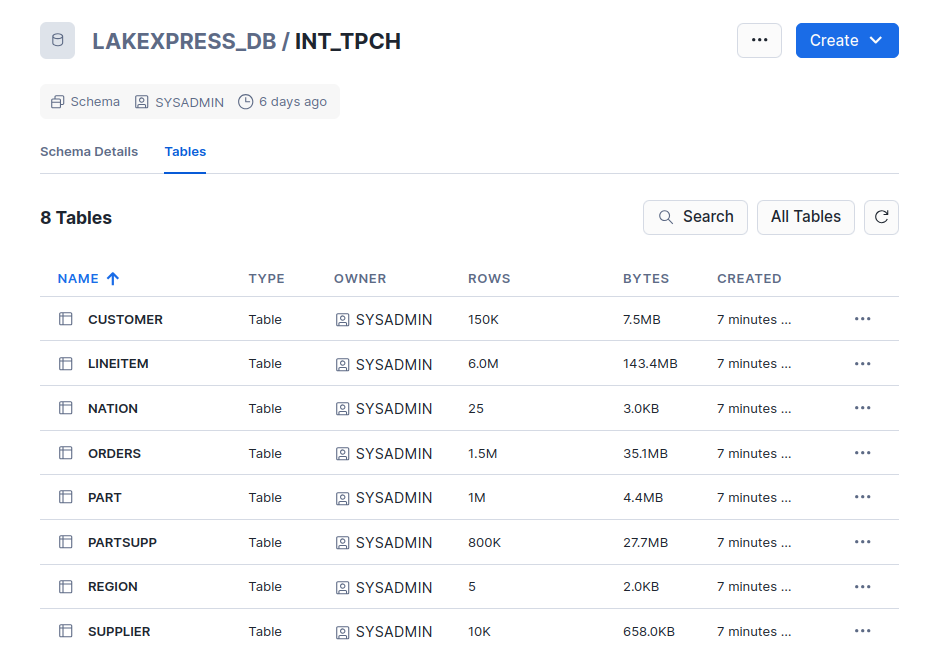
In Snowflake, the INT_TPCH schema now contains all 8 tables:
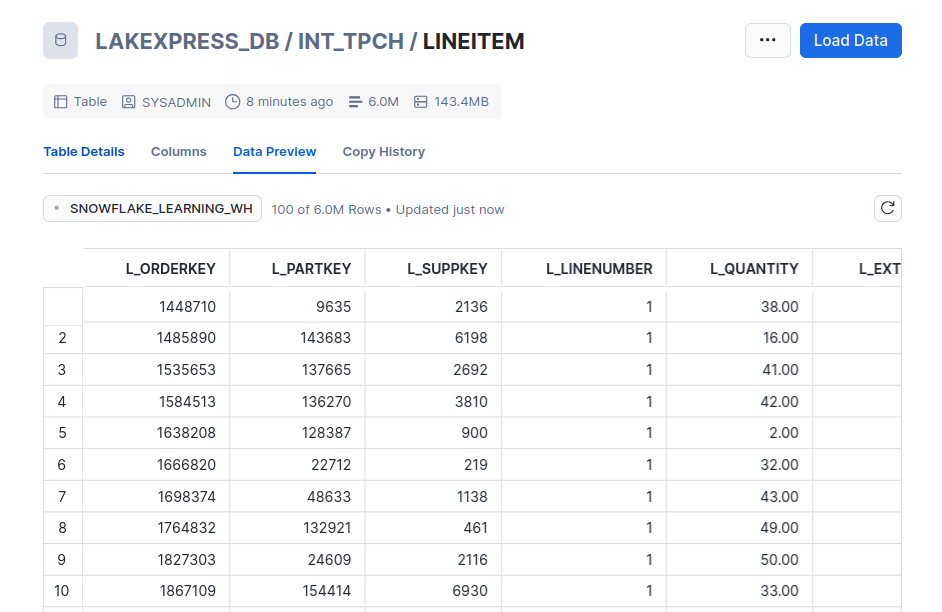
Drilling into LINEITEM confirms the data is loaded and queryable -- 6 million rows:
Wrap-up
Two commands to go from a SAP HANA schema to queryable Snowflake tables:
config create-- define what to export, where to land it on S3, and where to publishsync-- run the full pipeline: parallel export, compression, metadata generation, and Snowflake loading
LakeXpress also supports SQL Server, Postgres, and other source databases. For the full CLI reference and more advanced features (incremental syncs, table-level configuration, other publish targets), see the documentation.
Want to try it on your own data? Download LakeXpress and get a free 30-day trial.