How to Use FastBCP with Apache Airflow

Integrating FastBCP into Apache Airflow allows you to build robust, production-grade data export workflows that leverage parallel processing while maintaining full observability and orchestration control.
In this integration guide, we'll show you how to run FastBCP tasks in Airflow using the Docker operator, configure secure connection and credential management for both databases and cloud storage, and monitor execution results.
Why Use FastBCP with Apache Airflow?
Apache Airflow is the industry-standard platform for authoring, scheduling, and monitoring data pipelines. Combining it with FastBCP gives you:
- Production-ready orchestration: Build complex data export pipelines with dependencies, retries, and error handling
- Parallel execution: Leverage FastBCP's multi-threaded exports within orchestrated DAGs
- Secure credential management: Store database and cloud storage credentials centrally using Airflow connections
- Monitoring and alerting: Track execution details, export statistics, and performance metrics in Airflow's UI
- Scheduling flexibility: Run data exports on cron schedules, event triggers, or via API
- Multi-format support: Export to CSV, Parquet, JSON with automatic compression (gzip, snappy, zstd)
- Cloud integration: Direct export to AWS S3, Azure Blob Storage, or local file systems
Prerequisites
Before starting, ensure you have:
- Apache Airflow installed and running (standalone, Docker Compose, or Kubernetes)
- Docker available to Airflow (for running FastBCP containers)
- apache-airflow-providers-docker package installed
- A valid FastBCP license (request a trial license)
- Source database accessible from your Airflow environment
- Cloud storage credentials (AWS S3, Azure) if exporting to cloud
For local testing, Airflow can be quickly started with Docker Compose or using airflow standalone. See the Airflow quickstart guide.
What is Apache Airflow?
Apache Airflow is a powerful open-source platform for developing, scheduling, and monitoring batch-oriented workflows. It provides:
- Python-based DAGs: Define your entire pipeline as code using Python
- Rich operator ecosystem: Native integrations with databases, cloud services, containers, and more
- Built-in monitoring: Track executions, logs, and metrics in a unified web UI
- Scalability: Run on a single machine or scale to thousands of workers
- Active community: Extensive documentation and a thriving ecosystem of plugins
Docs: https://airflow.apache.org/docs/
Configure Airflow Connections
Airflow connections allow you to securely store and manage credentials for external systems. FastBCP integration requires connections for your source database and cloud storage.
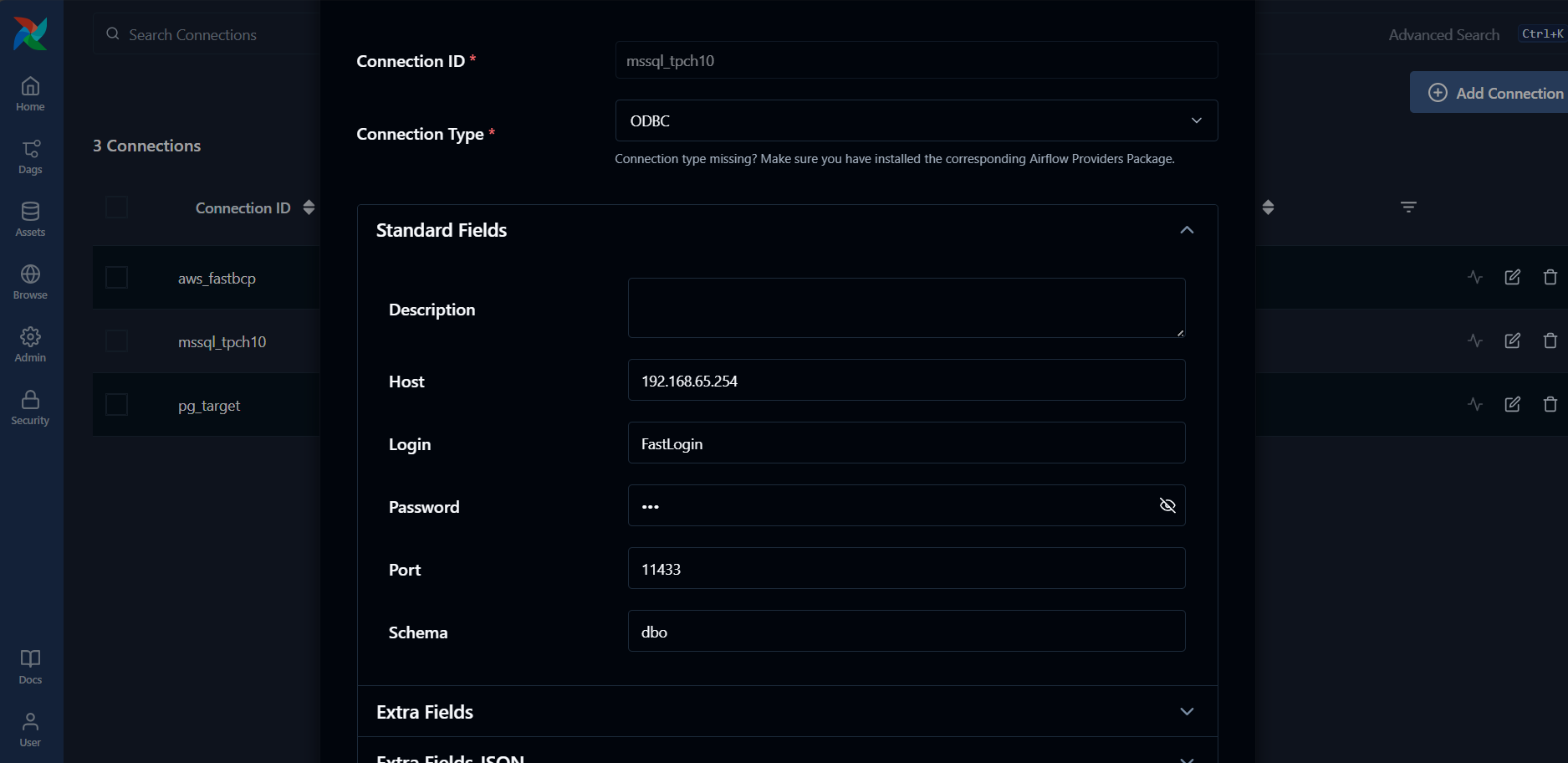
A) Source Database Connection (MSSQL Example)
Create an MSSQL connection for your source database:
- Navigate to Admin → Connections in the Airflow UI
- Click + to create a new connection
- In the Connection Type dropdown, select ODBC
- Configure the connection:
Connection Settings:
- Connection Id:
mssql_tpch10(or your preferred name) - Connection Type:
ODBC(select this from the dropdown) - Host:
192.168.65.254(your database host) - Port:
11433(your database port) - Login: Your database username (e.g.,
FastLogin) - Password: Your database password
- Extra:
{"database":"tpch10"}
For ODBC connections, the database name should be specified in the Extra JSON field using {"database":"your_database_name"}.
B) AWS Connection (for S3 Export)
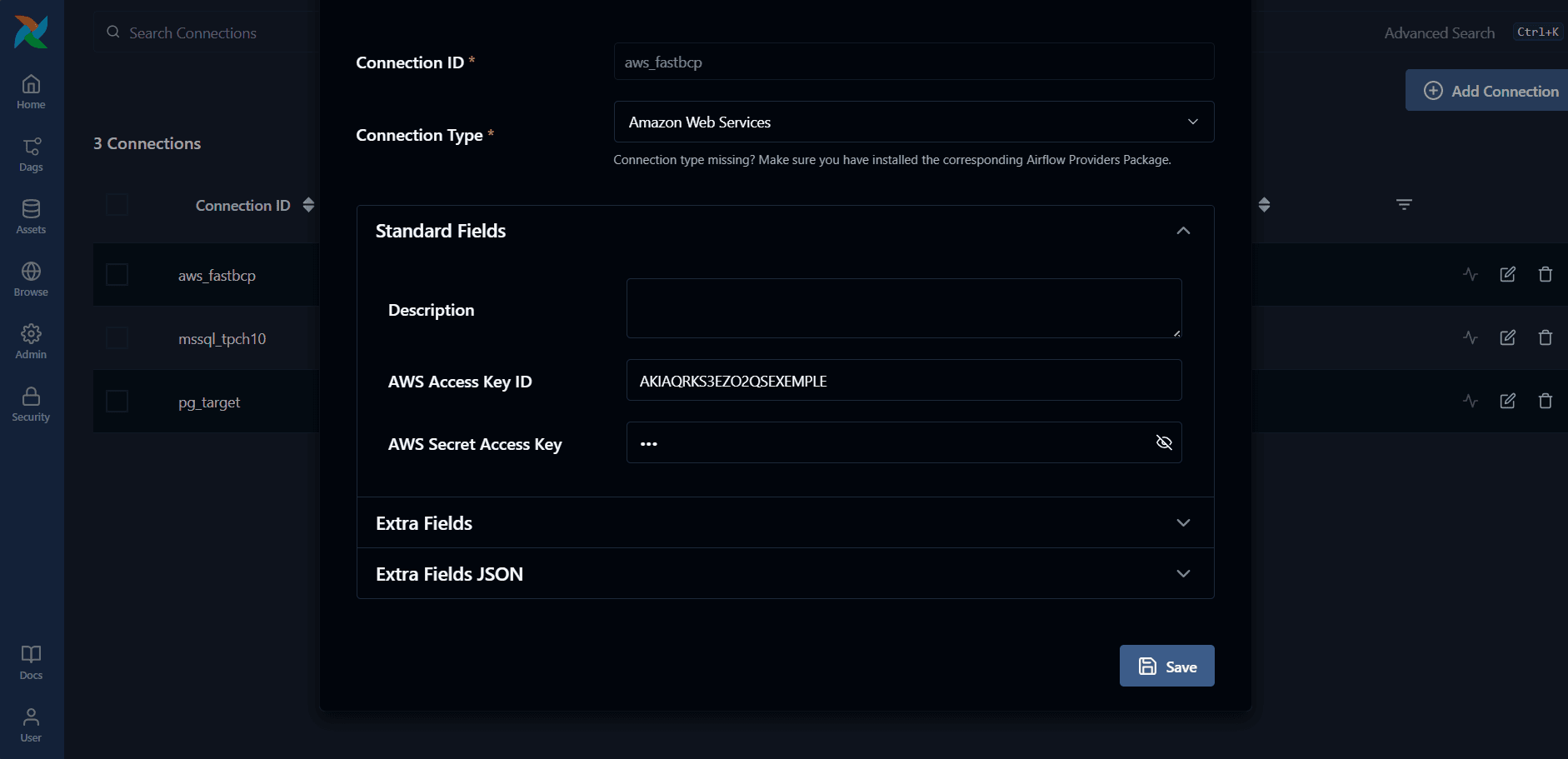
Create an AWS connection to securely pass cloud credentials to the container:
- Navigate to Admin → Connections in the Airflow UI
- Click + to create a new connection
- In the Connection Type dropdown, select Amazon Web Services
- Configure the connection:
Connection Settings:
- Connection Id:
aws_fastbcp(or your preferred name) - Connection Type:
Amazon Web Services(select this from the dropdown) - AWS Access Key ID: Your AWS access key (in the Login field)
- AWS Secret Access Key: Your AWS secret key (in the Password field)
- Extra:
{"region_name":"eu-west-1"}(or your preferred region)
Airflow AWS providers commonly use region_name in Extra JSON. Alternatively, you can use {"region":"eu-west-1"} or {"aws_default_region":"eu-west-1"}.
Creating a FastBCP Export DAG
Complete DAG Example: Export to S3 Parquet
Create a DAG file (e.g., fastbcp_export_orders_to_s3.py) in your Airflow DAGs folder:
from datetime import datetime

from airflow import DAG
from airflow.sdk.bases.hook import BaseHook
from airflow.providers.docker.operators.docker import DockerOperator


def _mssql_parts(conn_id: str):
    """
    Extract MSSQL connection details from Airflow connection.

    Works with ODBC connections where database is stored in Extra JSON.

    Returns:
      tuple: (host, port, user, password, database)
    """
    c = BaseHook.get_connection(conn_id)
    host = c.host
    port = c.port
    user = c.login
    pwd = c.password

    # For ODBC MSSQL, the database is typically stored in Extra JSON
    db = c.extra_dejson.get("database") or c.schema

    if not db:
        raise ValueError(
            f"Connection '{conn_id}': missing database. Add it to Extra JSON "
            f'{{"database":"your_database_name"}} (recommended for ODBC).'
        )

    return host, port, user, pwd, db


def _aws_env(conn_id: str):
    """
    Extract AWS credentials from Airflow connection and map to container env vars.

    Expected Airflow AWS connection:
      - Connection Type: Amazon Web Services
      - Login    -> AWS_ACCESS_KEY_ID
      - Password -> AWS_SECRET_ACCESS_KEY
      - Extra    -> {"region_name":"eu-west-1"}

    Returns a dictionary with:
      - AWS_ACCESS_KEY_ID
      - AWS_SECRET_ACCESS_KEY
      - AWS_DEFAULT_REGION
    """
    c = BaseHook.get_connection(conn_id)

    # Keys can be in login/password or in Extra JSON
    access_key = c.login or c.extra_dejson.get("aws_access_key_id")
    secret_key = c.password or c.extra_dejson.get("aws_secret_access_key")

    # Airflow AWS providers commonly use "region_name" in Extra JSON
    region = (
        c.extra_dejson.get("region_name")
        or c.extra_dejson.get("region")
        or c.extra_dejson.get("aws_default_region")
    )

    missing = [
        k
        for k, v in {
            "AWS_ACCESS_KEY_ID": access_key,
            "AWS_SECRET_ACCESS_KEY": secret_key,
            "AWS_DEFAULT_REGION": region,
        }.items()
        if not v
    ]

    if missing:
        raise ValueError(
            f"Connection '{conn_id}': missing AWS fields: {missing}. "
            f"Set login/password and add region in Extra JSON."
        )

    return {
        "AWS_ACCESS_KEY_ID": access_key,
        "AWS_SECRET_ACCESS_KEY": secret_key,
        "AWS_DEFAULT_REGION": region,
    }


with DAG(
    dag_id="fastbcp_export_orders_parquet_to_s3",
    start_date=datetime(2025, 1, 1),
    schedule=None,
    catchup=False,
    tags=["fastbcp", "mssql", "s3", "parquet", "docker"],
) as dag:

    # Extract connection details
    mssql_host, mssql_port, mssql_user, mssql_pwd, mssql_db = _mssql_parts("mssql_tpch10")
    aws_env = _aws_env("aws_fastbcp")

    # FastBCP Docker task
    export_task = DockerOperator(
        task_id="export_orders_parquet_to_s3",
        image="arpeio/fastbcp:latest",
        docker_url="tcp://host.docker.internal:2375",
        api_version="auto",
        auto_remove="success",
        mount_tmp_dir=False,  # Avoids the remote-engine tmp mount warning
        do_xcom_push=False,
        environment=aws_env,
        command=[
            "--connectiontype", "mssql",
            "--server", f"{mssql_host},{mssql_port}",
            "--user", mssql_user,
            "--password", mssql_pwd,
            "--database", mssql_db,
            "--sourceschema", "dbo",
            "--sourcetable", "orders",
            "--fileoutput", "orders.parquet",
            "--directory", "s3://fastbcp-export/orders/parquet",
            "--parallelmethod", "Ntile",
            "--paralleldegree", "12",
            "--distributekeycolumn", "o_orderkey",
            "--merge", "false",
            "--nobanner",
        ],
        network_mode="bridge",
    )
Key Parameters Explained
image: Specifies the FastBCP Docker image (arpeio/fastbcp:latest)environment: Dictionary of environment variables (AWS credentials in this case)command: List of FastBCP CLI argumentsauto_remove: Automatically remove the container after successful executionmount_tmp_dir: Set toFalseto avoid warnings with remote Docker daemons
Helper Functions Explained
The DAG includes two utility functions to streamline connection management:
_mssql_parts(conn_id)
Extracts connection details from an Airflow ODBC connection. This function:
- Retrieves host, port, username, and password from the connection
- Extracts the database name from the Extra JSON field (for ODBC connections)
- Returns all components needed to build the FastBCP connection parameters
- Validates that all required fields are present
_aws_env(conn_id)
Extracts AWS credentials from an Airflow AWS connection and maps them to environment variables expected by FastBCP:
AWS_ACCESS_KEY_ID- AWS access keyAWS_SECRET_ACCESS_KEY- AWS secret keyAWS_DEFAULT_REGION- AWS region
This function supports multiple Extra JSON formats for maximum flexibility with different Airflow configurations.
This approach ensures that credentials are managed centrally in Airflow and never hardcoded in DAG files.
Running and Monitoring the DAG
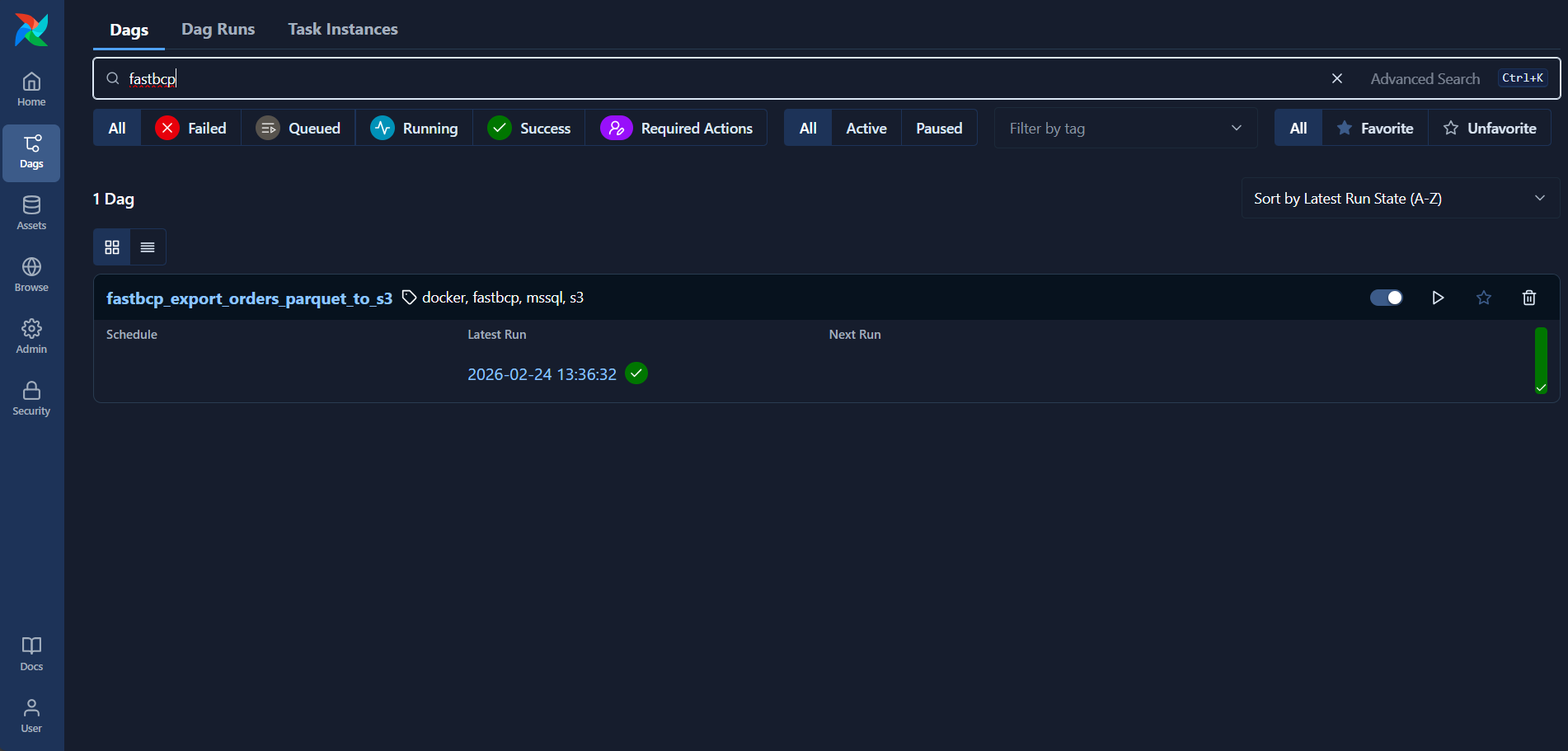
1. Verify the DAG in Airflow UI
After placing your DAG file in the DAGs folder, it should appear in the Airflow UI:
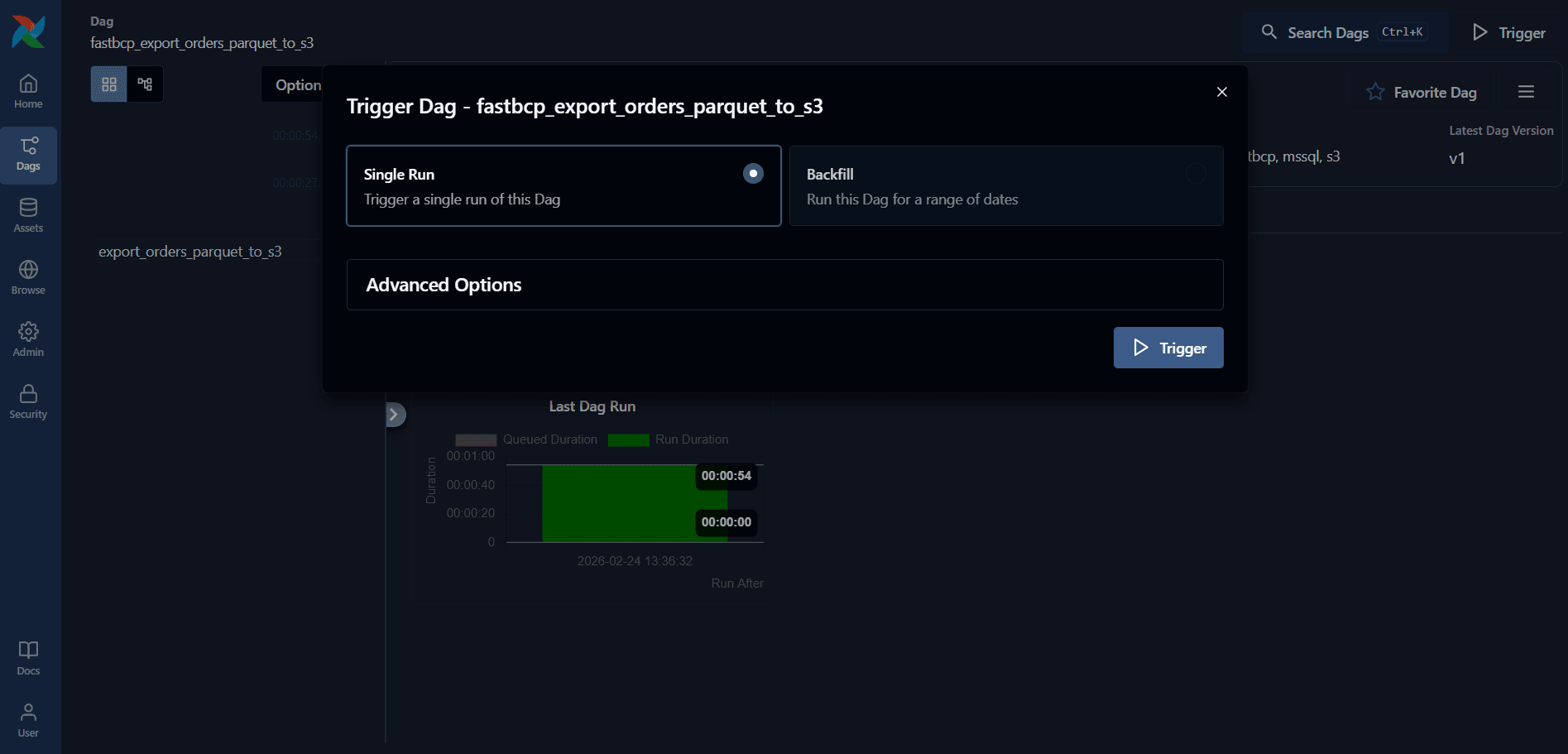
2. Trigger the DAG
Click on the DAG and then click the Trigger DAG button (play icon) to start execution:
3. Monitor Execution Progress
The Grid view shows the execution status in real-time:
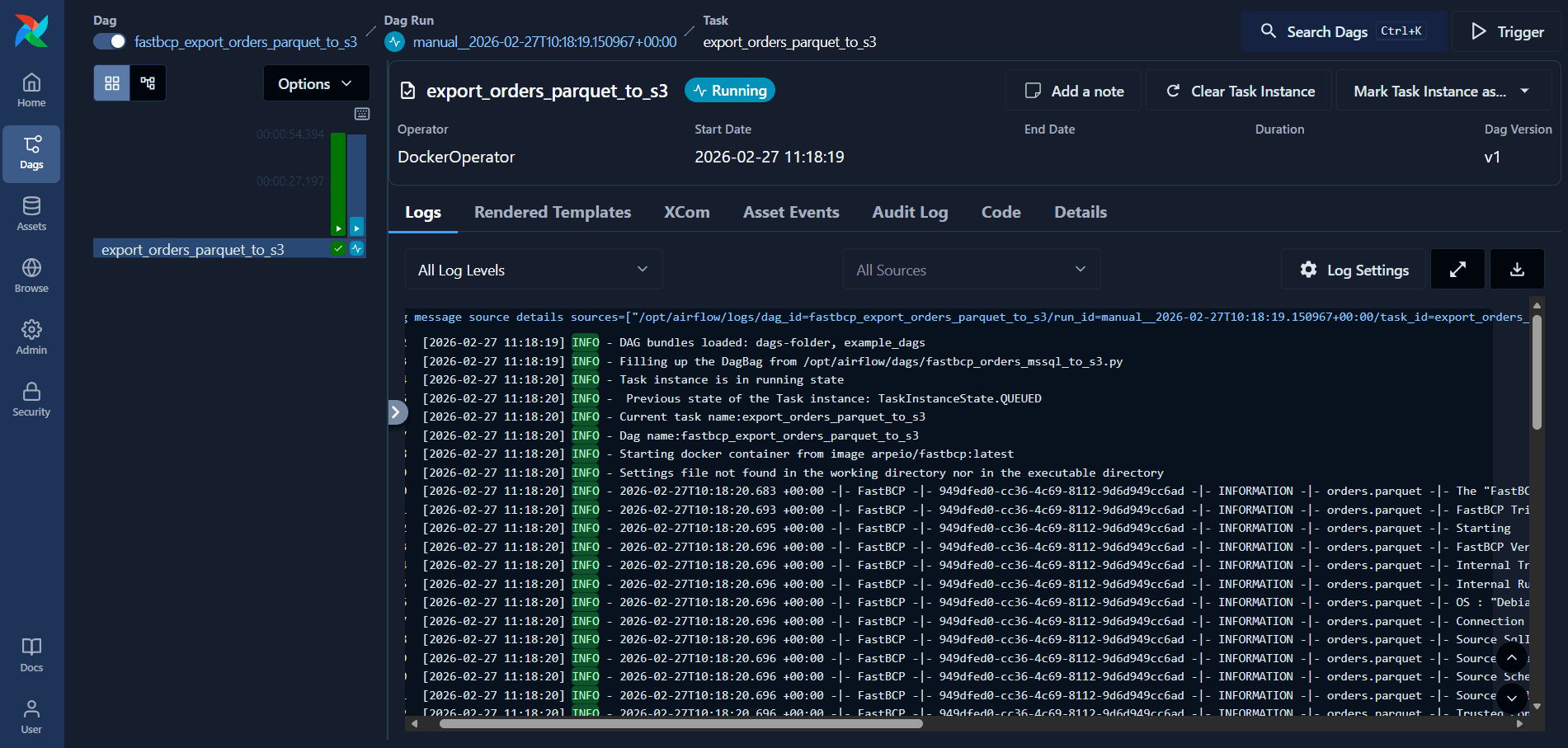
4. View Detailed Logs
Click on the task execution (green square) and then click the Logs tab to view detailed execution logs:
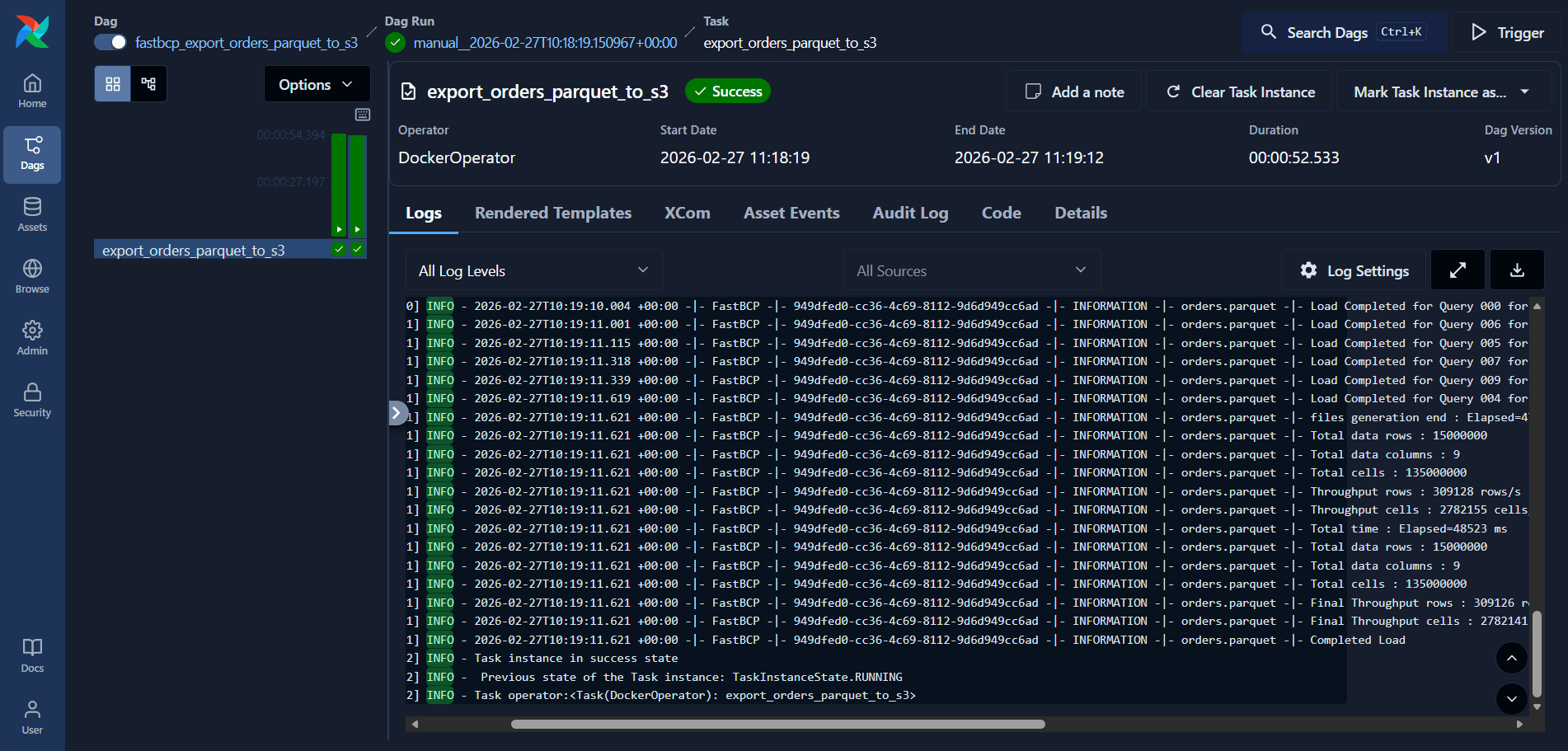
Example Log Output
The logs provide detailed information about the FastBCP execution:
[2026-02-24 13:36:38] INFO - Running docker container: arpeio/fastbcp:latest
[2026-02-24 13:36:38] INFO - 2026-02-24T12:36:38.046 +00:00 -|- FastBCP -|- 7e54647b-e1ab-468e-b02a-7e60042e86e9 -|- INFORMATION -|- orders.parquet -|- Prefix + TargetFullFileName = s3://fastbcp-export/orders/parquet/orders_chunk_000.parquet
[2026-02-24 13:36:38] INFO - 2026-02-24T12:36:38.046 +00:00 -|- FastBCP -|- 7e54647b-e1ab-468e-b02a-7e60042e86e9 -|- INFORMATION -|- orders.parquet -|- Prefix + TargetFullFileName = s3://fastbcp-export/orders/parquet/orders_chunk_001.parquet
[2026-02-24 13:36:38] INFO - 2026-02-24T12:36:38.046 +00:00 -|- FastBCP -|- 7e54647b-e1ab-468e-b02a-7e60042e86e9 -|- INFORMATION -|- orders.parquet -|- Prefix + TargetFullFileName = s3://fastbcp-export/orders/parquet/orders_chunk_007.parquet
[2026-02-24 13:36:38] INFO - 2026-02-24T12:36:38.046 +00:00 -|- FastBCP -|- 7e54647b-e1ab-468e-b02a-7e60042e86e9 -|- INFORMATION -|- orders.parquet -|- Prefix + TargetFullFileName = s3://fastbcp-export/orders/parquet/orders_chunk_010.parquet
[2026-02-24 13:37:19] INFO - 2026-02-24T12:37:19.603 +00:00 -|- FastBCP -|- 7e54647b-e1ab-468e-b02a-7e60042e86e9 -|- INFORMATION -|- orders.parquet -|- Load Completed for Query 002 for o_orderkey between 10000003 and 15000003 into s3://fastbcp-export/orders/parquet/orders_chunk_002.parquet : 1250001 rows x 9 columns in 38460ms
[2026-02-24 13:37:19] INFO - 2026-02-24T12:37:19.650 +00:00 -|- FastBCP -|- 7e54647b-e1ab-468e-b02a-7e60042e86e9 -|- INFORMATION -|- orders.parquet -|- Load Completed for Query 010 for o_orderkey between 50000035 and 55000035 into s3://fastbcp-export/orders/parquet/orders_chunk_010.parquet : 1250001 rows x 9 columns in 38507ms
[2026-02-24 13:37:20] INFO - 2026-02-24T12:37:20.857 +00:00 -|- FastBCP -|- 7e54647b-e1ab-468e-b02a-7e60042e86e9 -|- INFORMATION -|- orders.parquet -|- Load Completed for Query 007 for o_orderkey between 35000032 and 40000032 into s3://fastbcp-export/orders/parquet/orders_chunk_007.parquet : 1250001 rows x 9 columns in 39714ms
[2026-02-24 13:37:22] INFO - 2026-02-24T12:37:22.234 +00:00 -|- FastBCP -|- 7e54647b-e1ab-468e-b02a-7e60042e86e9 -|- INFORMATION -|- orders.parquet -|- Load Completed for Query 005 for o_orderkey between 25000006 and 30000006 into s3://fastbcp-export/orders/parquet/orders_chunk_005.parquet : 1250001 rows x 9 columns in 41090ms
[2026-02-24 13:37:23] INFO - 2026-02-24T12:37:23.124 +00:00 -|- FastBCP -|- 7e54647b-e1ab-468e-b02a-7e60042e86e9 -|- INFORMATION -|- orders.parquet -|- Load Completed for Query 001 for o_orderkey between 5000002 and 10000002 into s3://fastbcp-export/orders/parquet/orders_chunk_001.parquet : 1250001 rows x 9 columns in 41981ms
[2026-02-24 13:37:23] INFO - 2026-02-24T12:37:23.124 +00:00 -|- FastBCP -|- 7e54647b-e1ab-468e-b02a-7e60042e86e9 -|- INFORMATION -|- orders.parquet -|- Load Completed for Query 011 for o_orderkey between 55000036 and 60000000 into s3://fastbcp-export/orders/parquet/orders_chunk_011.parquet : 1249989 rows x 9 columns in 41980ms
[2026-02-24 13:37:24] INFO - 2026-02-24T12:37:24.062 +00:00 -|- FastBCP -|- 7e54647b-e1ab-468e-b02a-7e60042e86e9 -|- INFORMATION -|- orders.parquet -|- Load Completed for Query 006 for o_orderkey between 30000007 and 35000007 into s3://fastbcp-export/orders/parquet/orders_chunk_006.parquet : 1250001 rows x 9 columns in 42919ms
[2026-02-24 13:37:24] INFO - 2026-02-24T12:37:24.131 +00:00 -|- FastBCP -|- 7e54647b-e1ab-468e-b02a-7e60042e86e9 -|- INFORMATION -|- orders.parquet -|- Load Completed for Query 009 for o_orderkey between 45000034 and 50000034 into s3://fastbcp-export/orders/parquet/orders_chunk_009.parquet : 1250001 rows x 9 columns in 42988ms
[2026-02-24 13:37:25] INFO - 2026-02-24T12:37:25.066 +00:00 -|- FastBCP -|- 7e54647b-e1ab-468e-b02a-7e60042e86e9 -|- INFORMATION -|- orders.parquet -|- Load Completed for Query 000 for o_orderkey between 1 and 5000001 into s3://fastbcp-export/orders/parquet/orders_chunk_000.parquet : 1250001 rows x 9 columns in 43923ms
[2026-02-24 13:37:25] INFO - 2026-02-24T12:37:25.880 +00:00 -|- FastBCP -|- 7e54647b-e1ab-468e-b02a-7e60042e86e9 -|- INFORMATION -|- orders.parquet -|- Load Completed for Query 003 for o_orderkey between 15000004 and 20000004 into s3://fastbcp-export/orders/parquet/orders_chunk_003.parquet : 1250001 rows x 9 columns in 44737ms
[2026-02-24 13:37:26] INFO - 2026-02-24T12:37:26.168 +00:00 -|- FastBCP -|- 7e54647b-e1ab-468e-b02a-7e60042e86e9 -|- INFORMATION -|- orders.parquet -|- Load Completed for Query 008 for o_orderkey between 40000033 and 45000033 into s3://fastbcp-export/orders/parquet/orders_chunk_008.parquet : 1250001 rows x 9 columns in 45024ms
[2026-02-24 13:37:26] INFO - 2026-02-24T12:37:26.184 +00:00 -|- FastBCP -|- 7e54647b-e1ab-468e-b02a-7e60042e86e9 -|- INFORMATION -|- orders.parquet -|- files generation end : Elapsed=45978 ms - maxdop=12
[2026-02-24 13:37:26] INFO - 2026-02-24T12:37:26.185 +00:00 -|- FastBCP -|- 7e54647b-e1ab-468e-b02a-7e60042e86e9 -|- INFORMATION -|- orders.parquet -|- Total data rows : 15000000
[2026-02-24 13:37:26] INFO - 2026-02-24T12:37:26.185 +00:00 -|- FastBCP -|- 7e54647b-e1ab-468e-b02a-7e60042e86e9 -|- INFORMATION -|- orders.parquet -|- Total data columns : 9
[2026-02-24 13:37:26] INFO - 2026-02-24T12:37:26.185 +00:00 -|- FastBCP -|- 7e54647b-e1ab-468e-b02a-7e60042e86e9 -|- INFORMATION -|- orders.parquet -|- Total cells : 135000000
[2026-02-24 13:37:26] INFO - 2026-02-24T12:37:26.185 +00:00 -|- FastBCP -|- 7e54647b-e1ab-468e-b02a-7e60042e86e9 -|- INFORMATION -|- orders.parquet -|- Throughput rows : 323018 rows/s
[2026-02-24 13:37:26] INFO - 2026-02-24T12:37:26.185 +00:00 -|- FastBCP -|- 7e54647b-e1ab-468e-b02a-7e60042e86e9 -|- INFORMATION -|- orders.parquet -|- Throughput cells : 2907169 cells/s
[2026-02-24 13:37:26] INFO - 2026-02-24T12:37:26.185 +00:00 -|- FastBCP -|- 7e54647b-e1ab-468e-b02a-7e60042e86e9 -|- INFORMATION -|- orders.parquet -|- Total time : Elapsed=46438 ms
[2026-02-24 13:37:26] INFO - 2026-02-24T12:37:26.185 +00:00 -|- FastBCP -|- 7e54647b-e1ab-468e-b02a-7e60042e86e9 -|- INFORMATION -|- orders.parquet -|- Final Throughput rows : 323010 rows/s
[2026-02-24 13:37:26] INFO - 2026-02-24T12:37:26.185 +00:00 -|- FastBCP -|- 7e54647b-e1ab-468e-b02a-7e60042e86e9 -|- INFORMATION -|- orders.parquet -|- Final Throughput cells : 2907094 cells/s
[2026-02-24 13:37:26] INFO - 2026-02-24T12:37:26.185 +00:00 -|- FastBCP -|- 7e54647b-e1ab-468e-b02a-7e60042e86e9 -|- INFORMATION -|- orders.parquet -|- Completed Load
[2026-02-24 13:37:26] INFO - Task instance in success state
Key metrics visible in the logs:
- Total rows exported: 15,000,000 rows
- Throughput: ~323,000 rows/second
- Export time: ~48 seconds
- Parallel execution: 12 concurrent workers using the Ntile distribution method
- Output files: 12 Parquet files (chunks) exported to S3
Advanced Use Cases
Scheduled Daily Exports
Add a schedule to run the export daily at 2 AM:
with DAG(
    dag_id="fastbcp_export_orders_parquet_to_s3",
    start_date=datetime(2025, 1, 1),
    schedule="0 2 * * *",  # Daily at 2 AM
    catchup=False,
    tags=["fastbcp", "mssql", "s3", "parquet"],
) as dag:
    # ... tasks
Conclusion
Integrating FastBCP with Apache Airflow provides a powerful combination: Airflow's industry-standard orchestration and monitoring capabilities paired with FastBCP's high-performance parallel data exports.
Whether you're building scheduled data lake pipelines, orchestrating complex multi-table exports, exporting data in multiple formats for different consumers, or creating sophisticated data workflows with validation and error handling, this integration delivers the reliability, performance, and observability modern data teams need.
Want to try it on your own data? Download FastBCP and get a free 30-day trial.
Resources
- FastBCP: https://fastbcp.arpe.io
- FastBCP Docker Image: https://hub.docker.com/repository/docker/arpeio/fastbcp
- FastBCP Documentation: https://fastbcp-docs.arpe.io/latest/
- FastBCP Airflow Integration: https://fastbcp-docs.arpe.io/latest/integration/apache-airflow
- Apache Airflow Documentation: https://airflow.apache.org/docs/
- Airflow Docker Provider: https://airflow.apache.org/docs/apache-airflow-providers-docker/stable/