FastTransfer 1.0: Built-in ADBC Drivers, Db2 and the Physical Method

FastTransfer 1.0 is the first major release. It bundles six Arpe.io ADBC drivers (SQL Server, PostgreSQL, Oracle, Db2, Teradata and Netezza) that move rows as Arrow columns from source to target, with nothing to install. On a 6-million-row table, cross-database transfers run 1.5 to 2.1 times faster than with the vendor drivers, and Oracle to Oracle 14 times faster. Db2 for LUW becomes a source and a target, one Physical method replaces the four engine-specific ones, and the SQL Server physical split is up to 3.7 times faster.
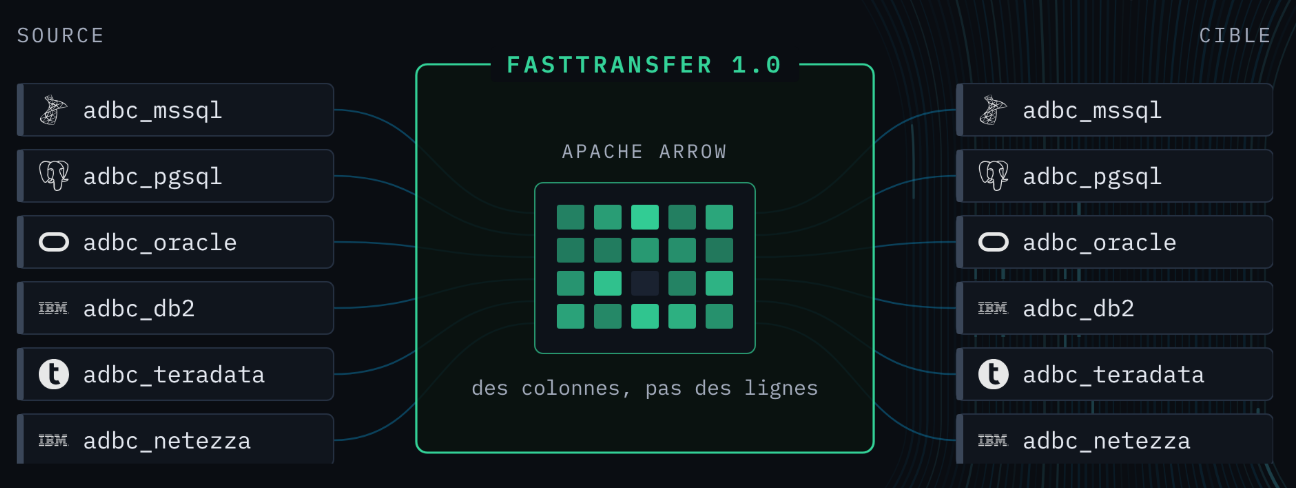
FastTransfer 1.0 adds a new data path. With an adbc_* connection type on both ends, rows are read and written as Arrow columns by the Arpe.io ADBC drivers that ship inside the binary.
The release also adds Db2 for LUW, makes choosing a parallel method simpler, and tightens a few things around reliability and security. If you run 0.18 today, read the upgrade notes before you deploy.
New ADBC connections
1.0 adds six connection types. Each one works as a source and as a target.
 SQL Server
- adbc_mssql
 PostgreSQL
- adbc_pgsql
 Oracle
- adbc_oracle
 Db2 for LUW
- adbc_db2
 Teradata
- adbc_teradata

 Netezza
- adbc_netezza
The drivers are part of FastTransfer: there is no client to install and nothing to configure. The source driver hands Arrow columns to the target driver, and no row is converted on the way.
The command line does not change. The same server, database, user, password and trusted authentication parameters apply, and so do all parallel methods. Only the connection type is new:
- Windows
- Linux
.\FastTransfer.exe `
  --sourceconnectiontype "adbc_oracle" `
  --sourceserver "oraserver:1521/ORCLPDB1" `
  --sourceuser "TPCH" `
  --sourcepassword "mypassword" `
  --sourceschema "TPCH" `
  --sourcetable "ORDERS" `
  --targetconnectiontype "adbc_mssql" `
  --targetserver "localhost" `
  --targettrusted `
  --targetdatabase "tpch" `
  --targetschema "dbo" `
  --targettable "orders" `
  --parallelmethod "Physical" `
  --degree 8 `
  --loadmode "Truncate"
./FastTransfer \
  --sourceconnectiontype "adbc_oracle" \
  --sourceserver "oraserver:1521/ORCLPDB1" \
  --sourceuser "TPCH" \
  --sourcepassword "mypassword" \
  --sourceschema "TPCH" \
  --sourcetable "ORDERS" \
  --targetconnectiontype "adbc_mssql" \
  --targetserver "localhost" \
  --targettrusted \
  --targetdatabase "tpch" \
  --targetschema "dbo" \
  --targettable "orders" \
  --parallelmethod "Physical" \
  --degree 8 \
  --loadmode "Truncate"
- Both ends must use an
adbc_*type. - The drivers run on Windows x64 and Linux x64.
- They need an ADBC driver block in your license file. Contact Arpe.io to have it added.
Performance FastTransfer 0.18 vs 1.0
The test table is LINEITEM from TPC-H SF1, 6 million rows, transferred with the RangeId method and a degree of 4. Each figure is the median time in seconds, with the vendor driver and with the Arpe.io ADBC drivers.
| LINEITEM, 6 M rows, RangeId, degree 4, FastTransfer 0.18 vs 1.0 (median, seconds) | |||
|---|---|---|---|
| Source → Target | Vendor driver | Arpe.io ADBC drivers | Gain |
| SQL Server → PostgreSQL | 6.7 s | 3.7 s | 1.8x |
| PostgreSQL → SQL Server | 5.1 s | 3.3 s | 1.5x |
| Oracle → SQL Server | 6.8 s | 3.6 s | 1.9x |
| Oracle → PostgreSQL | 6.8 s | 3.2 s | 2.1x |
| SQL Server → SQL Server | 5.9 s | 4.4 s | 1.3x |
| Oracle → Oracle (degree 1) | 47.7 s | 3.4 s | 14x |
- Vendor driver
- Arpe.io ADBC drivers
- Across databases, the ADBC path cuts the time by a third to more than half: 1.5 to 2.1 times faster.
- Between two SQL Server instances, the gain is smaller, 1.3 times.
- Oracle as a target is where the change shows most: 47.7 seconds down to 3.4, 14 times faster, with a degree of 1.
Db2 for LUW, source and target
Db2 for LUW joins the supported databases, as a source and as a target, through adbc_db2. It also gets the parallel methods that fit it:
DBPartitionreads the data partitions of a Db2 table.Randomnow uses the right modulo syntax on Db2, and on Teradata too.
DBPartition also works with the ADBC types of SQL Server, PostgreSQL, Oracle and Teradata.
One method for physical splits: Physical
Every engine has its own way to locate a row on disk, and until 0.18 you picked the FastTransfer method that matched it: Ctid, Rowid, Physloc or NZDataSlice. With --parallelmethod Physical, FastTransfer picks it from the source:
There is no key column to choose. Give the source schema and table, and a degree.
A faster physical split on SQL Server
The physical split of a SQL Server table now spreads the rows evenly over all streams, on rowstore tables and on clustered columnstore tables. On a clustered rowstore table with 8 streams, the transfer went from about 17.7 seconds to 4.7.
- FastTransfer 0.18
- FastTransfer 1.0
Reliability and security
Passwords in uri= connection strings are hidden in all logs.
Each release download comes with SLSA build provenance, so you can check that a binary was built from the FastTransfer sources.
Upgrading from 0.18
Ctid, Rowid, Physloc and NZDataSlice still work in 1.0, with a warning. They will be removed in 2.0. Switch to Physical now.
A few commands that ran on 0.18 need a change:
| Case | In 1.0 |
|---|---|
Physloc, or Physical on SQL Server | Needs --sourceschema and --sourcetable. A --query can still filter the table. |
NZDataSlice, or Physical on Netezza | No longer needs --sourceschema and --sourcetable. |
Oracle source, PARTITION (...) in the FROM of --query | Refused. Use the DBPartition method instead. |
Known limitations
The ADBC connection types run on Windows x64 and Linux x64 only.
With ADBC, values with a time zone offset from SQL Server and Oracle arrive as the same instant in UTC.
A few data types are not supported yet as ADBC targets, such as Db2 DECFLOAT and Teradata PERIOD.
In the Command Wizard
The Command Wizard offers the ADBC connection types and the Physical method, so you can build a 1.0 command without looking up the parameter names.
Free 30-day trial