Loading Parquet into SQL Server: DuckDB vs FastTransfer

DuckDB's community mssql extension lets you write data from DuckDB directly into SQL Server. I tested it on a real dataset — 38 million rows, 44 columns — against FastTransfer 0.16.1. Both tools ran on the same machine, targeting the same SQL Server instance.
Here's what I found.
Software versions:
- DuckDB 1.5 for Windows AMD64
- FastTransfer 0.16.1 for Windows x64
Dataset: F_JOURNEE — 38M rows × 44 columns, stored as Parquet files
Feature Comparison
| Feature | DuckDB mssql extension | FastTransfer |
|---|---|---|
| Windows Authentication | ❌ | ✅ |
| Encryption | ✅ | ✅ |
| Bulk copy support | ✅ | ✅ |
| Parallel bulk load | ❌ | ✅ |
| Truncate table | ❌ | ✅ |
| Generate table from SELECT (CTAS) | ⚠️ nvarchar(max) only | ❌ |
| Generate table with CREATE DDL | ⚠️ nvarchar(max) only | ❌ |
| Load into existing table | ❌ | ✅ |
| Log to database / file / JSON | ❌ | ✅ |
The split is telling. DuckDB lets you skip table creation — it generates one automatically from your SELECT. FastTransfer works the other way: you load into a pre-existing table, which means you control the schema, get parallel writes, and can truncate before loading.
Loading Parquet into SQL Server with DuckDB
The mssql extension uses a COPY ... TO syntax with FORMAT 'bcp':
COPY (
  SELECT *
  FROM read_parquet('D:\data\F_journee\*.parquet')
)
TO 'mssql_server.sbi.F_JOURNEE_DUCKSQL'
(
  FORMAT 'bcp',
  TABLOCK true,
  FLUSH_ROWS 100000,
  CREATE_TABLE true
);
CREATE_TABLE true is not optional — the extension cannot insert into an existing table.
Load time: 553 seconds
 DuckDB loading F_JOURNEE in CREATE_TABLE mode: 553 seconds
Storage: 16 GB (uncompressed)
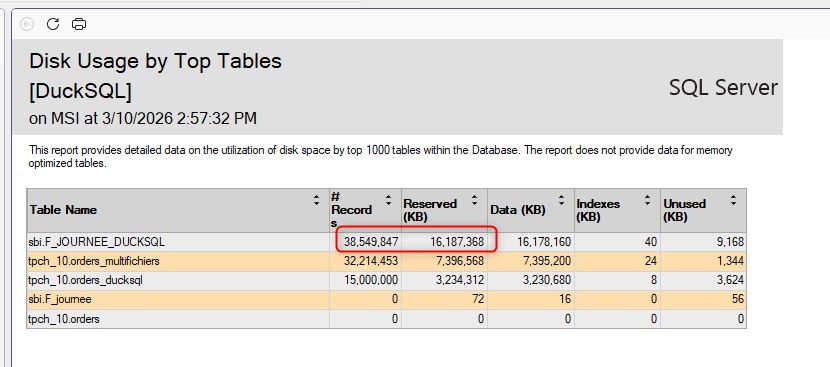 The resulting table sits at 16 GB in uncompressed row storage
And 553 seconds is only the raw load. You still need to ALTER TABLE every string column afterwards, then create the clustered columnstore index separately for compressed storage. Neither of those steps is included in that number.
The nvarchar(max) problem
DuckDB mssql extension maps every string type — varchar, nvarchar, char — to nvarchar(max). TIME columns get the same treatment.
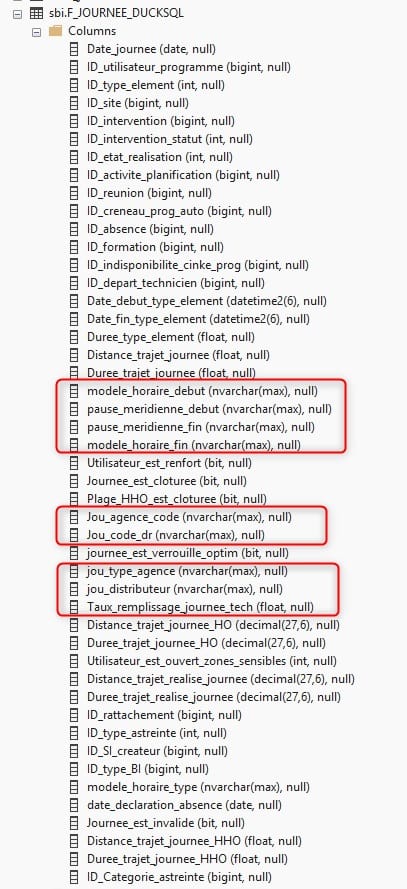
Every string column comes out as nvarchar(max), regardless of the source definition
This causes two problems.
- A table with
nvarchar(max)columns cannot hold a clustered columnstore index without converting each column first — so the entireALTER TABLEpass is mandatory before you can compress. - On top of that,
nvarchar(max)columns hurt query performance and storage efficiency.
Casting columns at the source doesn't change anything on the target side:

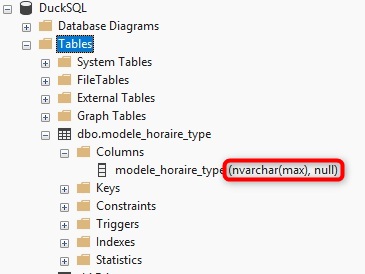
Casting at the source has no effect on the generated target column type
No support for existing tables
Unfortunately Truncate is not supported:
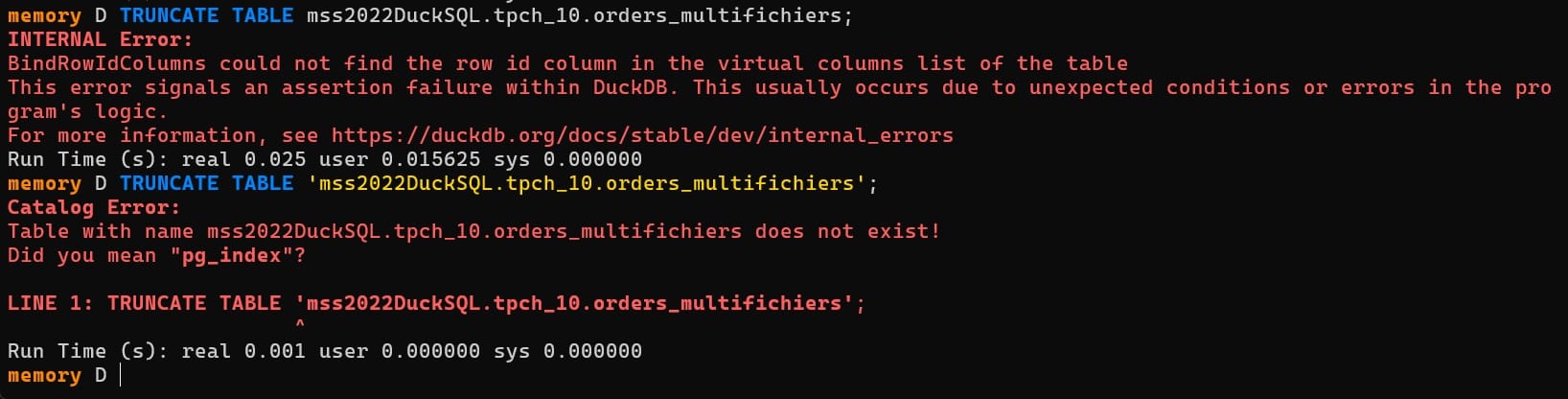
The extension only works with CREATE_TABLE true. Attempting to insert into a pre-existing table with proper column types fails:

The result: you're stuck with the auto-generated schema (nvarchar(max) everywhere), followed by a multi-step post-processing workflow — ALTER columns you need to manage if you want a clean schema, then build the columnstore — before the table is usable.
Loading Parquet into SQL Server with FastTransfer
FastTransfer reads Parquet files through DuckDB's streaming engine and writes to SQL Server in parallel using native bulk copy. The source is the same DuckDB engine, so reading speed is identical. The difference is entirely in how each tool writes to SQL Server.
.\FastTransfer.exe `
  --sourceconnectiontype duckdbstream `
  --sourceserver ":memory:" `
  --query "SELECT * FROM read_parquet('D:\data\F_journee\*.parquet')" `
  --targetconnectiontype msbulk `
  --targetserver "localhost" `
  --targetdatabase "DuckSQL" `
  --targettrusted `
  --targetschema "sbi" `
  --targettable "F_JOURNEE" `
  --loadmode Truncate `
  --mapmethod Name `
  --method DataDriven `
  --degree -2 `
  --distributekeycolumn "filename" `
  --datadrivenquery "select file from glob('D:\data\F_journee\*.parquet')"
Load time: 42 seconds
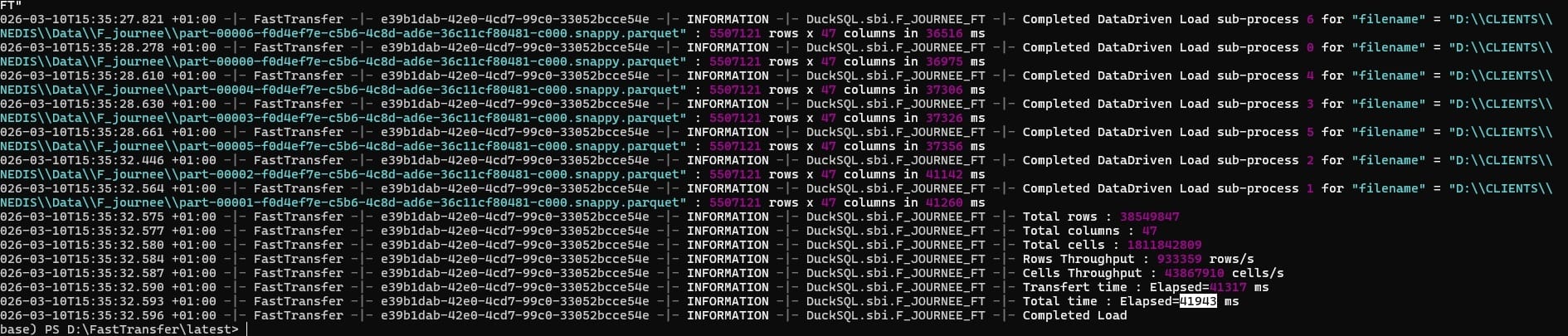
FastTransfer — 42 seconds, end to end
Storage: 283 MB (columnstore compression)
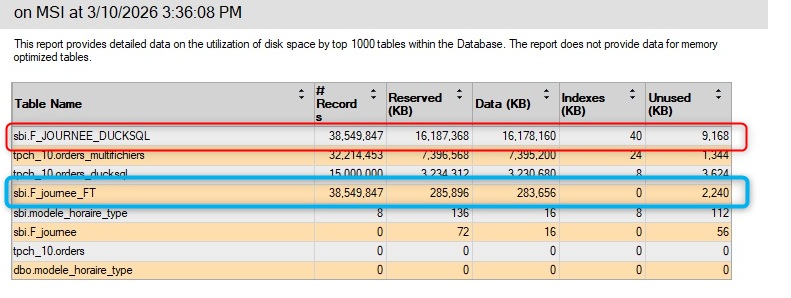 FastTransfer writes directly into the columnstore. No ALTER needed — 16 GB becomes 283 MB.
FastTransfer inserts directly into a pre-created table with a clustered columnstore index. Data lands compressed from the start. There is no post-load ALTER step.
Data types are correct
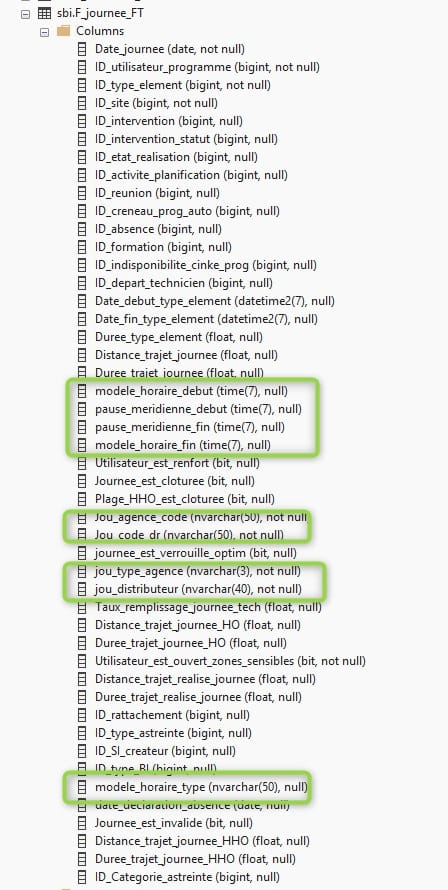
Column types match the source Parquet schema
Results Summary
| Metric | DuckDB mssql | FastTransfer |
|---|---|---|
| Load time | 553s | 42s |
| Post-load steps needed | ALTER columns + build columnstore | None |
| Final storage | 16 GB | 283 MB |
| Correct column types | No (nvarchar(max)) | Yes |
| Speed ratio | 1× | 13× faster |
| Storage ratio | 1× | 56× smaller |
Verdict
The current DuckDB mssql extension loads data. But it loads it slowly, with wrong column types, and locks you into a multi-step post-processing workflow. The 553-second load is just the beginning — the ALTER passes and columnstore creation come on top of that.
FastTransfer finished the same job in 42 seconds, writing directly into a columnstore with correct types. No extra steps.
One thing worth noting: FastTransfer uses DuckDB internally as its Parquet reading engine. The reading side is the same. The gap is entirely in how SQL Server rows get written.
I wouldn't recommend the DuckDB mssql extension for production SQL Server loads right now. The type mapping issues and no support for existing tables make it impractical beyond quick prototyping.
If you need Parquet-to-SQL Server at scale, FastTransfer is the right tool for the job : simple, fast, relyable, and built for production workloads.