How to Use pg_fastbcp in PostgreSQL

The pg_fastbcp extension brings the power of FastBCP directly into PostgreSQL, allowing you to execute high-speed data exports from databases to various formats using native SQL functions. Export to CSV, Parquet, or directly to cloud storage – all from standard SQL queries.
In this guide, we'll explore how to install, configure, and use pg_fastbcp to orchestrate data exports directly from your PostgreSQL database, with built-in password encryption and detailed performance metrics.
Why Use pg_fastbcp Extension?
Running FastBCP operations directly from PostgreSQL provides several key benefits:
- Native SQL Integration: Execute exports using standard SQL functions – no external orchestration needed
- Secure Credential Management: Built-in password encryption using PostgreSQL's
pgcryptoextension - Direct Result Processing: Export metrics returned as SQL result sets for easy logging and monitoring
- Multiple Output Formats: Export to CSV, Parquet, JSON, XLSX, BSON, or PostgreSQL Binary
- Cloud Storage Support: Direct export to AWS S3, Azure Blob Storage, Google Cloud Storage, or OneLake
- Cross-Platform Support: Available for Linux (Debian/Ubuntu) and Windows environments
- Multi-Database Sources: Export data from PostgreSQL, SQL Server, Oracle, MySQL, SAP HANA, and more
- Performance Visibility: Get detailed statistics including row counts, export time, and exit codes
- Parallel Processing: Leverage multiple threads for faster data export operations
pg_fastbcp is an open-source extension (MIT License) available on GitHub. It requires a valid FastBCP license to execute exports.
Prerequisites
Before installing the extension, ensure you have:
- PostgreSQL 15, 16, 17, or 18 installed
- Sudo/Administrator privileges on your system
- FastBCP binaries downloaded and installed
- A valid FastBCP license (request a trial)
The PostgreSQL server process runs under the postgres user account. You must ensure this user has execute permissions on the FastBCP binary and read permissions on the license file.
What is pg_fastbcp?
pg_fastbcp is a PostgreSQL extension that wraps the FastBCP command-line tool into SQL functions. It provides two main functions:
pg_fastbcp_encrypt(): Encrypts sensitive strings (passwords) usingpgp_sym_encryptxp_RunFastBcp_secure(): Executes FastBCP with all parameters passed as function arguments
The extension automatically handles:
- Password decryption for secure credential handling
- Command-line argument construction
- Process execution and output capture
- Result parsing and metric extraction
Installation
Download the Extension
Download the appropriate release for your PostgreSQL version and operating system from the pg_fastbcp releases page.
Latest version: v0.30.2 (March 11, 2026)
Linux Installation (Debian/Ubuntu)
Automated Installation (Recommended)
The archive includes an automated installation script:
# Extract the archive
tar -xzf pg_fastbcp-linux-pg16.zip
cd pg_fastbcp

# Make the installation script executable
chmod +x install-linux.sh

# Run the installer with sudo
sudo ./install-linux.sh
The script automatically detects your PostgreSQL installation and copies files to the correct locations.
Manual Installation
If you prefer manual installation:
# Stop PostgreSQL service
sudo systemctl stop postgresql

# Copy the shared library
sudo cp pg_fastbcp.so /usr/lib/postgresql/<version>/lib/

# Copy extension control and SQL files
sudo cp pg_fastbcp.control pg_fastbcp--1.0.sql \
    /usr/share/postgresql/<version>/extension/

# Restart PostgreSQL
sudo systemctl start postgresql
Set Permissions for postgres User
Ensure the postgres user can execute FastBCP:
# Make FastBCP executable
sudo chmod +x /path/to/FastBCP
sudo chown postgres:postgres /path/to/FastBCP
sudo chmod 750 /path/to/FastBCP

# Make license file readable
sudo chown postgres:postgres /path/to/FastBCP.lic
sudo chmod 640 /path/to/FastBCP.lic
Windows Installation
Automated Installation (Recommended)
The archive includes a batch file for automated installation:
-
Extract the ZIP file to a folder containing:
pg_fastbcp.dllpg_fastbcp.controlpg_fastbcp--1.0.sqlinstall-win.bat
-
Right-click
install-win.batand select "Run as administrator" -
The script will detect PostgreSQL and install the extension automatically
Manual Installation
If you prefer manual installation:
- Stop the PostgreSQL service
- Locate your PostgreSQL installation folder (typically
C:\Program Files\PostgreSQL\<version>) - Copy
pg_fastbcp.dllto thelibfolder - Copy
pg_fastbcp.controlandpg_fastbcp--1.0.sqlto theshare\extensionfolder - Restart the PostgreSQL service
Ensure the PostgreSQL service account has:
- Execute permission on
FastBCP.exe - Read permission on the
.licfile
SQL Setup
After installing the extension files, create it in your database:
-- Drop existing extension if upgrading
DROP EXTENSION IF EXISTS pg_fastbcp CASCADE;

-- Create the extension (requires pgcrypto)
CREATE EXTENSION pg_fastbcp CASCADE;
The CASCADE option automatically installs the required pgcrypto extension if not already present.
Extension Functions
pg_fastbcp_encrypt()
Encrypts sensitive strings (like passwords) for secure storage in SQL scripts.
Syntax:
pg_fastbcp_encrypt(text_to_encrypt text) RETURNS text
Example:
SELECT pg_fastbcp_encrypt('MySecurePassword');
-- Returns: "c30d04070302de9c45b41a6e95d00e75...base64encodedstring=="
The xp_RunFastBcp_secure() function automatically decrypts values passed to the password parameter.
The encryption key is defined in the PGFB_ENCRYPTION_KEY constant in pg_fastbcp.c. For production use, consider customizing this key and recompiling the extension.
xp_RunFastBcp_secure()
Executes the FastBCP tool with specified parameters and returns detailed metrics.
Key Parameters:
| Parameter | Type | Description |
|---|---|---|
connectiontype | text | Source connection type (e.g., 'mssql', 'pgsql', 'oracle') |
server | text | Source server address and port |
user_ | text | Source database username |
password | text | Source password (encrypted with pg_fastbcp_encrypt()) |
trusted | boolean | Use Windows authentication (Windows only) |
database_name | text | Source database name |
sourceschema | text | Source schema name |
sourcetable | text | Source table name |
query | text | Custom SQL query to export |
fileoutput | text | Output file name pattern |
directory | text | Output directory path (local or cloud) |
timestamped | boolean | Add timestamp to output file names |
encoding | text | Output file encoding (e.g., 'UTF-8') |
delimiter | text | CSV delimiter character |
usequotes | boolean | Use quotes in CSV output |
dateformat | text | Date format pattern |
decimalseparator | text | Decimal separator character |
boolformat | text | Boolean format ('automatic', '1/0', 'true/false') |
noheader | boolean | Omit header row in CSV output |
parquetcompression | text | Parquet compression ('snappy', 'gzip', 'brotli') |
cloudprofile | text | Cloud storage profile name |
parallelmethod | text | Parallelization method ('Ntile', 'Mod', 'Range', 'Timepartition') |
paralleldegree | integer | Number of parallel workers |
distributekeycolumn | text | Column used for data distribution |
merge | boolean | Merge output files into single file |
license | text | Full path to FastBCP license file |
loglevel | text | Log level ('information', 'debug', 'warning') |
nobanner | boolean | Suppress banner output |
fastbcp_path | text | Directory containing FastBCP binary |
Return Columns:
| Column | Type | Description |
|---|---|---|
exit_code | integer | Process exit code (0 = success) |
output | text | Full FastBCP log output |
total_rows | bigint | Total rows exported |
total_columns | integer | Total columns exported |
total_time | bigint | Total execution time in milliseconds |
Usage Examples
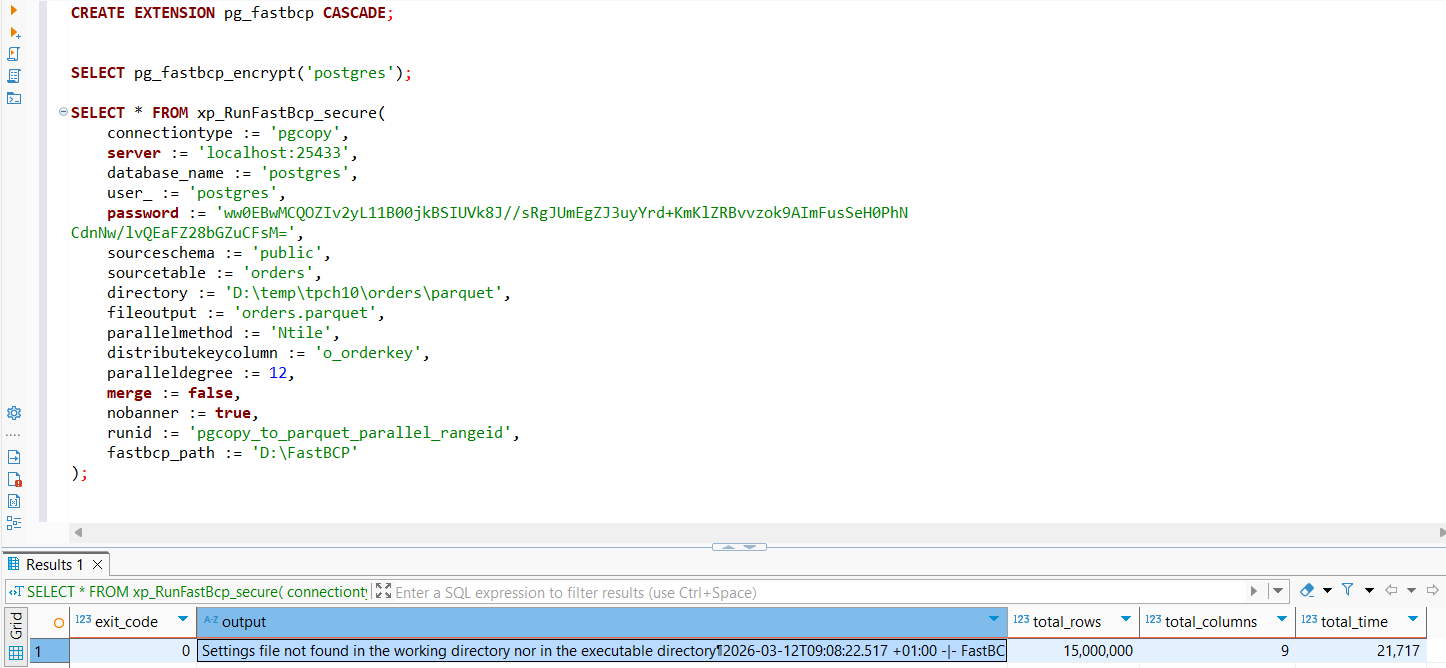
Example 1: PostgreSQL to Parquet (Windows)
Export data from PostgreSQL to Parquet files with parallel processing on Windows:
In this example, the password value has been encrypted beforehand using the pg_fastbcp_encrypt() function. The extension will automatically decrypt it during execution.
SELECT * FROM xp_RunFastBcp_secure(
    connectiontype := 'pgcopy',
    server := 'localhost:25433',
    database_name := 'postgres',
    user_ := 'postgres',
    password := 'ww0EBwMCQOZIv2yL11B00jkBSIUVk8J//sRgJUmEgZJ3uyYrd+KmKlZRBvvzok9AImFusSeH0PhN
CdnNw/lvQEaFZ28bGZuCFsM=',
    sourceschema := 'public',
    sourcetable := 'orders',
    directory := 'D:\temp\tpch10\orders\parquet',
    fileoutput := 'orders.parquet',
    parallelmethod := 'Ntile',
    distributekeycolumn := 'o_orderkey',
    paralleldegree := 12,
    merge := false,
    runid := 'pgcopy_to_parquet_parallel_rangeid',
    fastbcp_path := 'D:\FastBCP'
);
Result:
Example 2: PostgreSQL to CSV (Linux)
Export data from PostgreSQL to CSV files with parallel processing:
In this example, the password value has been encrypted beforehand using the pg_fastbcp_encrypt() function. The extension will automatically decrypt it during execution.
SELECT * FROM xp_RunFastBcp_secure(
    connectiontype := 'pgsql',
    server := 'localhost:5432',
    user_ := 'postgres',
    password := 'ww0EBwMCja4kgniJIOZz0jkBsIKEB9wnH2klOWdBHkQjlhrW8kvPvEniTIVHyoZ61f0oHlXJQi5x
fmZKyz0D7FpI1D8mwjSoyQU=',
    database_name := 'tpch',
    sourceschema := 'tpch_1',
    sourcetable := 'orders',

    fileoutput := 'orders.csv',
    directory := '/tmp/export',

    delimiter := ',',
    noheader := false,
    encoding := 'UTF-8',

    parallelmethod := 'Ntile',
    paralleldegree := 4,
    distributekeycolumn := 'o_orderkey',

    license := '/opt/fastbcp/FastBCP.lic',
    loglevel := 'information',
    nobanner := false,
    fastbcp_path := '/opt/fastbcp'
);
Result:
| exit_code | total_rows | total_columns | total_time |
|---|---|---|---|
| 0 | 15000000 | 9 | 8542 |
Output Formats
FastBCP supports multiple output formats:
- CSV: Comma-separated values with customizable delimiter and quoting
- Parquet: Apache Parquet with compression (Snappy, Gzip, Brotli)
- JSON: JSON Lines format (newline-delimited JSON)
- XLSX: Microsoft Excel format
- BSON: Binary JSON format
- PostgreSQL Binary: Native PostgreSQL COPY binary format
Specify the format by using the appropriate file extension in the fileoutput parameter.
The pg_fastbcp extension brings enterprise-grade data export capabilities directly into PostgreSQL, enabling secure, high-performance exports to multiple formats and cloud storage platforms using just SQL functions. Whether you're building data lake pipelines, generating reports, or archiving data, this extension provides a native, production-ready solution.
Give it a try and let us know your feedback on GitHub!
Resources
- GitHub Repository: arpe-io/pg_fastbcp
- FastBCP Documentation: fastbcp-docs.arpe.io
- Report Issues: GitHub Issues
- Get a Trial License: Request FastBCP Trial