Exporting a Postgres Schema to Parquet on S3 with LakeXpress

LakeXpress exports database tables to Parquet files, uploads them to cloud storage, and can publish them to data lakes.
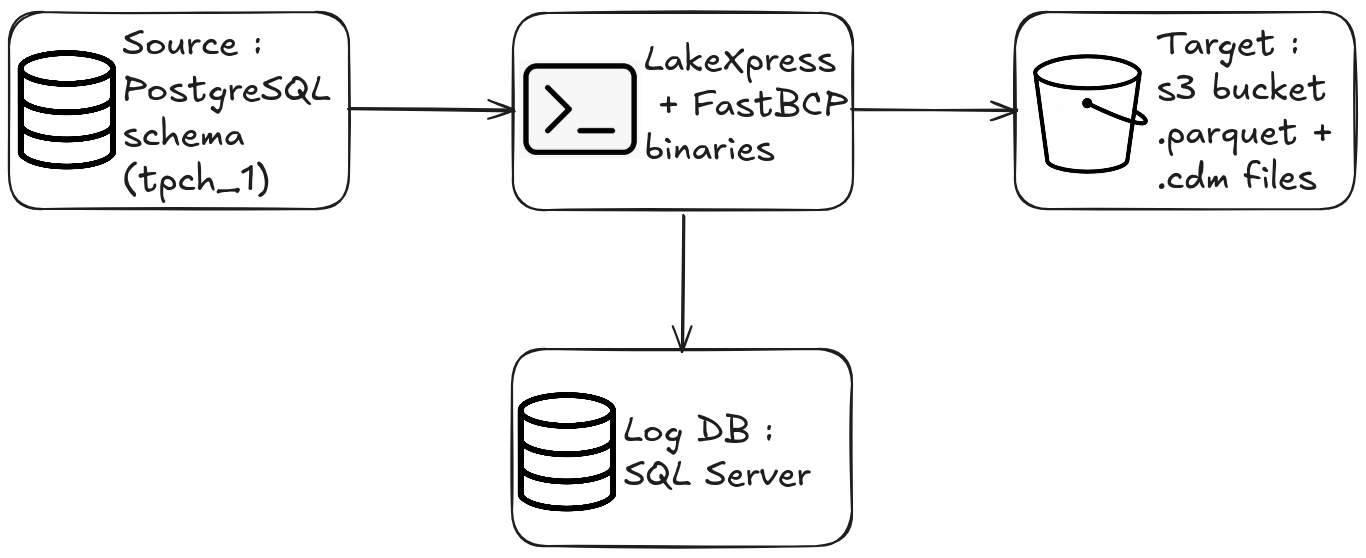
In this post, I'll walk through a minimal LakeXpress workflow: create a sync configuration, then run it. By the end, a full Postgres schema will be exported as Parquet files on S3 (no data lake publishing in this post).
Prerequisites
- The LakeXpress binary (Linux in this example)
- The FastBCP binary, used internally by LakeXpress for parallel table extraction
- A logging/orchestration database (SQL Server, Postgres, MySQL, SQLite or DuckDB. This example uses a local SQL Server instance)
- A running Postgres database containing the TPC-H dataset in a schema named
tpch_1(scale factor 1) - An S3 bucket and an AWS CLI profile configured
- A credentials file (
ds_credentials.json) -- more on this below
The credentials file
LakeXpress reads connection details from a single JSON file. Each entry is identified by a key that you reference later on the command line.
{
  "ds_pg_01": {
    "ds_type": "postgres",
    "auth_mode": "classic",
    "info": {
      "username": "$env{PG_USER}",
      "password": "$env{PG_PASSWORD}",
      "server": "localhost",
      "port": 5432,
      "database": "tpch"
    }
  },
  "log_db_ms": {
    "ds_type": "mssql",
    "auth_mode": "classic",
    "info": {
      "username": "$env{LOG_DB_USER}",
      "password": "$env{LOG_DB_PASSWORD}",
      "server": "localhost",
      "port": 1433,
      "database": "lakexpress"
    }
  },
  "aws_s3_01": {
    "ds_type": "s3",
    "auth_mode": "profile",
    "info": {
      "directory": "s3://mybucket/myproject/",
      "profile": "lakexpress"
    }
  }
}
Three entries:
ds_pg_01-- the source Postgres database (TPC-H data lives here)log_db_ms-- the logging and orchestration database (SQL Server here, but Postgres also works)aws_s3_01-- the S3 target, configured with an AWS CLI profile name and a base directory
Sensitive values like usernames and passwords can be given as environment variable with the $env{VARIABLE_NAME} syntax.
The log database persists sync configurations, run history, job statuses, file manifests, and table-level metrics. Because state is tracked per table, runs are resumable -- if an export is interrupted, LakeXpress picks up where it left off without re-exporting completed tables. The stored history also makes runs auditable: you can query past runs to see timings, row counts, and any errors.
The source data
The tpch_1 schema contains the eight standard TPC-H tables. A quick check with INFORMATION_SCHEMA:
SELECT table_name
FROM   INFORMATION_SCHEMA."tables"
WHERE  table_catalog = 'tpch'
AND    table_schema  = 'tpch_1';
 table_name
------------
 nation
 part
 partsupp
 orders
 lineitem
 customer
 region
 supplier
(8 rows)
Scale factor 1 means roughly 6 million rows in lineitem, 1.4 million in orders, and smaller counts for the remaining tables. Not a huge dataset, but enough to see how LakeXpress handles parallel exports.
Step 1 -- Create the sync configuration
The config create command registers a named sync configuration. It tells LakeXpress where to read from, where to write, and how much parallelism to use.
./LakeXpress config create \
       -a data/ds_credentials.json \
       --log_db_auth_id log_db_ms \
       --source_db_auth_id ds_pg_01 \
       --source_db_name tpch \
       --source_schema_name tpch_1 \
       --fastbcp_dir_path /home/francois/Workspace/FastBCP_exe/latest/ \
       --fastbcp_p 2 \
       --n_jobs 4 \
       --target_storage_id aws_s3_01 \
       --generate_metadata
What each argument does:
| Argument | Value | Description |
|---|---|---|
-a | data/ds_credentials.json | Path to the credentials JSON file |
--log_db_auth_id | log_db_ms | Which credential entry to use for the logging database |
--source_db_auth_id | ds_pg_01 | Which credential entry for the source Postgres |
--source_db_name | tpch | The Postgres database name |
--source_schema_name | tpch_1 | Schema to export (supports SQL LIKE patterns, e.g. tpch_%) |
--fastbcp_dir_path | /home/.../FastBCP_exe/latest/ | Path to the FastBCP executable directory |
--fastbcp_p | 2 | Parallelism within each table export -- 2 concurrent readers per table |
--n_jobs | 4 | Number of tables exported concurrently |
--target_storage_id | aws_s3_01 | Which credential entry for the S3 target |
--generate_metadata | (flag) | Produce CDM metadata files alongside the Parquet data |
LakeXpress assigns a unique sync_id and saves the configuration:
[...] config create: Creating sync configuration...
[...] Created sync configuration: sync-20260218-f97f78
[...] Saved sync to local registry: ~/.lakexpress/syncs.json
[...]
[...] ============================================================
[...] Sync configuration created successfully!
[...]
[...]   sync_id: sync-20260218-f97f78
[...]
[...] Use this sync_id with the following commands:
[...]   ./LakeXpress sync --sync_id sync-20260218-f97f78
[...]   ./LakeXpress 'sync[export]' --sync_id sync-20260218-f97f78
[...]   ./LakeXpress 'sync[publish]' --sync_id sync-20260218-f97f78
[...] ============================================================
The output shows the exact commands you can run next. sync runs the full pipeline (export + publish). sync[export] and sync[publish] let you run each phase independently.
Step 2 -- Run the sync
Now we execute the sync using the sync_id from the previous step:
./LakeXpress sync --sync_id sync-20260218-f97f78
sync is the subcommand; --sync_id identifies which saved configuration to run.
The output starts with a configuration summary:
[...] ============================================================
[...] Executing sync: sync-20260218-f97f78
[...] ============================================================
[...]
[...] Source database: ds_pg_01
[...] Source database name: tpch
[...] Source schemas: tpch_1
[...] Target storage: aws_s3_01
[...] FastBCP path: /home/francois/Workspace/FastBCP_exe/latest/
[...] Parallel degree: 2
[...] Concurrent jobs: 4
LakeXpress then discovers the tables in the schema, sorts them by estimated row count (largest first), and starts exporting:
[...] Discovered 8 tables in schema tpch_1
[...] Tables sorted by estimated row count (largest first) across all schemas:
[...]   1. tpch_1.lineitem (5,680,427 rows)
[...]   2. tpch_1.orders (1,410,012 rows)
[...]   3. tpch_1.part (200,000 rows)
[...]   4. tpch_1.customer (150,000 rows)
[...]   5. tpch_1.supplier (10,000 rows)
[...]   6. tpch_1.region (5 rows)
[...]   7. tpch_1.nation (0 rows)
[...]   8. tpch_1.partsupp (0 rows)
Scheduling the largest tables first is deliberate — it avoids the classic tail-wait problem where a single slow table stalls the end of the run.
With --n_jobs 4, four tables are exported concurrently. Each table export uses --fastbcp_p 2 parallel readers, so up to 8 concurrent streams are hitting Postgres at peak. A progress bar tracks overall completion:
[...] Export: CELLS: [####################] 100.0% TABLES: [####################] 100.0% (8/8) - 01:21
After the export, LakeXpress generates CDM metadata files (because we passed --generate_metadata). These JSON files describe the schema structure for downstream catalog tools.
The run summary confirms everything went through:
[...] ============================================================
[...] RUN SUMMARY
[...] ============================================================
[...] Export: 8/8 tables succeeded
[...] ============================================================
[...] Total                          - time (s) :     85.330
8 tables, 85 seconds total.
You can also inspect the saved configuration in the log database. Every parameter passed to config create is persisted, giving you a full record of each sync's configuration:
SELECT *
FROM   dbo.export_syncs
WHERE  sync_id = 'sync-20260218-f97f78';
sync_id                  | sync-20260218-f97f78
env_name                 | default
source_db_auth_id        | ds_pg_01
source_database          | tpch
source_schemas           | ["tpch_1"]
target_storage_id        | aws_s3_01
fastbcp_dir_path         | /home/francois/Workspace/FastBCP_exe/latest/
fastbcp_p                | 2
n_jobs                   | 4
compression_type         | Zstd
large_table_threshold    | 100000
generate_metadata        | 1
error_action             | fail
is_enabled               | 1
lakexpress_version       | 0.2.7
created_at               | 2026-02-18 15:51:16.220
Inspecting the results on S3
Let's see what landed in the bucket:
aws s3 ls s3://mybucket/myproject/tpch_1/ --recursive --profile lakexpress
2026-02-18 16:53:21       8386 myproject/tpch_1/customer.cdm.json
2026-02-18 16:51:58    4039874 myproject/tpch_1/customer/customer_chunk_000.parquet
2026-02-18 16:51:58    4041112 myproject/tpch_1/customer/customer_chunk_001.parquet
2026-02-18 16:53:21      14991 myproject/tpch_1/lineitem.cdm.json
2026-02-18 16:51:58   92809238 myproject/tpch_1/lineitem/lineitem_chunk_000.parquet
2026-02-18 16:51:58   92786196 myproject/tpch_1/lineitem/lineitem_chunk_001.parquet
2026-02-18 16:53:20       1669 myproject/tpch_1/manifest.json
2026-02-18 16:53:20      61471 myproject/tpch_1/model.json
2026-02-18 16:53:21       4752 myproject/tpch_1/nation.cdm.json
2026-02-18 16:52:14       2509 myproject/tpch_1/nation/nation.parquet
2026-02-18 16:53:21       9052 myproject/tpch_1/orders.cdm.json
2026-02-18 16:51:58   19938611 myproject/tpch_1/orders/orders_chunk_000.parquet
2026-02-18 16:51:58   19944629 myproject/tpch_1/orders/orders_chunk_001.parquet
2026-02-18 16:53:21       9263 myproject/tpch_1/part.cdm.json
2026-02-18 16:51:58    2067577 myproject/tpch_1/part/part_chunk_000.parquet
2026-02-18 16:51:58    2070774 myproject/tpch_1/part/part_chunk_001.parquet
2026-02-18 16:53:21       5708 myproject/tpch_1/partsupp.cdm.json
2026-02-18 16:52:16        244 myproject/tpch_1/partsupp/partsupp.parquet
2026-02-18 16:53:21       3918 myproject/tpch_1/region.cdm.json
2026-02-18 16:52:09       1413 myproject/tpch_1/region/region.parquet
2026-02-18 16:53:21       7515 myproject/tpch_1/supplier.cdm.json
2026-02-18 16:52:05     528903 myproject/tpch_1/supplier/supplier.parquet
Each table gets its own directory. Large tables (lineitem, orders, customer, part) are automatically split into chunks (_chunk_000, _chunk_001) based on the --fastbcp_p 2 parallelism setting. Smaller tables get a single file.
CDM metadata files sit at the schema level: one .cdm.json per table, plus a model.json (full schema description) and a manifest.json (list of all data files).
Zstd compression is effective -- the 6M-row lineitem table comes in at about 177 MB across two Parquet files.
Wrap-up
Two commands to go from a Postgres schema to production-ready Parquet files on S3:
config create-- define what to export and where to land itsync-- run the export with built-in parallelism, compression, and metadata generation
LakeXpress takes care of the rest: discovering tables, extracting in parallel, chunking, compressing, and generating metadata. For the full CLI reference and more advanced features (incremental syncs, publishing to Snowflake, table-level configuration), see the documentation.