How to Use FastTransfer with Kestra

Integrating FastTransfer into Kestra allows you to build robust, automated data transfer workflows that leverage parallel processing while maintaining full observability and orchestration control.
In this integration guide, we'll show you how to run FastTransfer tasks in Kestra, configure logging for workflow integration, and monitor execution results.
Why Use FastTransfer with Kestra?
Kestra is a modern, open-source orchestration platform designed for data workflows. Combining it with FastTransfer gives you:
- Declarative workflows: Define complex data pipelines in simple YAML
- Parallel execution: Leverage FastTransfer's multi-threaded transfers within orchestrated flows
- Logging and monitoring: Capture execution details, transfer statistics, and errors in Kestra's UI
- Scheduling: Run data transfers on cron schedules or trigger them via API
- Multi-source support: Transfer data between SQL Server, PostgreSQL, Oracle, MySQL, and more
Prerequisites
Before starting, ensure you have:
- Kestra installed and running (Docker Compose, Kubernetes, or standalone)
- Docker available to Kestra (for running FastTransfer containers)
- A valid FastTransfer license (request a trial license)
- Source and target databases accessible from your Kestra environment
For local testing, Kestra can be quickly started with Docker Compose. See the Kestra quickstart guide.
What is Kestra?
Kestra is an open-source orchestration and scheduling platform built for data engineering teams. It provides:
- YAML-based workflow definitions: Declare your entire pipeline in code
- Rich plugin ecosystem: Native integrations with databases, cloud services, containers
- Built-in monitoring: Track executions, logs, and metrics in a unified UI
- API-first design: Trigger and manage workflows programmatically
Docs: https://kestra.io/docs
Setting Up FastTransfer in Kestra
Kestra can run FastTransfer via the Docker task plugin, which executes containerized commands and captures their output.
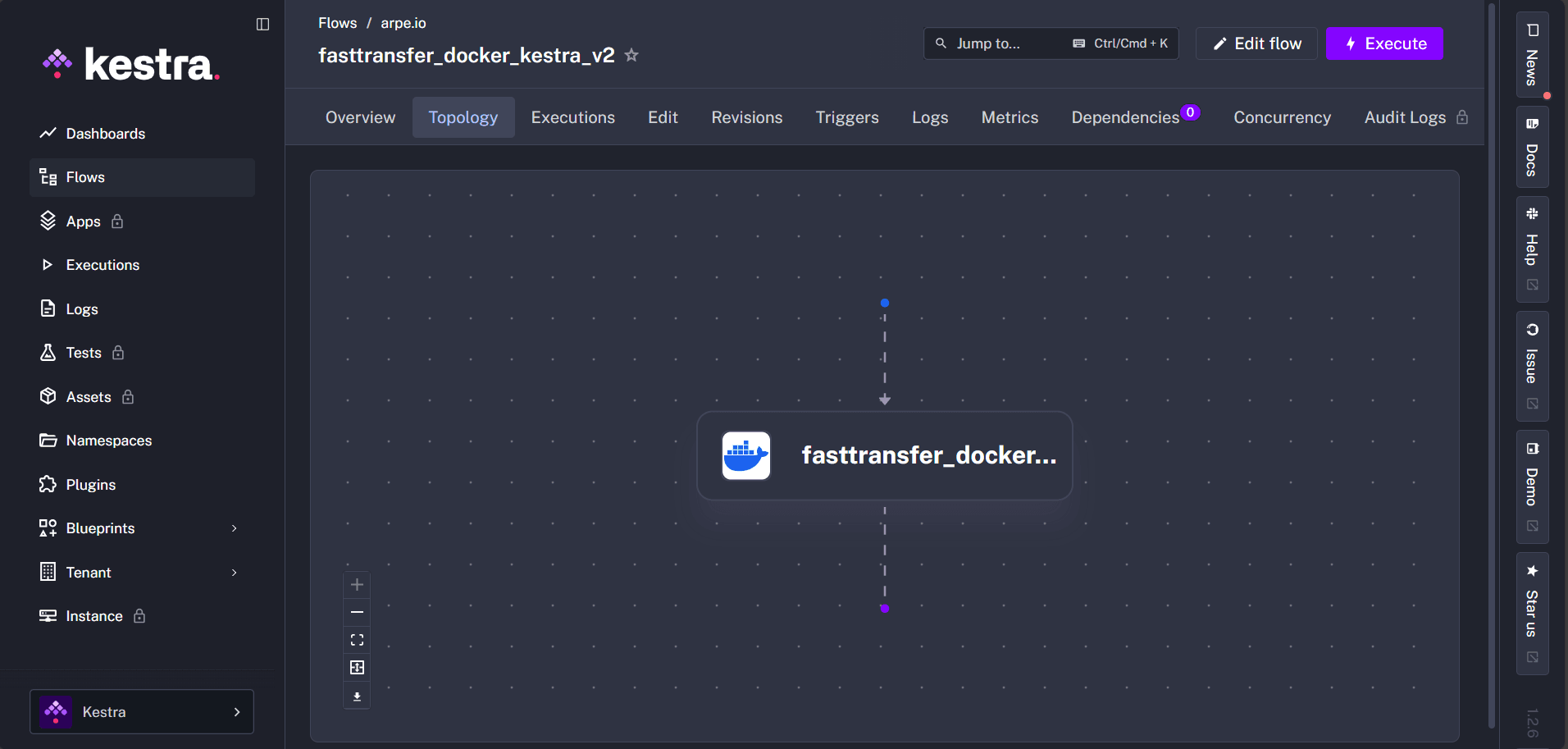
1. Create a Kestra Flow
Here's a complete example of a Kestra flow that transfers data from SQL Server to PostgreSQL using FastTransfer.
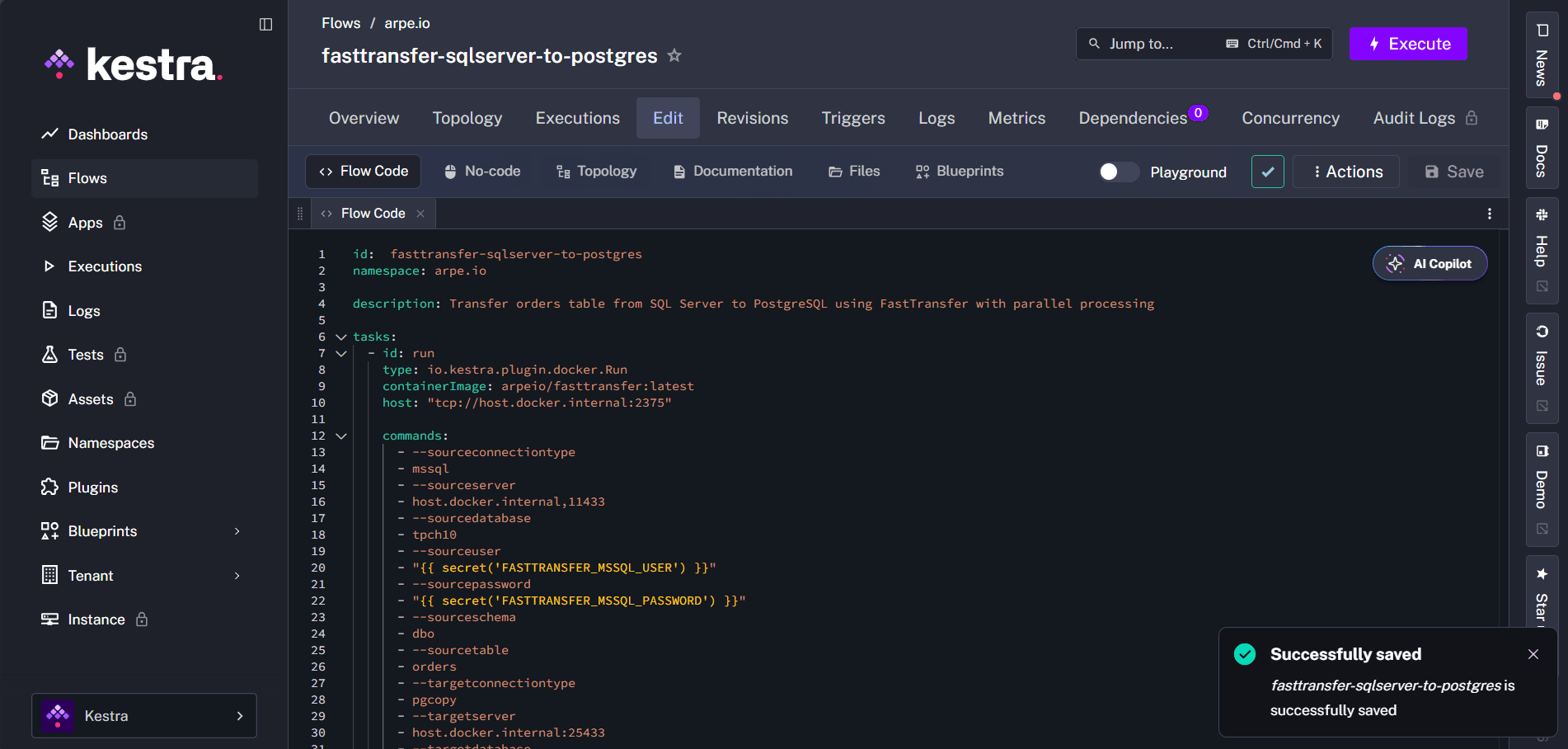
id: fasttransfer-sqlserver-to-postgres
namespace: arpe.io

description: Transfer orders table from SQL Server to PostgreSQL using FastTransfer with parallel processing

tasks:
  - id: run
    type: io.kestra.plugin.docker.Run
    containerImage: arpeio/fasttransfer:latest
    host: "tcp://host.docker.internal:2375"

    commands:
      - --sourceconnectiontype
      - mssql
      - --sourceserver
      - host.docker.internal,11433
      - --sourcedatabase
      - tpch10
      - --sourceuser
      - "{{ secret('FASTTRANSFER_MSSQL_USER') }}"
      - --sourcepassword
      - "{{ secret('FASTTRANSFER_MSSQL_PASSWORD') }}"
      - --sourceschema
      - dbo
      - --sourcetable
      - orders
      - --targetconnectiontype
      - pgcopy
      - --targetserver
      - host.docker.internal:25433
      - --targetdatabase
      - postgres
      - --targetuser
      - "{{ secret('FASTTRANSFER_PG_USER') }}"
      - --targetpassword
      - "{{ secret('FASTTRANSFER_PG_PASSWORD') }}"
      - --targetschema
      - public
      - --targettable
      - orders
      - --loadmode
      - Truncate
      - --mapmethod
      - Name
      - --method
      - Ntile
      - --degree
      - "12"
      - --distributekeycolumn
      - o_orderkey
      - --nobanner
      - --licenses
      - "mylicensecontent"
Key Points
io.kestra.plugin.docker.Run: Kestra's Docker task that runs containerized commands{{ secret('...') }}: Securely retrieves credentials from Kestra secrets- FastTransfer license: The license content can be stored as a Kestra secret and passed via
--license "{{ secret('FASTTRANSFER_LICENSE') }}"for secure license management --method Ntile: Parallel distribution method using the Ntile algorithm--degree "12": Configures FastTransfer to use 12 parallel workers--distributekeycolumn o_orderkey: Column used to distribute data across parallel workers--nobanner: Suppresses the FastTransfer banner for cleaner logs
Running the Flow
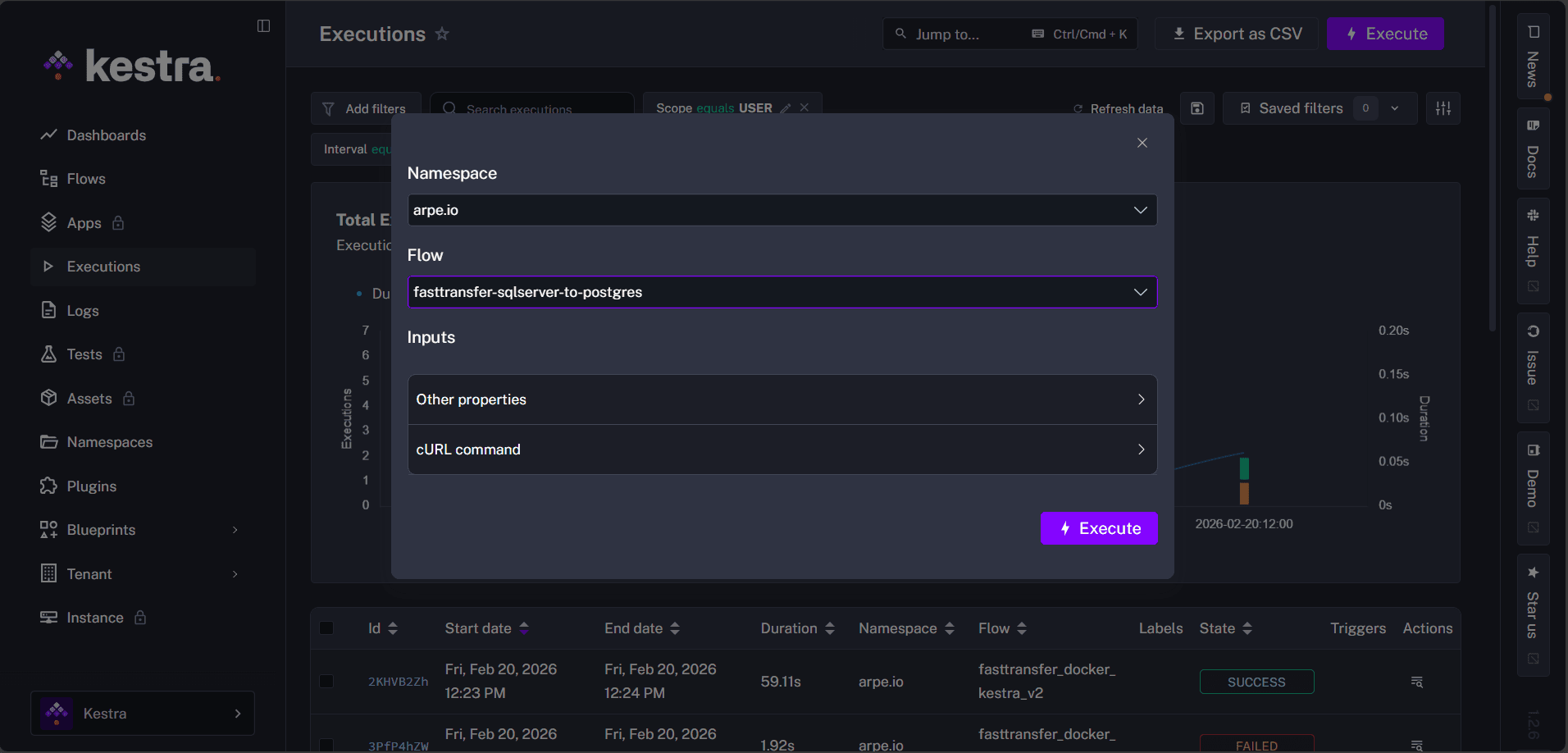
1. Execute the Flow from Kestra UI
Navigate to your flow in the Kestra UI and click Execute.
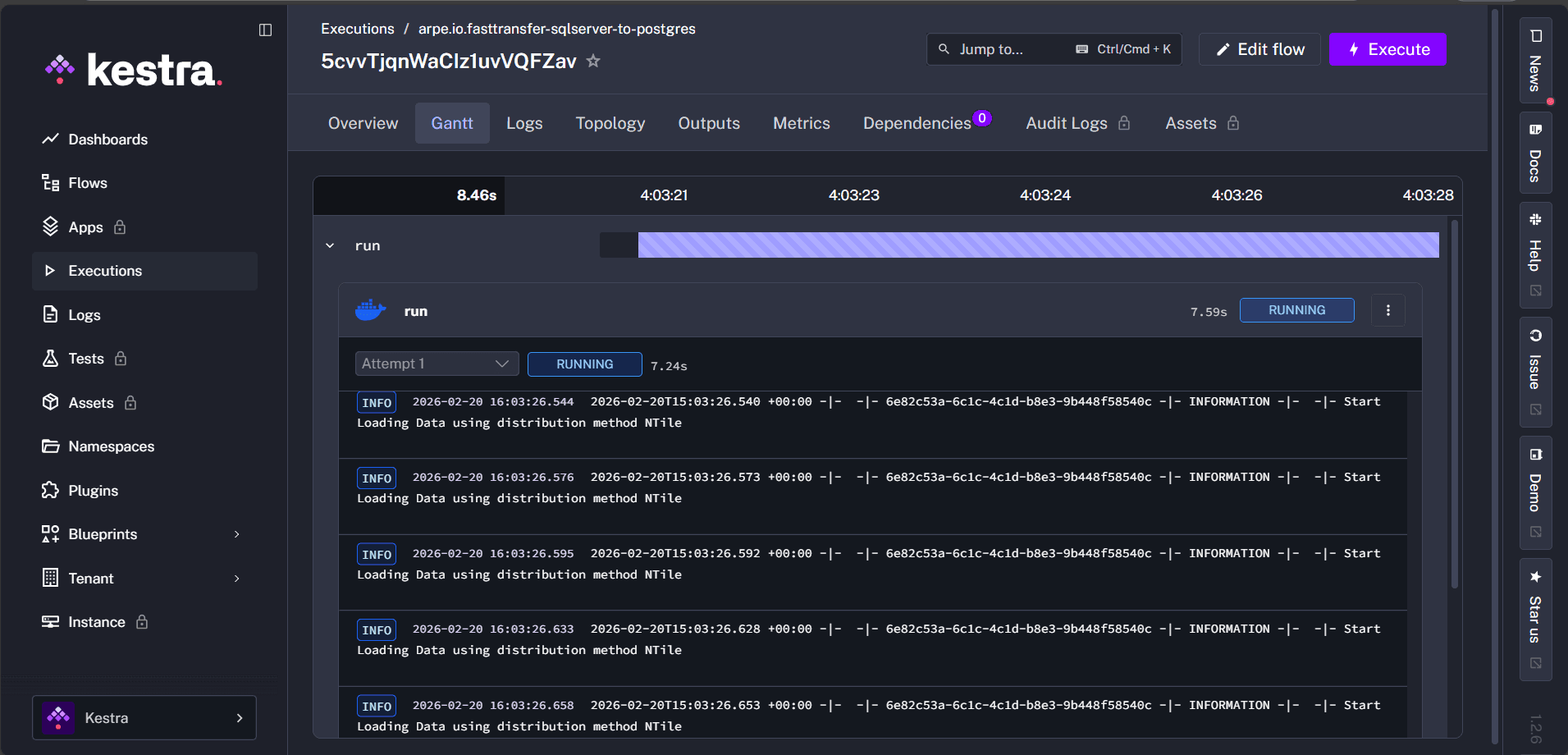
2. Monitor Execution
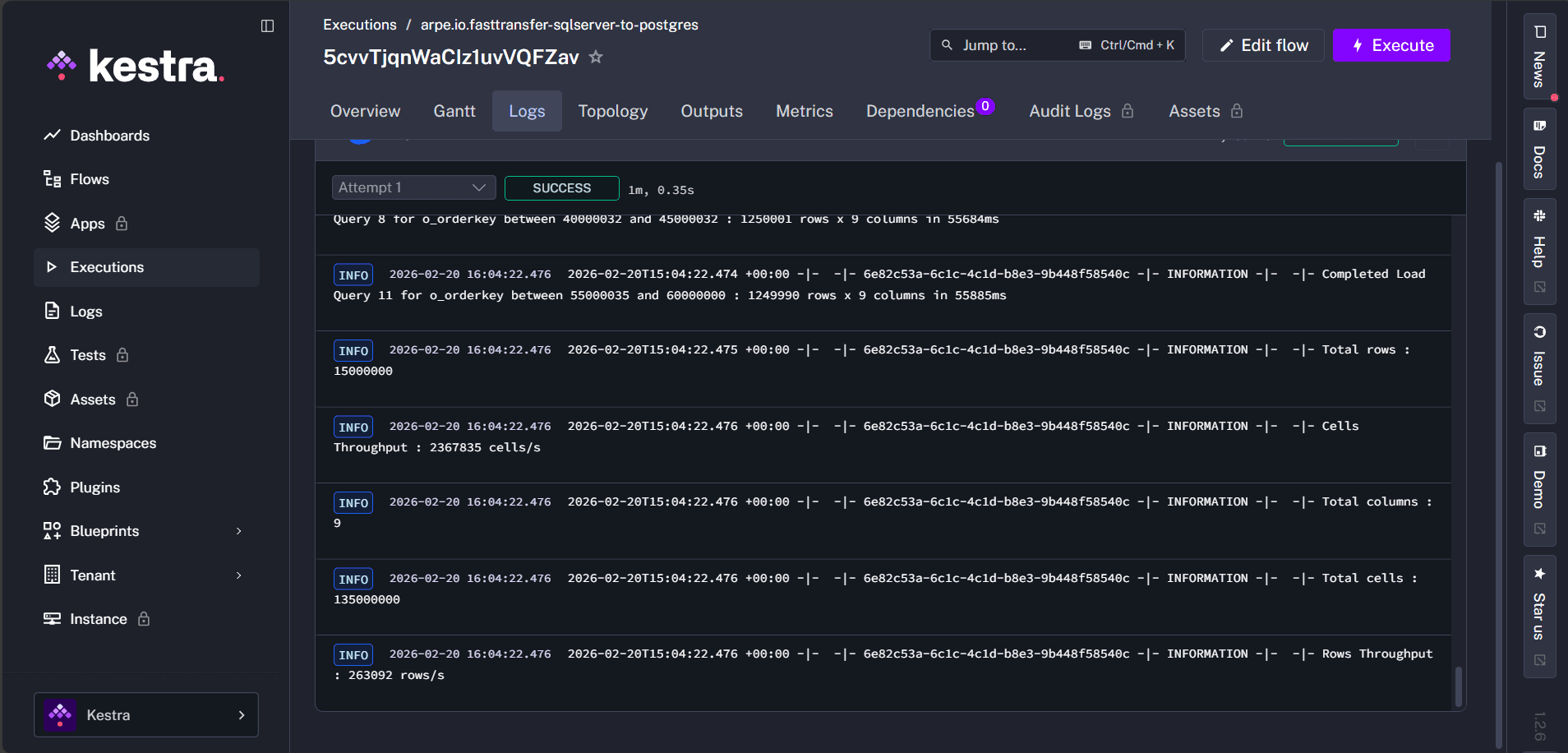
Kestra displays real-time logs as FastTransfer runs:
3. View Transfer Summary in Logs
Once the transfer completes successfully, FastTransfer outputs a detailed summary at the end of the execution logs. You can view key metrics directly in Kestra's log output:
- Total rows transferred
- Elapsed time
- Throughput (rows/second)
- Success status
- Any errors or warnings
2026-03-02 15:51:45.3752026-03-02T15:51:45.375 +00:00 -|-  -|- ca195802-59f7-4b13-85e8-0bb73e8f7b32 -|- INFORMATION -|- tpch.tpch_1_copy.orders -|- The "FastTransfer_Settings.json" file does not exist. Using default settings. Console Only with loglevel=Information
2026-03-02 15:51:45.3772026-03-02T15:51:45.377 +00:00 -|-  -|- ca195802-59f7-4b13-85e8-0bb73e8f7b32 -|- INFORMATION -|- tpch.tpch_1_copy.orders -|- FastTransfer - running in trial mode – trial mode will end on 2026‑03‑27 - normal licensed mode will then start (24 day(s) left).
2026-03-02 15:51:45.3772026-03-02T15:51:45.377 +00:00 -|-  -|- ca195802-59f7-4b13-85e8-0bb73e8f7b32 -|- INFORMATION -|- tpch.tpch_1_copy.orders -|- Starting
2026-03-02 15:51:45.3772026-03-02T15:51:45.377 +00:00 -|-  -|- ca195802-59f7-4b13-85e8-0bb73e8f7b32 -|- INFORMATION -|- tpch.tpch_1_copy.orders -|- FastTransfer Version : 0.16.0.0 Architecture : X64 - Framework : .NET 8.0.24
2026-03-02 15:51:45.3772026-03-02T15:51:45.377 +00:00 -|-  -|- ca195802-59f7-4b13-85e8-0bb73e8f7b32 -|- INFORMATION -|- tpch.tpch_1_copy.orders -|- OS : Debian GNU/Linux 13 (trixie)
2026-03-02 15:51:45.3782026-03-02T15:51:45.378 +00:00 -|-  -|- ca195802-59f7-4b13-85e8-0bb73e8f7b32 -|- INFORMATION -|- tpch.tpch_1_copy.orders -|- Process ID : 1
2026-03-02 15:51:45.3782026-03-02T15:51:45.378 +00:00 -|-  -|- ca195802-59f7-4b13-85e8-0bb73e8f7b32 -|- INFORMATION -|- tpch.tpch_1_copy.orders -|- Generated Run ID : ca195802-59f7-4b13-85e8-0bb73e8f7b32
2026-03-02 15:51:45.3782026-03-02T15:51:45.378 +00:00 -|-  -|- ca195802-59f7-4b13-85e8-0bb73e8f7b32 -|- INFORMATION -|- tpch.tpch_1_copy.orders -|- Source Connection Type : mssql
2026-03-02 15:51:45.3782026-03-02T15:51:45.378 +00:00 -|-  -|- ca195802-59f7-4b13-85e8-0bb73e8f7b32 -|- INFORMATION -|- tpch.tpch_1_copy.orders -|- Source SqlInstance : sql22,1433
2026-03-02 15:51:45.3782026-03-02T15:51:45.378 +00:00 -|-  -|- ca195802-59f7-4b13-85e8-0bb73e8f7b32 -|- INFORMATION -|- tpch.tpch_1_copy.orders -|- Source Database : tpch
2026-03-02 15:51:45.3782026-03-02T15:51:45.378 +00:00 -|-  -|- ca195802-59f7-4b13-85e8-0bb73e8f7b32 -|- INFORMATION -|- tpch.tpch_1_copy.orders -|- Source Trusted Connection : False
2026-03-02 15:51:45.3782026-03-02T15:51:45.378 +00:00 -|-  -|- ca195802-59f7-4b13-85e8-0bb73e8f7b32 -|- INFORMATION -|- tpch.tpch_1_copy.orders -|- Source User : migadmin
2026-03-02 15:51:45.3782026-03-02T15:51:45.378 +00:00 -|-  -|- ca195802-59f7-4b13-85e8-0bb73e8f7b32 -|- INFORMATION -|- tpch.tpch_1_copy.orders -|- Source Schema : tpch10
2026-03-02 15:51:45.3782026-03-02T15:51:45.378 +00:00 -|-  -|- ca195802-59f7-4b13-85e8-0bb73e8f7b32 -|- INFORMATION -|- tpch.tpch_1_copy.orders -|- Source Table : orders
2026-03-02 15:51:45.3782026-03-02T15:51:45.378 +00:00 -|-  -|- ca195802-59f7-4b13-85e8-0bb73e8f7b32 -|- INFORMATION -|- tpch.tpch_1_copy.orders -|- Target Type : pgcopy
2026-03-02 15:51:45.3782026-03-02T15:51:45.378 +00:00 -|-  -|- ca195802-59f7-4b13-85e8-0bb73e8f7b32 -|- INFORMATION -|- tpch.tpch_1_copy.orders -|- Target Server : host.docker.internal:5432
2026-03-02 15:51:45.3782026-03-02T15:51:45.378 +00:00 -|-  -|- ca195802-59f7-4b13-85e8-0bb73e8f7b32 -|- INFORMATION -|- tpch.tpch_1_copy.orders -|- Target Database : tpch
2026-03-02 15:51:45.3782026-03-02T15:51:45.378 +00:00 -|-  -|- ca195802-59f7-4b13-85e8-0bb73e8f7b32 -|- INFORMATION -|- tpch.tpch_1_copy.orders -|- Target Schema : tpch_1_copy
2026-03-02 15:51:45.3782026-03-02T15:51:45.378 +00:00 -|-  -|- ca195802-59f7-4b13-85e8-0bb73e8f7b32 -|- INFORMATION -|- tpch.tpch_1_copy.orders -|- Target Table : orders
2026-03-02 15:51:45.3782026-03-02T15:51:45.378 +00:00 -|-  -|- ca195802-59f7-4b13-85e8-0bb73e8f7b32 -|- INFORMATION -|- tpch.tpch_1_copy.orders -|- Target Trusted Connection : False
2026-03-02 15:51:45.3782026-03-02T15:51:45.378 +00:00 -|-  -|- ca195802-59f7-4b13-85e8-0bb73e8f7b32 -|- INFORMATION -|- tpch.tpch_1_copy.orders -|- Target User : pytabextract_pguser
2026-03-02 15:51:45.3782026-03-02T15:51:45.378 +00:00 -|-  -|- ca195802-59f7-4b13-85e8-0bb73e8f7b32 -|- INFORMATION -|- tpch.tpch_1_copy.orders -|- Columns Map Method : Name
2026-03-02 15:51:45.3782026-03-02T15:51:45.378 +00:00 -|-  -|- ca195802-59f7-4b13-85e8-0bb73e8f7b32 -|- INFORMATION -|- tpch.tpch_1_copy.orders -|- Degree : -4
2026-03-02 15:51:45.3782026-03-02T15:51:45.378 +00:00 -|-  -|- ca195802-59f7-4b13-85e8-0bb73e8f7b32 -|- INFORMATION -|- tpch.tpch_1_copy.orders -|- Distribute Method : Ntile
2026-03-02 15:51:45.3782026-03-02T15:51:45.378 +00:00 -|-  -|- ca195802-59f7-4b13-85e8-0bb73e8f7b32 -|- INFORMATION -|- tpch.tpch_1_copy.orders -|- Distribute Column : o_orderkey
2026-03-02 15:51:45.3782026-03-02T15:51:45.378 +00:00 -|-  -|- ca195802-59f7-4b13-85e8-0bb73e8f7b32 -|- INFORMATION -|- tpch.tpch_1_copy.orders -|- Bulkcopy Batch Size : 1048576
2026-03-02 15:51:45.3782026-03-02T15:51:45.378 +00:00 -|-  -|- ca195802-59f7-4b13-85e8-0bb73e8f7b32 -|- INFORMATION -|- tpch.tpch_1_copy.orders -|- Load Mode : Truncate
2026-03-02 15:51:45.3782026-03-02T15:51:45.378 +00:00 -|-  -|- ca195802-59f7-4b13-85e8-0bb73e8f7b32 -|- INFORMATION -|- tpch.tpch_1_copy.orders -|- Use Work Tables : False
2026-03-02 15:51:45.3792026-03-02T15:51:45.379 +00:00 -|-  -|- ca195802-59f7-4b13-85e8-0bb73e8f7b32 -|- INFORMATION -|- tpch.tpch_1_copy.orders -|- Encoding used : Unicode (UTF-8) - 65001 - utf-8
2026-03-02 15:51:45.5172026-03-02T15:51:45.517 +00:00 -|-  -|- ca195802-59f7-4b13-85e8-0bb73e8f7b32 -|- INFORMATION -|- tpch.tpch_1_copy.orders -|- Source Connection String : Data Source=sql22,1433;Initial Catalog=tpch;User ID=migadmin;Password=xxxxx;Connect Timeout=120;Encrypt=True;Trust Server Certificate=True;Application Name=FastTransfer;Application Intent=ReadOnly;Command Timeout=10800
2026-03-02 15:51:45.5172026-03-02T15:51:45.517 +00:00 -|-  -|- ca195802-59f7-4b13-85e8-0bb73e8f7b32 -|- INFORMATION -|- tpch.tpch_1_copy.orders -|- Target Connection String : Host=host.docker.internal;Port=5432;Database=tpch;Trust Server Certificate=True;Application Name=FastTransfer;Timeout=15;Command Timeout=10800;Username=pytabextract_pguser;Password=xxxxx
2026-03-02 15:51:45.5172026-03-02T15:51:45.517 +00:00 -|-  -|- ca195802-59f7-4b13-85e8-0bb73e8f7b32 -|- INFORMATION -|- tpch.tpch_1_copy.orders -|- Source Database Version : Microsoft SQL Server 2022 (RTM-CU2) (KB5023127) - 16.0.4015.1 (X64)  	Feb 27 2023 15:40:01  	Copyright (C) 2022 Microsoft Corporation 	Developer Edition (64-bit) on Linux (Ubuntu 20.04.5 LTS) <X64>
2026-03-02 15:51:45.5172026-03-02T15:51:45.517 +00:00 -|-  -|- ca195802-59f7-4b13-85e8-0bb73e8f7b32 -|- INFORMATION -|- tpch.tpch_1_copy.orders -|- Target Database Version : PostgreSQL 15.15 (Ubuntu 15.15-1.pgdg22.04+1) on x86_64-pc-linux-gnu, compiled by gcc (Ubuntu 11.4.0-1ubuntu1~22.04.2) 11.4.0, 64-bit
2026-03-02 15:51:45.6342026-03-02T15:51:45.634 +00:00 -|-  -|- ca195802-59f7-4b13-85e8-0bb73e8f7b32 -|- INFORMATION -|- tpch.tpch_1_copy.orders -|- Degree of parallelism was computed to 5 (=> 20\4)
2026-03-02 15:51:45.8702026-03-02T15:51:45.870 +00:00 -|-  -|- ca195802-59f7-4b13-85e8-0bb73e8f7b32 -|- INFORMATION -|- tpch.tpch_1_copy.orders -|- Ntile DataSegments Computation Completed in 235 ms
2026-03-02 15:51:45.8722026-03-02T15:51:45.872 +00:00 -|-  -|- ca195802-59f7-4b13-85e8-0bb73e8f7b32 -|- INFORMATION -|- tpch.tpch_1_copy.orders -|- Start Loading Data using distribution method NTile
2026-03-02 15:51:45.8842026-03-02T15:51:45.884 +00:00 -|-  -|- ca195802-59f7-4b13-85e8-0bb73e8f7b32 -|- INFORMATION -|- tpch.tpch_1_copy.orders -|- Start Loading Data using distribution method NTile
2026-03-02 15:51:45.8912026-03-02T15:51:45.891 +00:00 -|-  -|- ca195802-59f7-4b13-85e8-0bb73e8f7b32 -|- INFORMATION -|- tpch.tpch_1_copy.orders -|- Start Loading Data using distribution method NTile
2026-03-02 15:51:45.9002026-03-02T15:51:45.900 +00:00 -|-  -|- ca195802-59f7-4b13-85e8-0bb73e8f7b32 -|- INFORMATION -|- tpch.tpch_1_copy.orders -|- Start Loading Data using distribution method NTile
2026-03-02 15:51:45.9112026-03-02T15:51:45.911 +00:00 -|-  -|- ca195802-59f7-4b13-85e8-0bb73e8f7b32 -|- INFORMATION -|- tpch.tpch_1_copy.orders -|- Start Loading Data using distribution method NTile
2026-03-02 15:51:54.2332026-03-02T15:51:54.233 +00:00 -|-  -|- ca195802-59f7-4b13-85e8-0bb73e8f7b32 -|- INFORMATION -|- tpch.tpch_1_copy.orders -|- Completed Load Query 3 for o_orderkey between 36000003 and 48000003 : 3000001 rows x 9 columns in 8360ms
2026-03-02 15:51:54.2382026-03-02T15:51:54.238 +00:00 -|-  -|- ca195802-59f7-4b13-85e8-0bb73e8f7b32 -|- INFORMATION -|- tpch.tpch_1_copy.orders -|- Completed Load Query 1 for o_orderkey between 12000001 and 24000001 : 3000001 rows x 9 columns in 8365ms
2026-03-02 15:51:54.2412026-03-02T15:51:54.241 +00:00 -|-  -|- ca195802-59f7-4b13-85e8-0bb73e8f7b32 -|- INFORMATION -|- tpch.tpch_1_copy.orders -|- Completed Load Query 2 for o_orderkey between 24000002 and 36000002 : 3000001 rows x 9 columns in 8368ms
2026-03-02 15:51:54.4432026-03-02T15:51:54.443 +00:00 -|-  -|- ca195802-59f7-4b13-85e8-0bb73e8f7b32 -|- INFORMATION -|- tpch.tpch_1_copy.orders -|- Completed Load Query 0 for o_orderkey between 1 and 12000000 : 3000000 rows x 9 columns in 8570ms
2026-03-02 15:51:54.4432026-03-02T15:51:54.443 +00:00 -|-  -|- ca195802-59f7-4b13-85e8-0bb73e8f7b32 -|- INFORMATION -|- tpch.tpch_1_copy.orders -|- Completed Load Query 4 for o_orderkey between 48000004 and 60000004 : 3000001 rows x 9 columns in 8570ms
2026-03-02 15:51:54.4462026-03-02T15:51:54.446 +00:00 -|-  -|- ca195802-59f7-4b13-85e8-0bb73e8f7b32 -|- INFORMATION -|- tpch.tpch_1_copy.orders -|- Total rows : 15000000
2026-03-02 15:51:54.4462026-03-02T15:51:54.446 +00:00 -|-  -|- ca195802-59f7-4b13-85e8-0bb73e8f7b32 -|- INFORMATION -|- tpch.tpch_1_copy.orders -|- Total columns : 9
2026-03-02 15:51:54.4462026-03-02T15:51:54.446 +00:00 -|-  -|- ca195802-59f7-4b13-85e8-0bb73e8f7b32 -|- INFORMATION -|- tpch.tpch_1_copy.orders -|- Total cells : 135000000
2026-03-02 15:51:54.4462026-03-02T15:51:54.446 +00:00 -|-  -|- ca195802-59f7-4b13-85e8-0bb73e8f7b32 -|- INFORMATION -|- tpch.tpch_1_copy.orders -|- Rows Throughput : 1766084 rows/s
2026-03-02 15:51:54.4462026-03-02T15:51:54.446 +00:00 -|-  -|- ca195802-59f7-4b13-85e8-0bb73e8f7b32 -|- INFORMATION -|- tpch.tpch_1_copy.orders -|- Cells Throughput : 15894756 cells/s
2026-03-02 15:51:54.4462026-03-02T15:51:54.446 +00:00 -|-  -|- ca195802-59f7-4b13-85e8-0bb73e8f7b32 -|- INFORMATION -|- tpch.tpch_1_copy.orders -|- Transfert time : Elapsed=8494 ms
2026-03-02 15:51:54.4462026-03-02T15:51:54.446 +00:00 -|-  -|- ca195802-59f7-4b13-85e8-0bb73e8f7b32 -|- INFORMATION -|- tpch.tpch_1_copy.orders -|- Total time : Elapsed=9142 ms
2026-03-02 15:51:54.4462026-03-02T15:51:54.446 +00:00 -|-  -|- ca195802-59f7-4b13-85e8-0bb73e8f7b32 -|- INFORMATION -|- tpch.tpch_1_copy.orders -|- Completed Load
2026-03-02 15:51:54.448Command succeed with exit code 0
2026-03-02 15:51:54.450Container deleted: ca0de79e3eb4ede961668cb5080e4c20f858960c118d10731b8e0ade3ad87685
2026-03-02 15:51:54.455Volume deleted: a6b822d7677064a91d2dd555c360dc61ec49e3954149eacd5c22549c2a300850
Example Use Cases
Scheduled Daily Transfers
Add a trigger to run the flow daily at 2 AM:
triggers:
  - id: daily_schedule
    type: io.kestra.plugin.core.trigger.Schedule
    cron: "0 2 * * *"
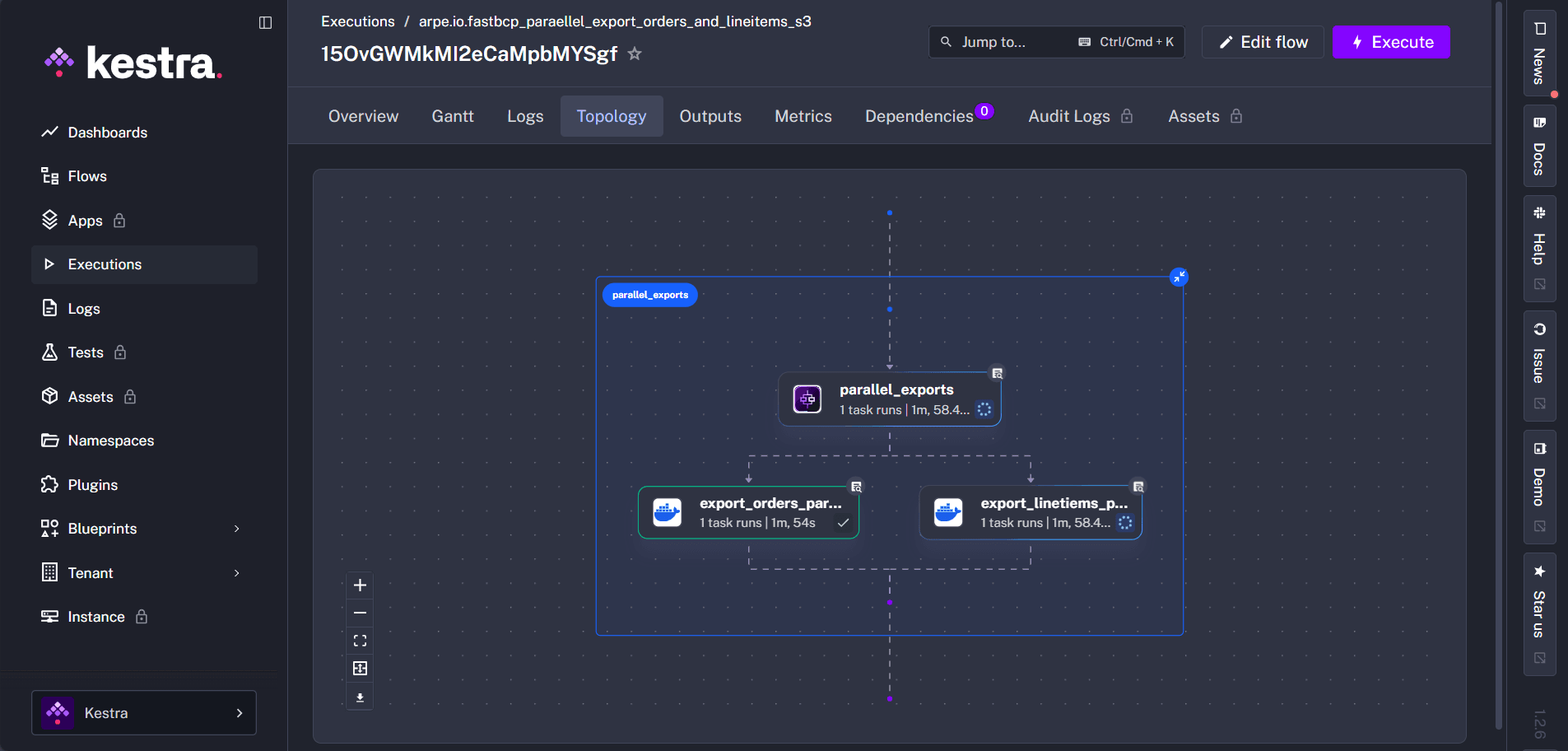
Parallel Multi-Table Transfers
Use Kestra's parallel task execution to transfer multiple tables simultaneously:
tasks:
  - id: parallel_transfers
    type: io.kestra.plugin.core.flow.Parallel
    tasks:
      - id: export_orders_parquet_to_s3
        type: io.kestra.plugin.docker.Run
        containerImage: arpeio/fasttransfer:latest
        commands:
          - --sourceconnectiontype
          - mssql
          - --sourceserver
          - host.docker.internal,11433
          - --sourcedatabase
          - tpch10
          - --sourcetable
          - orders
          - ...

      - id: export_linetiems_parquet_to_s3
        type: io.kestra.plugin.docker.Run
        containerImage: arpeio/fasttransfer:latest
        commands:
          - --sourceconnectiontype
          - mssql
          - --sourceserver
          - host.docker.internal,11433
          - --sourcedatabase
          - tpch10
          - --sourcetable
          - lineitem
          - ...
Conclusion
Integrating FastTransfer with Kestra gives you a powerful combination: Kestra's orchestration and monitoring capabilities paired with FastTransfer's high-performance parallel data transfers.
Whether you're scheduling daily ETL jobs, orchestrating complex multi-table migrations, or building event-driven data pipelines, this integration provides the flexibility and performance modern data teams need.
Want to try it on your own data? Download FastTransfer and get a free 30-day trial.
Resources
- FastTransfer: https://fasttransfer.arpe.io
- FastTransfer Docker Image: https://hub.docker.com/repository/docker/arpeio/fasttransfer
- FastTransfer Documentation: https://fasttransfer-docs.arpe.io/latest/
- FastTransfer Docker Integration: https://fasttransfer-docs.arpe.io/latest/integration/docker-integration
- Kestra Documentation: https://kestra.io/docs
- Kestra Docker Plugin: https://kestra.io/plugins/plugin-docker