How to Use FastBCP with n8n: Parallel Exports and Run Tracking

We built an n8n community node for FastBCP. It runs the export, parses the FastBCP log into metrics, masks secrets, and sends each run to a Success or Failure output with the same full summary. A workflow then stores every run and every log line in SQL Server, fails the execution and raises an alert when an export fails. n8n brings scheduling and alerting; the parallel export stays FastBCP's job.
n8n is an open-source workflow automation tool: visual, self-hostable, and fully programmable. Pairing it with FastBCP lets you schedule your exports, chain them with the rest of a pipeline (loading, notifications, API calls), and above all track every run: rows, duration, throughput and errors.
This guide starts with the simplest integration, the Execute Command node, shows where it falls short, then builds a dedicated node and a run-tracking workflow around it.
What we are building
- n8n 2.47.6, installed with npm
- Portable Node.js 24
- Windows 11
- FastBCP 1.6.4, Windows x64
- Parquet and CSV output
- Local NVMe disk
- SQL Server 2022 Developer
- TPC-H SF10, 76.5 M rows
- Tracking tables on the same instance
Install n8n locally
Since version 2.x, n8n requires Node.js 24 or later. A portable build kept inside the project folder leaves the machine's Node.js untouched:
mkdir tools && cd tools
curl -LO https://nodejs.org/dist/v24.22.3/node-v24.22.3-win-x64.zip
unzip node-v24.22.3-win-x64.zip && mv node-v24.22.3-win-x64 node

cd ../n8n-app
npm install n8n@2.47.6
npm 11 no longer runs install scripts by default, so the native sqlite3 module behind n8n's internal database is not built, and n8n fails to start. Allow it explicitly:
npm install-scripts approve sqlite3 msgpackr-extract
npm rebuild sqlite3 msgpackr-extract
A small PowerShell script sets the environment and starts n8n:
# start-n8n.ps1
$root = $PSScriptRoot
$env:PATH = "$root\tools\node;$env:PATH"                     # portable Node 24
$env:N8N_CUSTOM_EXTENSIONS = "$root\n8n-nodes-fastbcp\dist"  # the FastBCP node
$env:NODES_EXCLUDE = "[]"                                    # re-enables Execute Command

$env:FASTBCP_PATH    = "D:\FastBCP\FastBCP.exe"
$env:FASTBCP_LICENSE = "D:\FastBCP\FastBCP.lic"
$env:FASTBCP_LOG_DIR = "$root\logs"

& "$root\n8n-app\node_modules\.bin\n8n.cmd" start
The editor is then available at http://localhost:5678. For production, run n8n in Docker with the Linux FastBCP binary, as in How to use FastBCP with Docker.
The quick approach: Execute Command
The most direct integration calls FastBCP from the Execute Command node. Since n8n 2.0 this node is disabled by default: NODES_EXCLUDE="[]" in the start script brings it back.
"D:\FastBCP\FastBCP.exe" --connectiontype mssql --server localhost --trusted
  --database tpch10 --sourceschema dbo --sourcetable orders
  --fileoutput orders.parquet --directory "D:\exports\orders"
  --parallelmethod Ntile --distributekeycolumn o_orderkey --paralleldegree -2
  --runid "n8n-{{ $execution.id }}" --nobanner
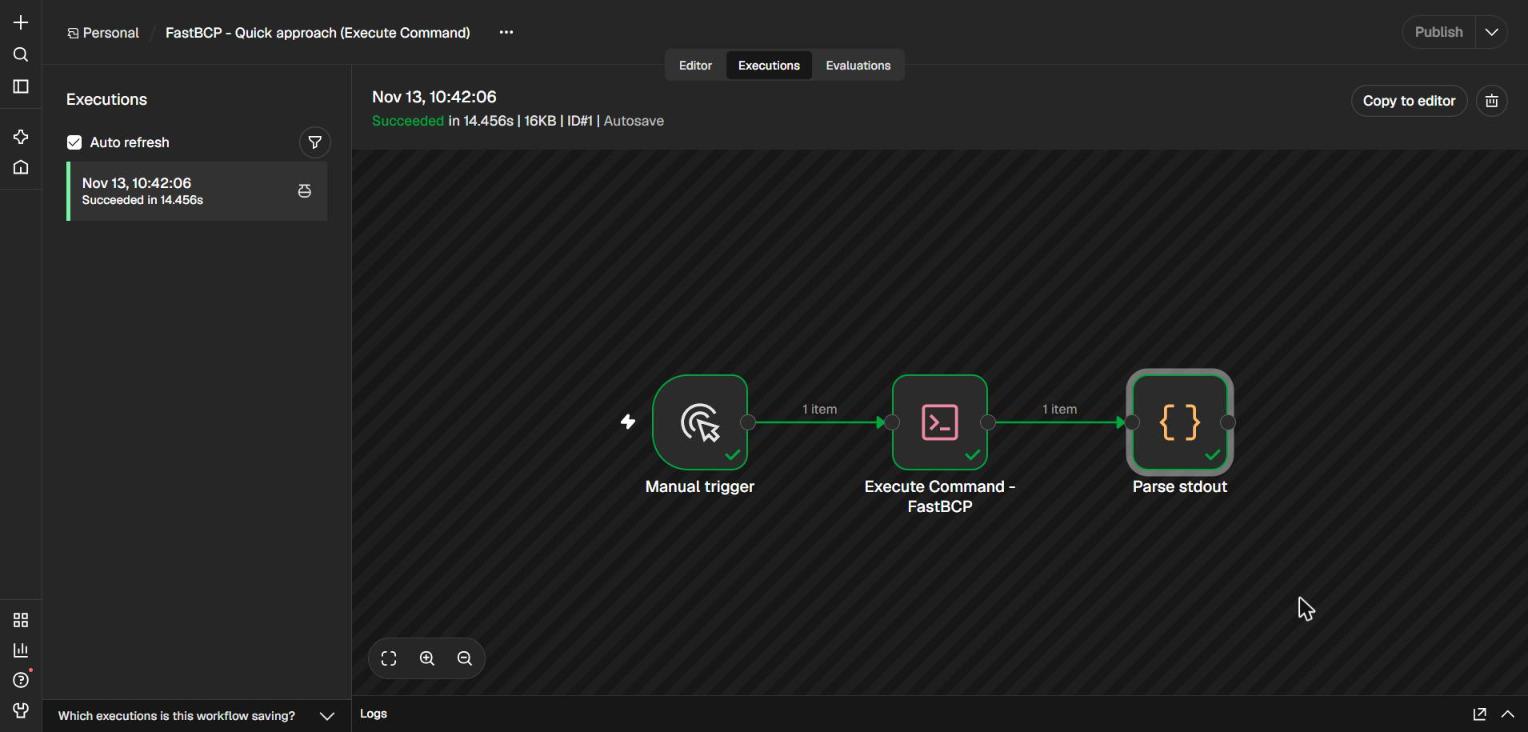
It works: 15,000,000 rows of orders in 13.4 s. But it does not scale to a real pipeline:
- Credentials in plain text in the workflow JSON.
- One command line per table, to write and maintain by hand.
- Fragile parsing of
stdout, and almost no error detail: a non-zero exit code, nothing more. - Any command can run: many teams prefer to keep Execute Command disabled.
A dedicated FastBCP node
Credential and parameters
A credential holds the source connection: type (mssql, pgcopy, oraodp, mysql, clickhouse, odbc…), server, database, and Trusted or user / password authentication. n8n encrypts the password: it never appears in the workflow.
The parameters follow the FastBCP command line: source, output file and directory (local, s3://, Azure, OneLake…), parallel method, degree, distribution key, Parquet compression, and more. They all accept expressions, so one node exports a whole list of tables:
// Code node "Tables to export": one item = one FastBCP run
return [
  { table: 'region',   method: 'None',       key: '',                 file: 'region.csv' },
  { table: 'nation',   method: 'None',       key: '',                 file: 'nation.csv' },
  { table: 'customer', method: 'Ntile',      key: 'c_custkey',        file: 'customer.parquet' },
  { table: 'orders',   method: 'Ntile',      key: 'o_orderkey',       file: 'orders.parquet' },
  { table: 'lineitem', method: 'DataDriven', key: 'YEAR(l_shipdate)', file: 'lineitem.parquet' },
].map(t => ({ json: { schema: 'dbo', degree: -2, dir: OUT_DIR + '\\' + t.table, ...t } }));
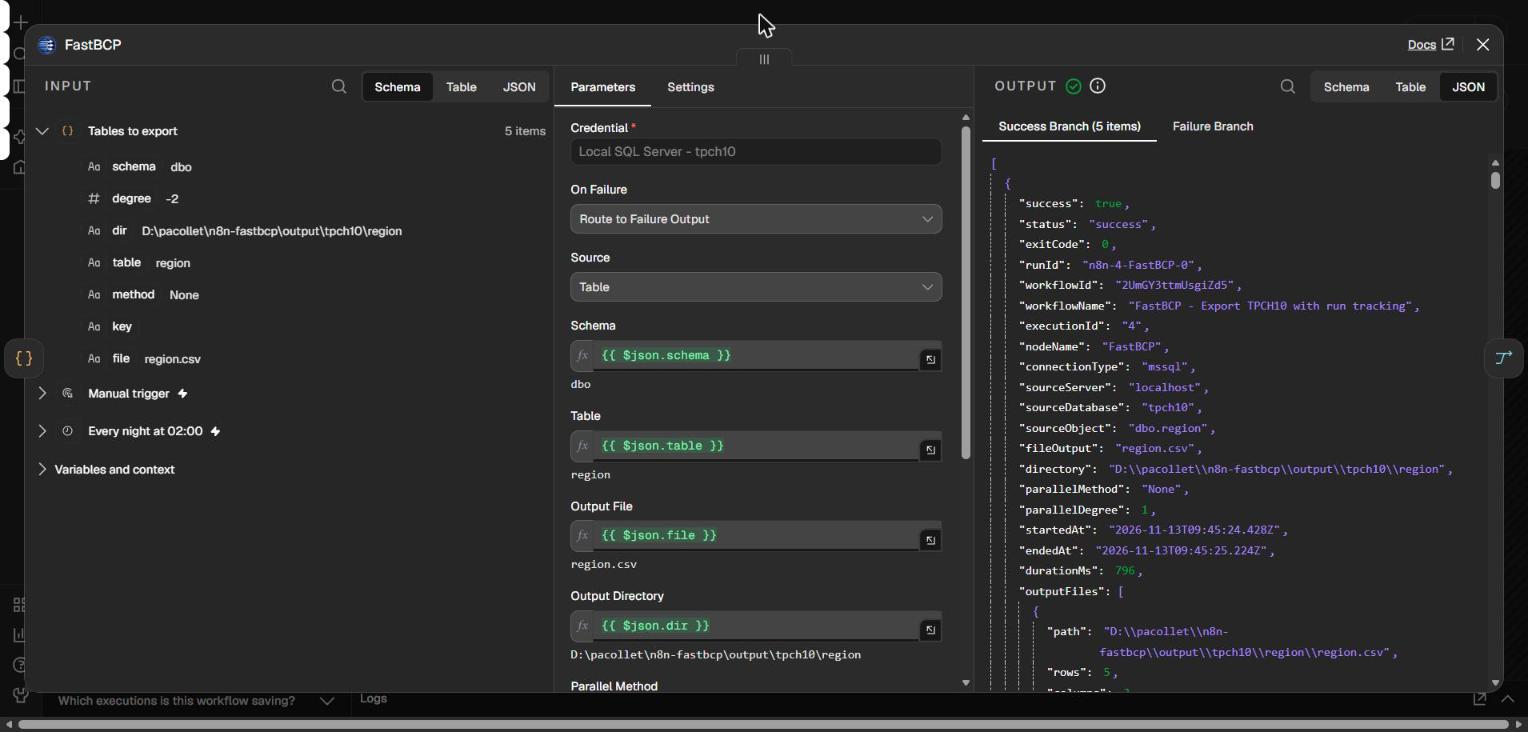
In a parameter, D:\exports\{{ $json.table }} is not evaluated: n8n reads \{{ as an escaped brace. Build the path in the Code node (dir) and pass {{ $json.dir }}.
Running and parsing FastBCP
The node starts FastBCP with child_process.spawn, without a shell, so arguments never need escaping:
- Run ID
n8n-<execution>-<node>-<item>, passed with--runid: the same identifier in n8n, in the FastBCP log and in the tracking tables. - ControlA configurable timeout, and cancellation: stopping the n8n execution kills the FastBCP process.
- MaskingThe password and the license e-mail are replaced with
***in every log returned or written to disk. - ParsingThe Serilog output becomes metrics: version, rows, columns, duration, throughput, and the files produced.
On error, the parser keeps the driver's Message : … line rather than the generic Failed Load:
... -|- ERROR -|- x.csv -|- Source : "Core Microsoft SqlClient Data Provider"
... -|- ERROR -|- x.csv -|- Message : "Invalid object name 'dbo.nope'."
... -|- ERROR -|- x.csv -|- Failed Load
becomes FastBCP exited with code 2: Invalid object name 'dbo.nope'.
Two outputs: Success and Failure
Each run produces a full summary:
{
  "success": true, "status": "success", "exitCode": 0,
  "runId": "n8n-4-FastBCP-3",
  "sourceObject": "dbo.orders", "parallelMethod": "Ntile", "parallelDegree": -2,
  "totalRows": 15000000, "totalColumns": 9,
  "elapsedMs": 14509, "rowsPerSec": 1033828,
  "outputFiles": [ { "path": "...\\orders\\orders_chunk_006.parquet", "rows": 1250001 } ],
  "logFile": "...\\logs\\n8n-4-FastBCP-3.log",
  "logs": [ { "timestamp": "...", "level": "INFORMATION", "message": "..." } ]
}
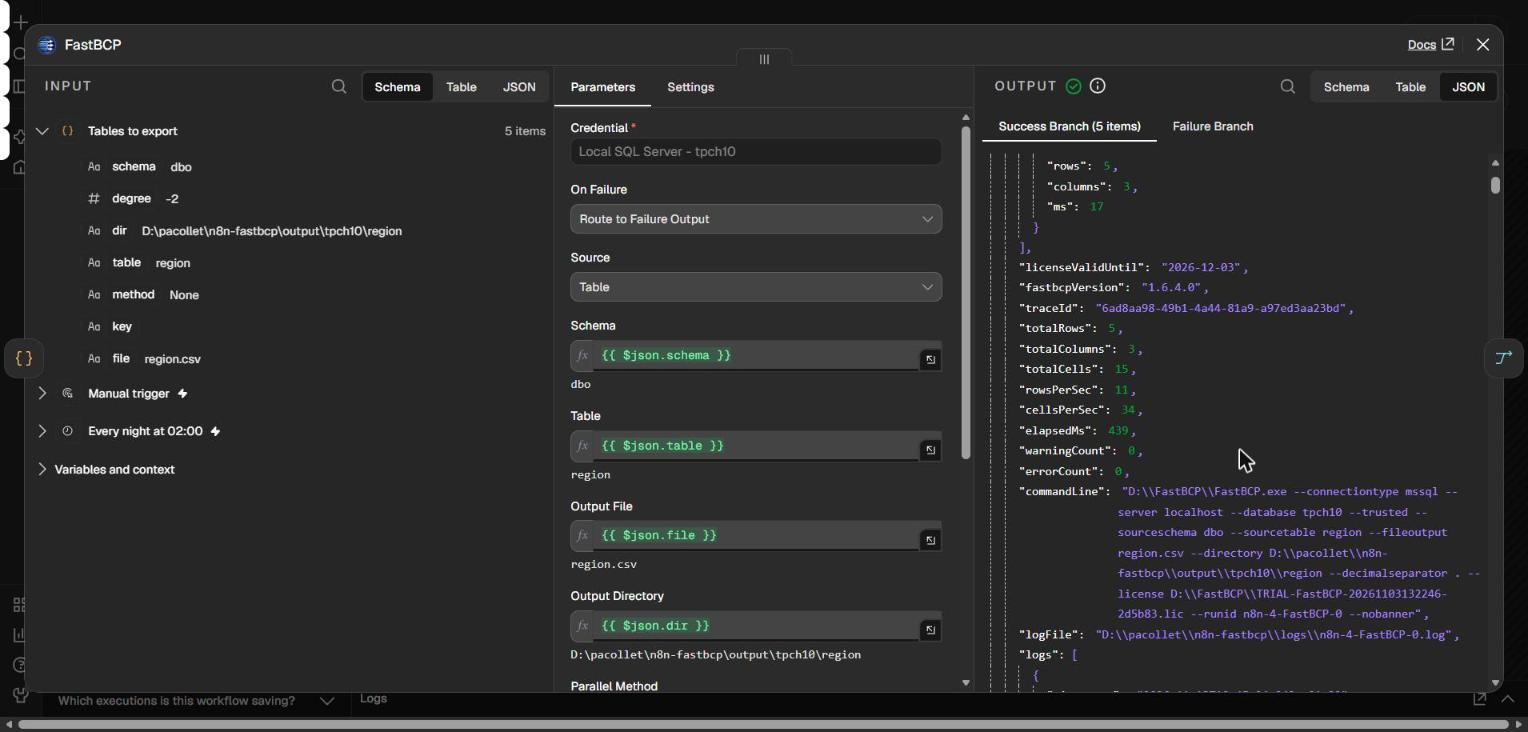
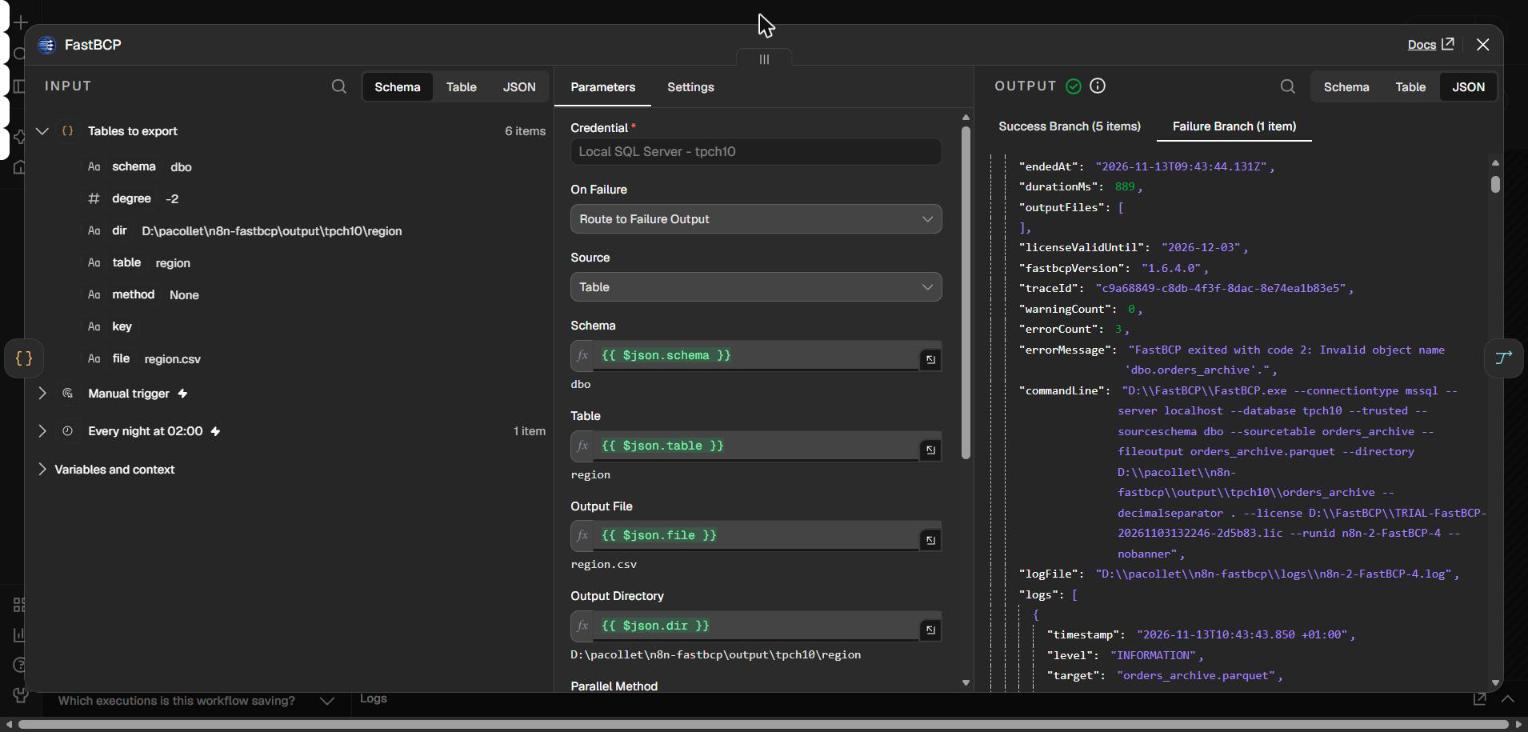
Successful runs go to the Success output and failed runs to the Failure output, with the same summary. A failed table does not stop the next ones.
The generic On Error → Continue (using error output) setting reduces the error item to { "error": "…" }: every metric and log line is lost for the tracking branch. Dedicated outputs keep the full summary on both sides.
Tracking every run
Two tables receive the history: fastbcp_run, one row per run (status, rows, duration, throughput, error message), and fastbcp_run_log, one row per log line, both keyed by the Run ID.
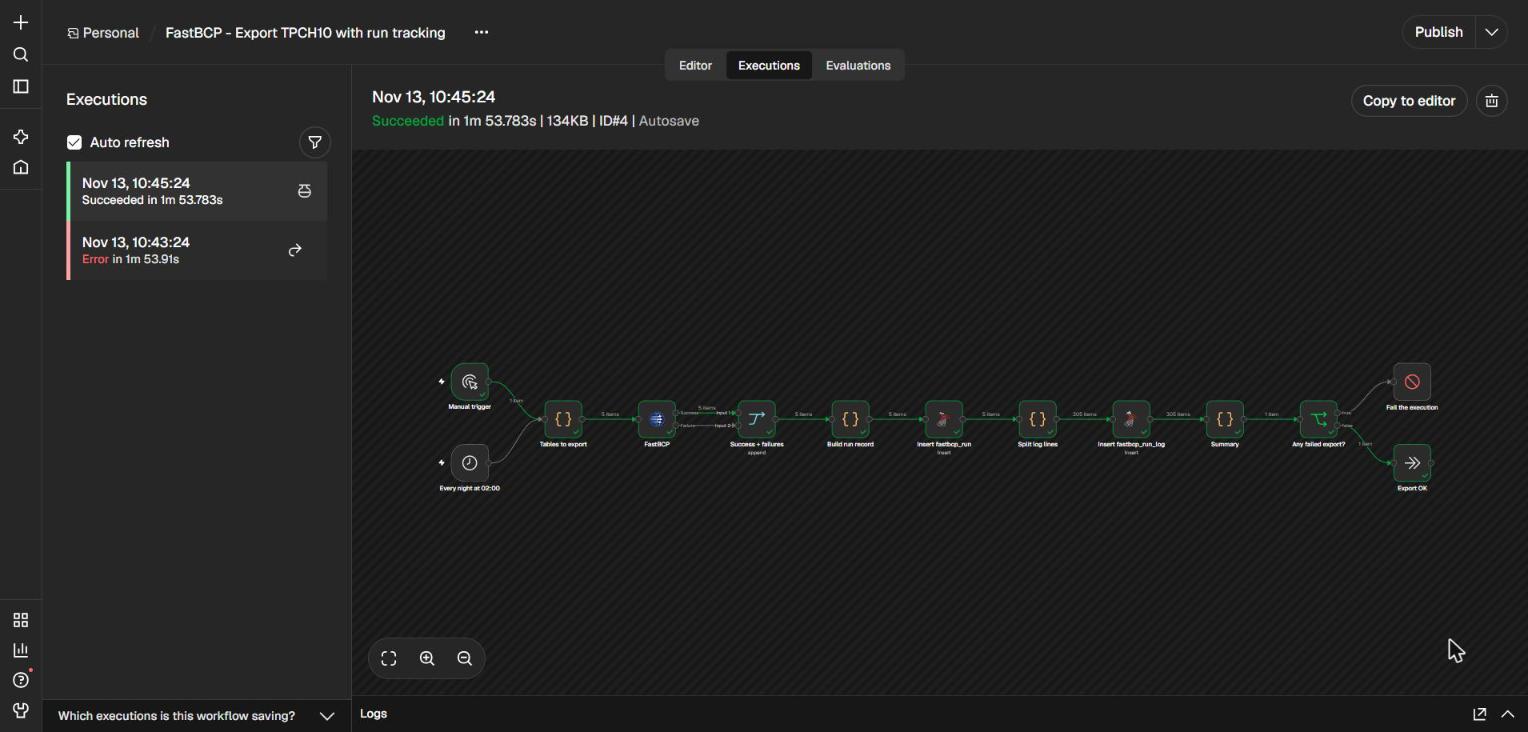
- TriggerManual, or every night at 02:00.
- FastBCPOne run per table, on two outputs.
- MergeGathers both outputs, so the tracking branch runs once.
- RecordInsert into
fastbcp_run, then one row per log line intofastbcp_run_log. - DecideIf an export failed, Stop and Error fails the execution, after the tracking data is written.
Wiring Success and Failure straight into the same node makes n8n run that node, and everything after it, once per branch. The Merge node is required.
Results
The workflow exports the five TPC-H tables (76.5 million rows) in 1 min 54 s, tracking included. We then exported orders and lineitem again with the other parallel methods that fit their keys: RangeId on o_orderkey, and Timepartition on (l_shipdate,year).
- Method used in the workflow
- Alternative method
The four runs were made back to back, with the Total time reported by FastBCP. On orders, RangeId and Ntile are within 5%. On lineitem, Timepartition is 38% faster than DataDriven on the same yearly split, and also writes 7 Hive-style folders, named year=1992/ instead of YEAR(l_shipdate)=1992/. See Choosing the right FastBCP parallel method for when to use each one.
When an export fails
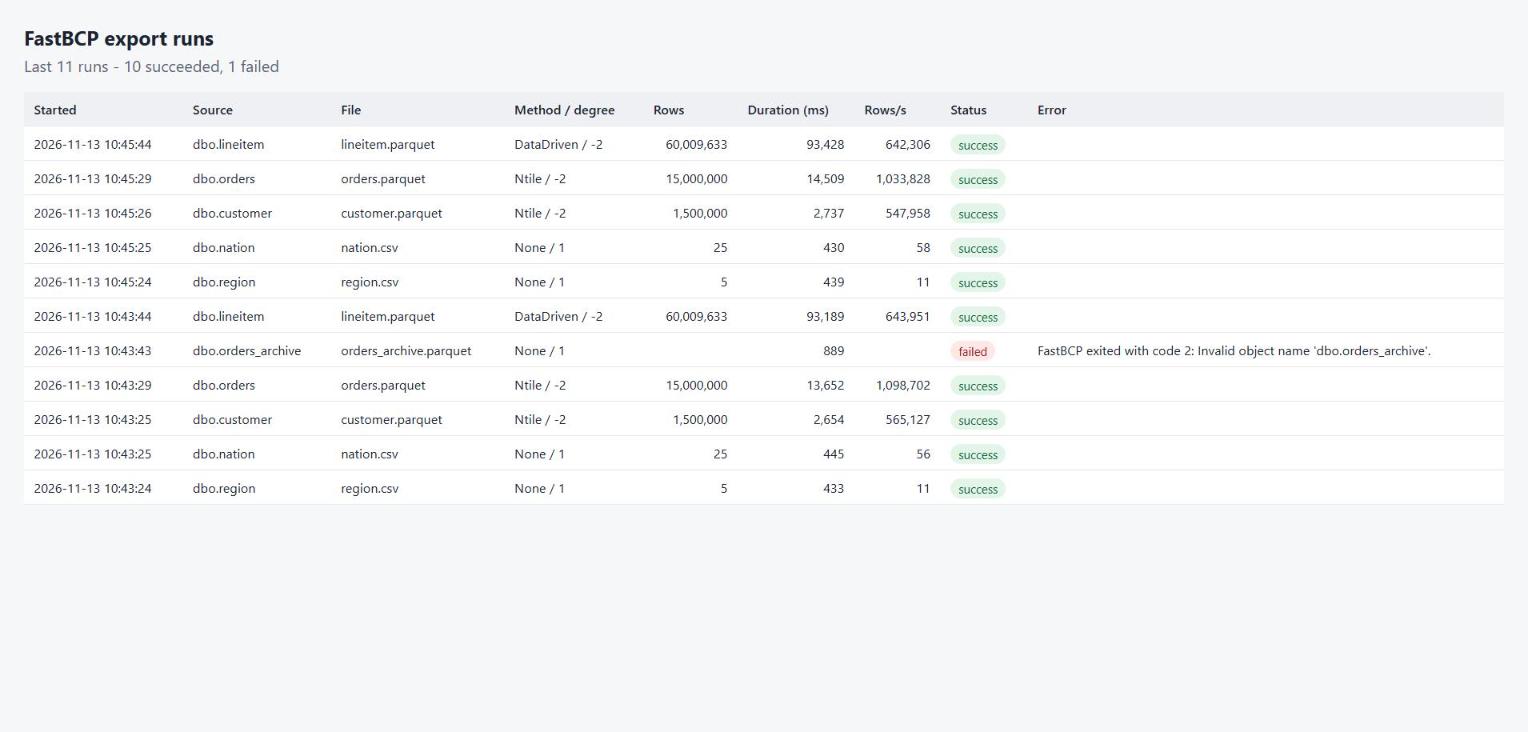
We add a table that does not exist, orders_archive, to the list. The five other tables are exported normally, the failed run and its log land in the tracking tables, and the execution fails with "1 FastBCP export(s) failed: dbo.orders_archive: FastBCP exited with code 2: Invalid object name 'dbo.orders_archive'."
The export workflow names an error workflow in its settings: Error Trigger, Build alert, Log alert. Replace the last node with Teams, Slack or e-mail to get notified.
The error workflow never fires for manual executions, and in n8n 2.x it must be published. Otherwise the server log only says Workflow "…" is not active and cannot be executed. Test it with a scheduled run.
Finally, four nodes serve a run dashboard: Webhook, a SQL query on fastbcp_run, an HTML page built in a Code node, and Respond to Webhook.
Parallel export from SQL Server, PostgreSQL, Oracle, MySQL, Teradata and more, to Parquet, CSV or JSON, on local disk or in the cloud. Orchestrate it from n8n, Airflow or Kestra, and keep a record of every run.